Dziękujemy za zakup niniejszego produktu z firmy Perixx. Produkt został zaprojektowany tak, aby
zapewnić szybką instalację i działanie. Dzięki funkcji Plug and Play (podłącz i używaj) urządzenie nie
potrzebuje specjalnych sterowników w przypadku systemu operacyjnego Windows XP, Vista, 7, 8.
Konfiguracja połączenia
1.Wyjmij baterię z urządzenia (tylko podczas resetowania)
2.Włóż baterię i włącz urządzenie
3.Włóż odbiornik USB
4.Urządzenie powinno działać po kilku sekundach. Jeśli nie, proszę powtórzyć czynności od kroku 1
Pytania i odpowiedzi
P. Dlaczego bezprzewodowa mysz nie działa po jej zainstalowaniu?
O: Powodem jest brak bezprzewodowego połączenia. Urządzenie nie łączy się z komputerem,
należy ponownie ustanowić połączenie między urządzeniem i odbiornikiem.
P. Bezprzewodowa mysz działa przez pierwsze kilka dni, ale teraz nie działa prawidłowo lub
przestaje działać. Dlaczego?
O: Jeśli stan zasilenia baterii jest niski, mysz może nie pracować prawidłowo. Należy natychmiast
wymienić baterię na nową i mysz powinna znowu działać.
P. Wskaźnik myszy drży?
O: Zazwyczaj powodem jest powierzchnia, na której używa się myszy. Aby uzyskać najlepszą
wydajność myszy zaleca się używanie podkładki o wysokiej jakości; jednakże w większości
przypadków mysz będzie działać idealnie na większości powierzchni poza szkłem czy
powierzchniami wysoko odblaskowymi. W razie wątpliwości, należy wypróbować mysz na innej
powierzchni.
PERIMICE-715
User's Guide
Español (ES)
Gracias por adquirir este producto de Perixx. Este producto ha sido diseñado para permitirle una
rápida instalación y funcionamiento. Con función Plug & Play, este dispositivo no precisa de
controladores específicos con Windows XP, Vista, 7, 8.
Configuración de la conexión
1.Extraiga la pila del dispositivo (solo Reset)
2.Introduzca la pila y encienda el dispositivo
3.Conecte el receptor USB
4.El dispositivo debería funcionar después de unos segundos. En caso contrario, repita la operación
desde el punto 1
Preguntas y respuestas
P. Tras instalar el dispositivo inalámbrico, ¿por qué no funciona?
R: Debido a la falta de conexión inalámbrica. El dispositivo no está conectado al PC; además, no
olvide volver a configurar la conexión entre el dispositivo y el receptor.
P. El ratón inalámbrico funciona los primeros días, pero después no funciona correctamente o deja
de funcionar. ¿Por qué?
R: Cuando la batería esté baja, es posible que el ratón no funcione correctamente. Sustituya la
batería inmediatamente y el ratón volverá a funcionar.
P. El puntero del ratón “tiembla”.
R: Normalmente, esto se debe a la superficie sobre la que se utiliza el ratón. Para que el ratón
funcione a la perfección, recomendamos utilizar una alfombrilla de calidad; no obstante, en la
mayoría de los casos, el ratón funcionará sin problemas en la mayoría de las superficies salvo
las de cristal o superficies muy reflectantes. En caso de duda, pruebe el ratón sobre otra
superficie.
Battery
On / Off Switch
Receiver
Storage
Right Button
WWW:
Backward
Scroll Whell
Low Energy LED
WWW
WWW:Forward
Left Button
123.48 mm65.05 mm
61.73 mm
/1
%
Quick check
I'm not a robot
Incorrect answer, please try again.
Chat with your Perixx PERIMICE-715 manual using AI
Get instant AI answers from your Perixx PERIMICE-715 manual
Ask anything about the Perixx PERIMICE-715. Answers come from this manual, with the pages they are based on.
Ask a Question
0/1000
Do you recommend PERIMICE-715?
YesNo
0
Marta Schmidt
10 months ago
I have large hands and wrist/arm pain, but I also worry about durability. Is this mouse comfortable for bigger hands and does the scroll wheel hold up or get jumpy after months?
0
Manual.ly
10 months ago
Based on customer feedback, the shape fits well even for larger hands and many users report less strain with regular use. It is also described as power-efficient.
For durability, a common issue mentioned is that the scroll wheel can become erratic after extended use. If the wheel starts jumping, please try basic troubleshooting first: clean the wheel area, check for debris, and ensure the correct surface and stable connection. If it still scrolls unpredictably, contact our support with your order details so we can help with next steps (such as replacement under the applicable warranty/return policy).
M: OA-GPT-5-NAN
M: OA-GPT-5-NAN
Frequently Asked
Questions
A
Insert the battery, switch the mouse on, plug in the USB receiver, and wait a few seconds. If it does not respond, repeat the setup from the reset step and check the wireless connection again.
Is this answer helpful?
A
No. The mouse is described as plug and play, so it can work without a specific driver on supported Windows systems such as XP, Vista, 7, and 8.
Is this answer helpful?
A
A weak battery is the most common reason. If the mouse starts responding poorly or stops working, replace the battery and test it again before troubleshooting anything else.
Is this answer helpful?
A
Try using the mouse on a better surface, such as a quality mouse mat. Glass and highly reflective surfaces can cause tracking issues, so switching surfaces often improves performance.
Is this answer helpful?
A
The wireless link may not be established. Reinsert the battery, turn the mouse back on, plug in the receiver again, and repeat the pairing process until the connection is restored.
Is this answer helpful?
M: OA-GPT-54-NAN
Advantagesand
Disadvantages
Advantages
Plug-and-play setup keeps installation quick and simple.
USB receiver connection makes everyday use convenient.
On/off control and battery-based design support portable use.
Works well for basic office, browsing, and home tasks.
VS
Disadvantages
Battery power must be monitored, or performance may drop.
May need re-pairing if the wireless link is lost.
Cursor movement can be unstable on glass or shiny surfaces.
Designed mainly for older Windows versions in the manual.
Thumb rest, Charge level indicator, Storable receiver
M: OA-GPT-54-NAN
Product
Description
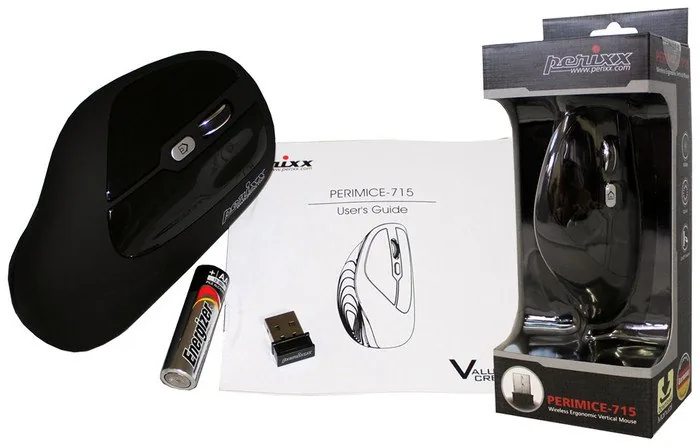
Perixx PERIMICE-715 Black, USB Manual: A Simple Wireless Mouse for Everyday Work
The Perixx PERIMICE-715 in black is a practical wireless mouse built for users who want a fast setup and a clean desk. It follows a classic plug-and-play approach, so you can get started quickly without hunting for extra software on older Windows systems. For a product like this, the appeal is simplicity: insert the battery, switch it on, connect the USB receiver, and you are ready to go within seconds.
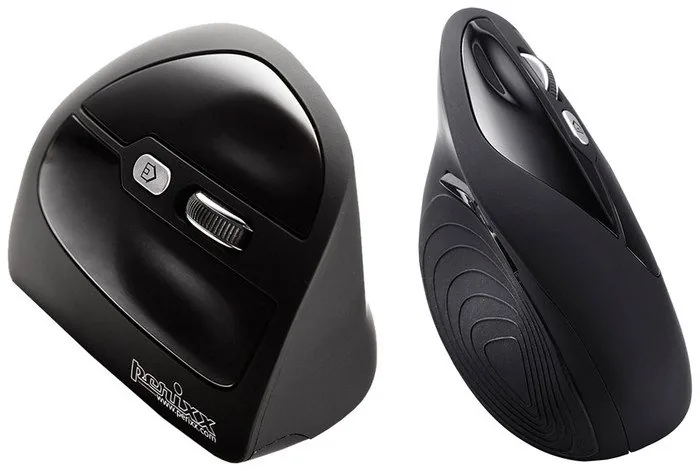
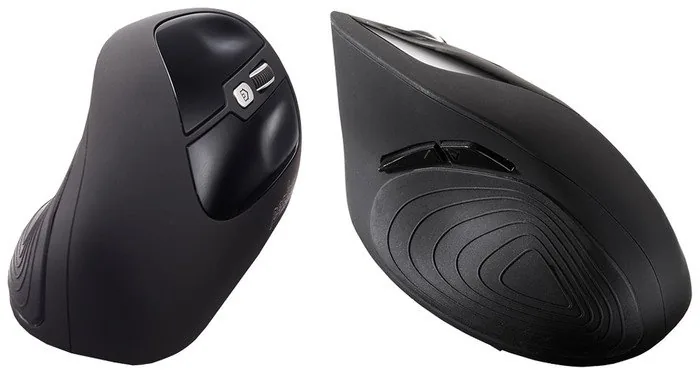
What makes this mouse easy to appreciate is its low-friction setup and familiar feel. The body is compact, the controls are straightforward, and the USB receiver keeps the connection stable once paired correctly. It is designed for daily navigation, office tasks, and general browsing rather than flashy extras. That makes it a solid option for people who just want something dependable that works without a learning curve.
The included setup guidance also highlights how the mouse is meant to be used in real life. If the device stops responding, the first checks are simple: confirm the wireless link, replace the battery if power is low, and try the pairing process again if needed. The mouse is also sensitive to surface quality, so a good mouse mat can improve tracking and reduce cursor jitter. On glass or highly reflective surfaces, performance may be less consistent, which is worth keeping in mind before blaming the mouse itself.
Overall, the Perixx PERIMICE-715 black, USB Manual points to a no-nonsense peripheral that favors reliability over complexity. It is a practical match for home offices, school desks, and basic workstations where convenience matters. If you prefer a wireless mouse that stays out of the way and focuses on core performance, this model fits that idea well.
Notes
Best results come from a stable USB receiver connection.
Replace the battery promptly if tracking becomes unreliable.
A mouse mat can help on smooth or reflective surfaces.




Marta Schmidt
10 months ago
I have large hands and wrist/arm pain, but I also worry about durability. Is this mouse comfortable for bigger hands and does the scroll wheel hold up or get jumpy after months?
Manual.ly
10 months ago
Based on customer feedback, the shape fits well even for larger hands and many users report less strain with regular use. It is also described as power-efficient. For durability, a common issue mentioned is that the scroll wheel can become erratic after extended use. If the wheel starts jumping, please try basic troubleshooting first: clean the wheel area, check for debris, and ensure the correct surface and stable connection. If it still scrolls unpredictably, contact our support with your order details so we can help with next steps (such as replacement under the applicable warranty/return policy).