
PeakTech 5200 Manual
PDF manual · 20 Pages
English



Quick check
Incorrect answer, please try again.
Chat with your PeakTech 5200 manual using AI
Get instant AI answers from your PeakTech 5200 manual
Ask anything about the PeakTech 5200. Answers come from this manual, with the pages they are based on.
5200 Maintenance Schedule
The manufacturer recommends repeating calibration after one year.
Wipe the cabinet with a damp soft cloth and mild household cleanser. Do not let water enter the instrument.
Free maintenance reminders
Timed to your purchase date. Always free, unsubscribe anytime.
Ask a Question
Do you recommend 5200?
Yes NoFrequently Asked Questions
The meter measures moisture in sawn timber, paper, cardboard and hardened building materials such as mortar, concrete and plaster. Use the appropriate mode for wood or building materials to get correct range readings.
Is this answer helpful?
Three LEDs indicate moisture condition: for wood, below 6% no LEDs, 6–16% green, 16–20% yellow, above 20% red; for building materials, below 0.2% no LEDs, 0.2–0.7% green, 0.7–0.9% yellow, above 0.9% red.
Is this answer helpful?
Replace the spent 9V battery promptly. Open the rear cover, swap in a new 9V (6F22 or equivalent) observing correct polarity. Dispose of used batteries at designated collection points per regulations.
Is this answer helpful?
Wood moisture accuracy is typically ±2.0% with 1% resolution; building material resolution is 0.1% with 0.1% indicated accuracy. Temperature resolution is 1°C, but temperature accuracy is not explicitly specified—use caution for precision thermal work.
Is this answer helpful?
Press ON/SET to power on. Hold ON/SET ~3 seconds to enter mode selection, press to choose wood, material, °C or °F, then wait 3 seconds to start. Press ON/SET during measurement to freeze (DATA-HOLD) the display.
Is this answer helpful?
Keep the device dry, clean probes regularly, avoid shocks and magnetic fields, remove the battery for long-term storage, and clean the casing with a damp soft cloth and mild detergent ensuring no liquid enters the unit.
Is this answer helpful?
The unit is factory-calibrated. It is recommended to repeat calibration after one year or as needed to maintain measurement reliability, especially for professional or regulatory applications.
Is this answer helpful?
Advantages and Disadvantages
Advantages

- Portable, pocket-size design at 115 g for easy site use
- Simple LCD with backlight and intuitive ON/SET control
- Dual measurement modes: wood (6–60%) and building materials (0.2–2.9%)
- Quick LED status indicators for fast moisture assessment
- Data-hold and auto power-off extend usability and battery life
Disadvantages

- 9V battery power may require frequent replacement under heavy use
- Not a laboratory-grade instrument; readings can be influenced by material and temperature
- Temperature accuracy unspecified, limiting precise thermal diagnostics
- Limited protection against harsh environments (avoid water, shocks, extreme temps)
- Requires probe insertion—may not suit noninvasive testing needs
Product Description
PeakTech 5200 Wood Moisture Meter Manual
Overview
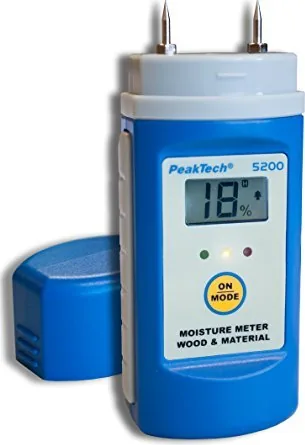
The PeakTech 5200 Wood Moisture Meter is a compact, pocket-sized instrument designed to measure moisture in sawn timber, paper, cardboard and hardened building materials such as mortar, concrete and plaster. It provides direct numerical readings on an illuminated LCD and uses three LEDs to indicate moisture condition at a glance. The meter also measures ambient temperature and includes a data-hold function and auto power-off for convenience and battery saving.
Key Features and Use
The device features a 9V-powered LCD with backlight, low-battery indicator and a straightforward ON/SET control to switch between modes: wood moisture (6–60% range), building material moisture (0.2–2.9% range), and temperature (0–40°C). Probes are inserted into the test material to acquire readings; LEDs signal good/acceptable/high moisture thresholds. The meter offers 1% resolution for wood and 0.1% for materials, plus a typical accuracy of ±2% for wood readings. Compact dimensions and a 115 g weight make it highly portable for site work.
Practical Notes
Operators should allow the instrument to stabilize to ambient temperature before measuring, replace the battery when the BAT icon appears, and remove the battery for long-term storage. Cleaning is limited to a damp soft cloth and mild detergent, ensuring no liquid enters the device. Avoid exposing the meter to extreme temperatures, humidity, strong magnetic fields, shocks or direct sunlight. Service and repairs should be performed only by qualified technicians.
Typical Applications
Ideal for carpenters, restorers, inspectors and construction professionals, the PeakTech 5200 is suited for quick moisture checks in timber storage, flooring, drywall and concrete work. Its LED quick-indication helps rapidly flag potentially problematic moisture levels during site surveys or quality checks.
Final Thoughts
The PeakTech 5200 balances affordability and practical function. It is well-suited for routine moisture screening tasks where portability and ease of use matter. Users should be mindful of factors that influence readings (material type, temperature), and not rely on it as a laboratory reference standard without calibration.
Notes
- Replace the 9V battery when the BAT symbol appears; dispose of batteries per regulations.
- Keep probes clean and device dry.
- Avoid measuring in explosive atmospheres or subjecting the unit to mechanical or magnetic stress.
- Factory calibration is provided; annual recalibration is recommended.
Search for 67,706 Manuals online


Type-in Brand or Model