
PeakTech 5187 Manual
PDF manual · 37 Pages
English



Quick check
Incorrect answer, please try again.
Chat with your PeakTech 5187 manual using AI
Get instant AI answers from your PeakTech 5187 manual
Ask anything about the PeakTech 5187. Answers come from this manual, with the pages they are based on.
5187 Maintenance Schedule
The unit is factory calibrated. We recommend to calibrate the unit again after one year.
Wipe the cabinet with a damp cloth and mild detergent. Do not use abrasives or solvents. Ensure no water gets inside.
Replace the 3.6V lithium battery as soon as the low battery symbol appears on the display.
Free maintenance reminders
Timed to your purchase date. Always free, unsubscribe anytime.
Ask a Question
Do you recommend 5187?
Yes NoFrequently Asked Questions
The 5187 model uses a Type-K temperature probe input to measure temperature values accurately across a wide range.
Is this answer helpful?
Yes, the sampling rate is adjustable from ten seconds up to twelve hours depending on your recording requirements.
Is this answer helpful?
The device requires a replaceable one-half AA 3.6 volts lithium battery to ensure long operational periods.
Is this answer helpful?
The device is designed for use with the Windows personal computer software provided on the installation disc.
Is this answer helpful?
The LED indicator flashes red to signal that an upper or lower alarm threshold has been breached on a channel.
Is this answer helpful?
Yes, the software allows exporting data to various formats including Excel files for detailed processing.
Is this answer helpful?
The Type-K sensor input measures temperatures ranging up to one thousand three hundred degrees Celsius.
Is this answer helpful?
Advantages and Disadvantages
Advantages

- Long battery life up to two years for extended monitoring needs
- Large internal memory stores up to thirty-two thousand readings
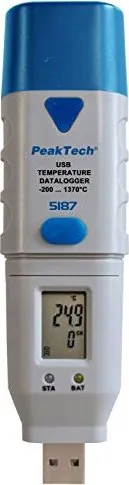
- Clear LCD display with multi-line information and warning LEDs
- Easy data export in multiple file formats for analysis
- Adjustable sampling rate from ten seconds to twelve hours
Disadvantages

- LCD display does not function below negative ten degrees Celsius
- Requires specific software installation instead of plug and play drive
- Sensor cable length is fixed at three meters maximum
- Battery replacement requires opening the casing
- Device not recognized as external hard drive without drivers
Product Specification
Measurement Range
-328-2372 deg F
Product Description
Enhancing Precision with Advanced Monitoring Solutions
In the realm of industrial and environmental monitoring, accuracy is paramount. The PeakTech 5187 Temperature USB Data Logger stands out as a robust solution for tracking thermal data over extended periods. This device is designed for users who require reliable measurement capabilities without constant supervision. The detailed information provided in the PeakTech 5187 Temperature USB Data Logger Manual outlines the setup and operation needed for optimal performance by users.
Key Features and Specifications
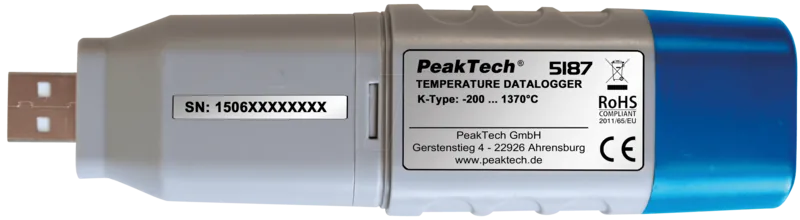
The unit utilizes a Type-K temperature probe, enabling it to measure extreme ranges from minus two hundred to one thousand three hundred degrees Celsius. An internal memory capacity allows storage of up to thirty-two thousand distinct readings. Users can program the sampling rate anywhere from ten seconds to twelve hours. Powering the system is a replaceable one-half AA thirty-point-six volt lithium battery, which offers a potential recording duration of up to two years depending on the settings. The screen displays current values and status indicators via a multi-line interface. Warning LEDs signal low battery or alarm conditions clearly to the operator.
Connectivity and Software
Data transfer happens via a USB connection to a Windows personal computer. The accompanying software package is known as Datenlogger Graph. This interface allows for configuration before deployment and graphical analysis after data collection is complete. Users can export results to various formats including CSV and Excel files for further processing. The LCD display confirms status through color-coded LEDs indicating power levels and alarm conditions. The software also supports zooming and panning of the generated graphs for detailed inspection of specific data points during review sessions.
Practical Applications and Safety
This tool is suitable for logistics, pharmaceutical storage, and HVAC monitoring where temperature fluctuations matter significantly. The device includes alarm settings that alert users if thresholds are breached via visual indicators on the front panel. Cleaning involves simple damp wiping without exposing the casing to moisture inside. Installation requires the specific USB drivers provided on the accompanying disc to ensure the device is recognized correctly by the system software. Safety precautions dictate avoiding direct sunlight and extreme moisture to prevent damage.
Operation Details
Operation relies on a single function button for starting and stopping logs. Users can set the start time to a specific date or trigger immediately upon connection. An alarm hold feature keeps the red LED flashing until acknowledged, ensuring critical limits are never missed by the monitoring staff. Battery replacement is straightforward when the battery icon appears on the screen. Users must adhere to local disposal laws for the lithium power cell.
Conclusion
Investing in quality measurement tools ensures data integrity throughout your workflow. With its long battery life and extensive memory, this model reduces the need for frequent retrieval of units. The system is compact, weighing only sixty grams and fitting easily into tight spaces.
Search for 67,706 Manuals online


Type-in Brand or Model