
PeakTech 4955 Manual
PDF manual · 64 Pages
English



Quick check
Incorrect answer, please try again.
Chat with your PeakTech 4955 manual using AI
Get instant AI answers from your PeakTech 4955 manual
Ask anything about the PeakTech 4955. Answers come from this manual, with the pages they are based on.
4955 Maintenance Schedule
Re-calibration is recommended after 1 year to ensure accuracy.
Clean only with a damp soft cloth and mild household cleanser. Ensure no water gets inside.
Free maintenance reminders
Timed to your purchase date. Always free, unsubscribe anytime.
Ask a Question
Do you recommend 4955?
Yes NoFrequently Asked Questions
The PeakTech 4955 combines infrared temperature measurement (up to 2200°C), ambient air temperature, relative humidity, dew point/wet‑bulb calculations, a Type‑K contact input and integrated camera/video with datalogging for comprehensive environmental and thermal diagnostics.
Is this answer helpful?
Accuracy varies by temperature range: typically ±1%+1°C for 20–500°C, ±1.5% for 500–1000°C and larger tolerances beyond. Specified accuracy applies at 18–28°C ambient and <80% humidity. Proper emissivity setting and target size (target larger than laser spot) are critical for precise readings.
Is this answer helpful?
The unit has 72 MB internal memory and a micro‑SD slot. Data and media can be saved internally or automatically to a micro‑SD card. Use the USB interface to connect to a PC—both internal memory and SD card mount as removable drives for file transfer; USB also charges the battery.
Is this answer helpful?
Emissivity describes how a surface emits infrared energy; values range 0.10–1.00. Matte, dark surfaces have higher emissivity (~0.95). Select the appropriate emissivity in the MEASURE SET menu; a detailed material table in the manual helps choose correct values for accurate temperature readings.
Is this answer helpful?
Yes. The datalogger records long‑term measurements with configurable intervals from 1 second to 60 seconds, supports colored graph display and high/low markers, and saves tabular logs that can be exported to a PC for analysis.
Is this answer helpful?
The internal Li‑Ion battery charges via the USB port (PC or AC adapter) in about two hours. Under normal conditions replacement is not required; if needed, only qualified service personnel should replace the battery using an equivalent Li‑Ion type to ensure safety and device integrity.
Is this answer helpful?
Do not point the Class‑2 laser at eyes or reflective surfaces, avoid measuring explosive gases, keep the unit away from extreme temperatures, moisture and strong magnetic fields, and do not open the device—repairs must be done by qualified personnel.
Is this answer helpful?
Advantages and Disadvantages
Advantages

- Multi‑function 5‑in‑1 unit: IR, air temp, RH, Type‑K, camera/video and datalogger.
- High IR range up to 2200°C with 50:1 distance‑to‑spot and dual lasers for precise targeting.
- Integrated imaging (JPG) and video (3GP) with measurement overlay for clear documentation.
- Adjustable emissivity (0.10–1.00) and comprehensive material emissivity reference table.
- USB charging/data transfer, micro‑SD support and configurable datalog intervals for long recordings.
Disadvantages

- Internal memory is modest (72 MB); large video or long logs require micro‑SD card.
- Accuracy depends on emissivity and target size; shiny or small targets need special handling.
- Battery replacement and repairs must be done by qualified personnel only.
- Video files may lose overlayed measurement values after PC transfer.
- Device complexity and menu navigation may require initial learning for full feature use.
Product Specification
Measurement range
-58°F to +3992°F
Special features
Softgrip, Memory function, SD card
Power supply
Battery operated (Li-Ion)
Weight
0.90 lb
Scope of delivery
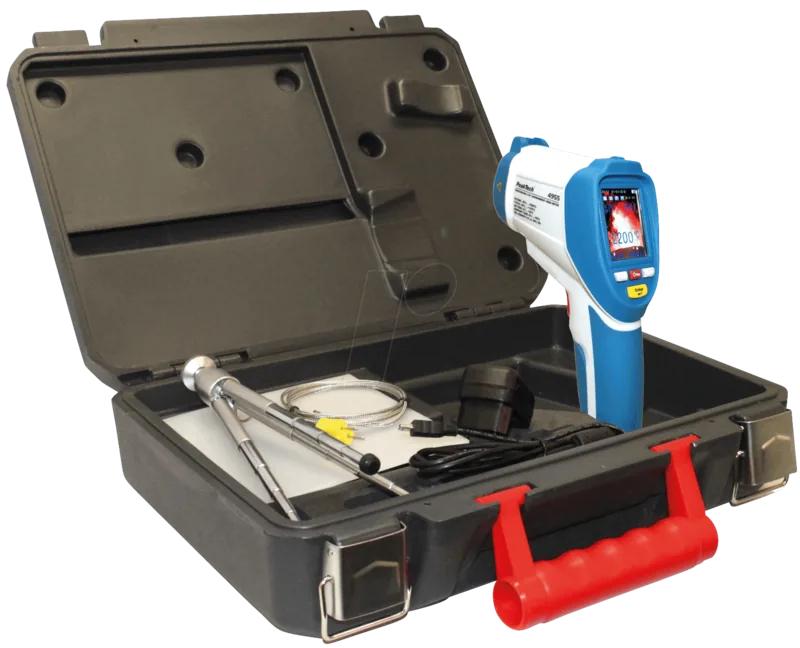
Case, Charger, 1x Battery (integrated), USB cable, Construction tripod, SD card
Product Description
PeakTech 4955 Infrared Thermometer — Powerful 5‑in‑1 Diagnostic Tool
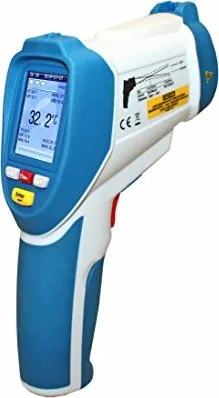
The PeakTech 4955 Infrared Thermometer is a versatile 5‑in‑1 inspection meter designed for professionals who need fast, accurate thermal and environmental diagnostics. Combining an IR thermometer, humidity and air temperature sensors, a Type‑K contact input and integrated camera/video with a data logger, this unit is built for HVAC technicians, building inspectors, maintenance teams and energy auditors.
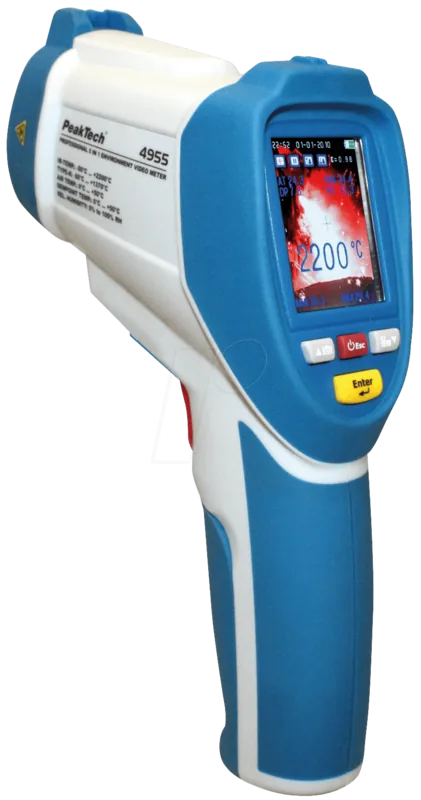
Featuring a bright 2.2" TFT color display (640×480), the PeakTech 4955 measures infrared temperatures up to 2200°C with a 50:1 distance‑to‑spot ratio and dual lasers for precise targeting. Adjustable emissivity (0.10–1.00) lets you tune readings for many materials; a detailed emissivity table helps with accurate surface measurements. Internal sensors provide ambient temperature, relative humidity and calculated dew point and wet‑bulb values for quick moisture risk assessments and thermal‑bridge detection.
The device’s IR camera mode overlays measurement data on photos and videos (JPG/3GP) so you can document conditions on site. A 72 MB internal memory and micro‑SD slot store images, video and long‑term datalogger records; USB connectivity allows easy file transfer and charging. The datalogger supports configurable intervals (1 s–60 s), color graphing, high/low markers and exports tabular logs for PC analysis.
Ergonomically laid out controls include trigger, camera/video buttons, ▲/▼ navigation, Enter and ESC keys, plus a tripod thread and Type‑K connector. The rechargeable 3.7 V Li‑Ion battery charges via USB in about two hours and supports field work; the unit warns about battery status on screen. Built‑in safety features include a Class‑2 laser (630–670 nm, <1 mW) and compliance with relevant EMC and RoHS directives.
Practical functions such as auto power‑off, adjustable display brightness, language selection, and selectable measurement displays (MIN/MAX/AVG/DIF, alarms, laser on/off) make the PeakTech 4955 adaptable to varied workflows. It is intended for professional use and requires qualified service for repairs or battery replacement. With its combination of IR accuracy, environmental sensing, imaging and data logging, the PeakTech 4955 is a compact all‑in‑one tool for diagnostics, documentation and troubleshooting.
Notes
- Emissivity must be set appropriately for accurate IR readings; matte/dark surfaces are most reliable. Consider using matte black tape on reflective targets.
- Ensure target area is larger than the laser spot; move closer for small targets.
- Observe laser and general safety warnings; do not point at eyes or reflective surfaces.
- Use only qualified personnel for internal repairs or battery replacement.
Search for 67,706 Manuals online


Type-in Brand or Model