
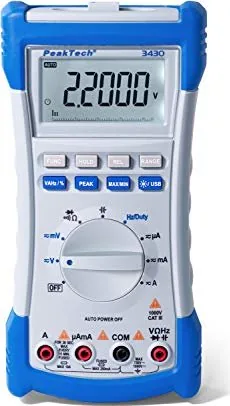
PeakTech 3430 Manual
PDF manual · 58 Pages
English



Quick check
Incorrect answer, please try again.
Chat with your PeakTech 3430 manual using AI
Get instant AI answers from your PeakTech 3430 manual
Ask anything about the PeakTech 3430. Answers come from this manual, with the pages they are based on.
3430 Maintenance Schedule
The manual recommends repeating factory calibration after 1 year to ensure measurement accuracy.
Wipe the cabinet with a damp, lint-free cloth and mild detergent. Ensure no liquid enters the device to prevent short circuits.
Replace the battery immediately when the 'BAT' symbol lights up on the display to avoid inaccurate readings and potential damage.
Check test leads and probes for faulty insulation, bare wires, or breaks before connecting them to the equipment.
Free maintenance reminders
Timed to your purchase date. Always free, unsubscribe anytime.
Ask a Question
Do you recommend 3430?
Yes NoFrequently Asked Questions
True RMS means the meter calculates the effective value of AC signals accurately, even if the waveform is distorted or not a pure sine wave. This provides much higher precision compared to standard multimeters that assume a sinusoidal shape.
Is this answer helpful?
No, the maximum frequency range for the PeakTech 3430 is 220 MHz. Attempting to measure higher frequencies may result in inaccurate readings or no reading at all.
Is this answer helpful?
You should limit 10A measurements to a maximum of 30 seconds under load. Afterward, allow the device to rest for at least 15 minutes to let the internal shunt cool down and prevent damage.
Is this answer helpful?
This device is designed strictly for indoor applications. Exposure to rain, extreme humidity, or direct sunlight can damage the electronics and void the warranty.
Is this answer helpful?
Use the provided USB cable to connect the meter to your PC. Install the driver and software from the included CD or download them from the manufacturer's website, then select the correct COM port in the application.
Is this answer helpful?
The multimeter operates using four 1.5V AA (UM-3) batteries. Replace them promptly when the low battery symbol appears to ensure accurate measurements and prevent leakage damage.
Is this answer helpful?
Advantages and Disadvantages
Advantages

- True RMS measurement ensures accuracy on non-sinusoidal waveforms
- High safety rating with CAT III 1000V overvoltage category
- USB connectivity allows for PC data logging and software integration
- Comprehensive measurement ranges including capacitance, frequency, and inductance
- Clear 4½-digit LCD display with bargraph and automatic polarity indication
Disadvantages

- 10A current measurement requires strict time limits to prevent overheating
- Maximum AC voltage limited to 750V, restricting use on some high-voltage lines
- Battery replacement requires unscrewing the back cover, which takes extra time
- No built-in temperature probe included in the standard package
- Inductance range is limited to 6mH through 600mH
Product Specification
Measurement range
max. 10A, max. 1000V, max. 220MΩ
Package contents
Bag, test leads, USB cable
Product Description
PeakTech 3430 True RMS Digital Multimeter: Precision and Safety in Every Measurement
The PeakTech 3430 True RMS Digital Multimeter stands as a robust tool for professionals and enthusiasts who demand accuracy in complex electrical environments. Designed with a sophisticated 4½-digit LCD display featuring a 46-segment bargraph, this device offers clear visibility of readings up to 21999 counts. Its True RMS capability is particularly vital, ensuring precise measurements of AC voltages and currents regardless of waveform distortion, a significant advantage over standard average-responding meters.
Safety remains the cornerstone of the PeakTech 3430 design. It complies with stringent EU directives for electromagnetic compatibility and low voltage, rated for Overvoltage Category III at 1000V. This makes it suitable for measuring industrial circuits, fixed installations, and utility connections where transient spikes are common. The meter includes comprehensive protection features, such as fuses rated for 10A/1000V and 250mA/1000V, preventing catastrophic failure during accidental misuse.
Beyond basic voltage and current checks, this multimeter expands its utility with advanced functions like capacitance measurement, frequency analysis up to 220 MHz, and inductance testing. The inclusion of a USB interface allows users to connect directly to a PC for data logging and remote monitoring, facilitated by dedicated software drivers. Whether you are troubleshooting household appliances or analyzing industrial control panels, the PeakTech 3430 delivers reliable performance with an intuitive layout of controls and terminals.
Key Features and Operational Notes
Operating the PeakTech 3430 is straightforward thanks to its logical button arrangement. Users can switch between DC and AC modes, select manual or auto-ranging, and utilize specialized functions like Hold, Relative measurement, and Peak detection. The device runs on four AA batteries and features a backlight for low-light conditions. For extended life and safety, always ensure the battery compartment is securely closed before operation and replace the battery immediately when the low-power indicator appears.
Important Usage Reminders
- Never measure current on the V/Ω terminals to avoid short circuits.
- Limit 10A current measurements to 30 seconds followed by a 15-minute cool-down period.
- Always discharge capacitors before measuring resistance or continuity.
- Use only 4mm safety test leads to maintain the integrity of the CAT III rating.
Search for 67,706 Manuals online


Type-in Brand or Model