
PeakTech 2175 Manual
PDF manual · 40 Pages
English



Quick check
Incorrect answer, please try again.
Chat with your PeakTech 2175 manual using AI
Get instant AI answers from your PeakTech 2175 manual
Ask anything about the PeakTech 2175. Answers come from this manual, with the pages they are based on.
2175 Maintenance Schedule
The manufacturer recommends repeating the calibration after one year to ensure accuracy.
Wipe the housing with a damp, soft cloth and mild detergent. Do not use abrasives or solvents, and ensure no water enters the device.
Free maintenance reminders
Timed to your purchase date. Always free, unsubscribe anytime.
Ask a Question
Do you recommend 2175?
Yes NoFrequently Asked Questions
It indicates the measured value exceeds the selected range. Switch to a higher range to continue measurements accurately.
Is this answer helpful?
Replace when BAT symbol appears to avoid inaccurate readings or safety hazards.
Is this answer helpful?
No, power must be disconnected first to avoid damaging the meter or injuring yourself.
Is this answer helpful?
Remove screws from back, replace 9V battery, ensure correct polarity and secure screws.
Is this answer helpful?
Specified as a percentage of reading plus digits depending on range set by user manually.
Is this answer helpful?
Avoid strong fields as they can interfere with measurement accuracy and stability.
Is this answer helpful?
Recommended annually to maintain factory calibration standards for professional use.
Is this answer helpful?
Advantages and Disadvantages
Advantages

- High precision 4.5 digit display for accurate readings
- Automatic ranging saves time during component testing
- Built-in MAX/MIN function tracks fluctuations over time
- Low battery indicator prevents false measurement results
- Durable plastic casing suitable for workshop environments
Disadvantages

- Manual ranging required for very specific measurement needs
- No external power supply input for continuous operation
- Backlight battery usage reduces total lifespan slightly
- Slow discharging speed for large capacitors is noted
- Fuse replacement requires opening the case completely
Product Specification
Measurement Range
Max. 110 MOhms
Package Contents
Case, Test Leads
Product Description
Master Your Electronics Testing with Precision
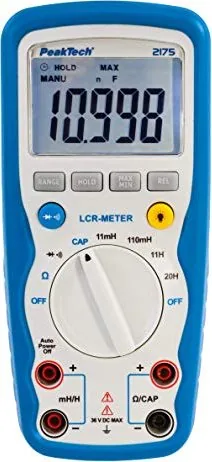
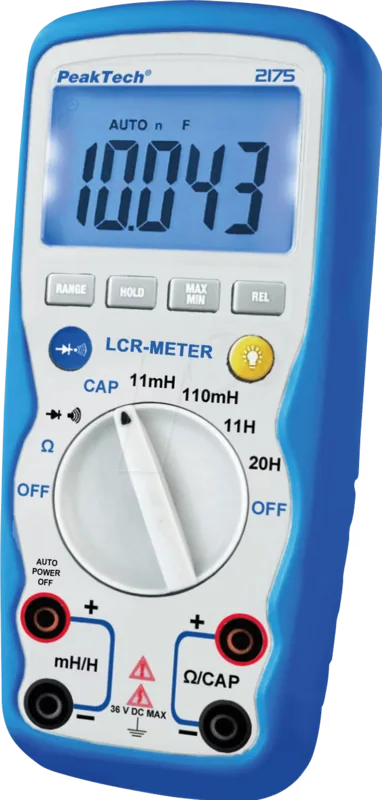
When working with complex circuits, having the right tools makes all the difference in your workflow efficiency. The PeakTech 2175 Digital LCR Meter is specifically designed for professionals and dedicated hobbyists who demand high precision and absolute reliability during daily operations. This advanced instrument measures resistance, capacitance, and inductance with exceptional accuracy. Whether you are repairing vintage audio equipment or building new projects, understanding how to properly utilize the PeakTech 2175 Digital LCR Meter Manual ensures you get the maximum potential from your investment.
Features and Technical Specifications
The device boasts a robust 4.5 digit LCD display, offering a maximum reading of 11000. This large screen ensures excellent readability in dimly lit workshops. The auto-power-off function conserves battery life after 15 minutes of inactivity. Users can switch between automatic and manual ranging depending on requirements. The dedicated MAX-MIN function allows recording fluctuations over time. A handy data-hold feature freezes critical readings for easy analysis without stress.
Safety and Operational Guidelines
Safety is paramount when handling voltage and current. The unit meets strict European safety standards including low voltage directives. Ensure test leads are physically intact before starting any high-risk operation. Avoid measuring voltages beyond 36V AC or DC to prevent damage to internal circuitry. The guide emphasizes discharging capacitors before measurements to avoid dangerous shocks. Always remove the battery if using the device for extended storage periods to prevent leakage.
Diode and Continuity Testing
Built-in functions simplify component checking. The diode test mode displays forward voltage drop. Continuity checks trigger an audible alarm if resistance drops below 30 ohms. This feature is useful for tracing broken wires or verifying solder joints quickly in any workshop environment.
Inductance and Capacitance
Measuring reactive components requires attention. Discharge all capacitors fully before testing. The inductance measurement handles various ranges from millihenries to henries. Wait for the display to stabilize before noting the value for accuracy. Ensure no external voltage sources are connected to the jacks.
Maintenance and Care
Regular maintenance extends the lifespan of measurement equipment. Clean the casing with a damp cloth and mild detergent. Avoid harsh chemicals that degrade housing. Replace the 9V battery when the indicator appears. Use the correct fuse rating during repairs. Calibrate annually to maintain accuracy for professional standards.
Notes
Always store the unit in a dry place. Keep it away from explosive substances. Check calibration regularly for critical tasks.
Conclusion for Engineers
Investing in quality tools is essential for success. This meter provides comprehensive data for electronics needs. Refer to detailed specifications for operational details. It supports hobbyists and professionals in achieving precise results consistently.
Search for 67,706 Manuals online


Type-in Brand or Model