
OWC Thunderbolt Pro Dock Manual
PDF manual · 7 Pages
English



Quick check
Incorrect answer, please try again.
Chat with your OWC Thunderbolt Pro Dock manual using AI
Get instant AI answers from your OWC Thunderbolt Pro Dock manual
Ask anything about the OWC Thunderbolt Pro Dock. Answers come from this manual, with the pages they are based on.
Ask a Question
Do you recommend Thunderbolt Pro Dock?
Yes NoFrequently Asked Questions
The dock works with macOS 10.13 or later, Windows 10 or later, and iPadOS 14.5 or later. It is compatible with any Mac, iPad, or PC featuring Thunderbolt 3, Thunderbolt 4, or USB4/Thunderbolt (USB-C) ports.
Is this answer helpful?
Yes, the dock features an 85W Thunderbolt 3 port that can provide power delivery. It is sufficient to charge most 15-inch MacBook Pro models when the dock is the only device connected to the host computer.
Is this answer helpful?
No, the docking station does not have built-in storage. It serves as a hub to connect external drives, media cards, and other peripherals to your computer.
Is this answer helpful?
Yes, Windows users need to download a specific driver to utilize the 10Gb Ethernet port. Drivers for other functions can be found on the OWC support website.
Is this answer helpful?
This application allows users to safely eject all drives connected to the dock with a single click. It is particularly useful for mobile workflows to ensure data integrity before disconnecting devices.
Is this answer helpful?
No, the network interface functions as a standard network adapter. It does not allow connected devices to operate as Network Attached Storage (NAS), so data cannot be accessed through the Ethernet connection.
Is this answer helpful?
Advantages and Disadvantages
Advantages

- Supports 8K display output via DisplayPort 1.4 for ultra-high-resolution monitors
- Features dual media slots for CFexpress Type B and SD 4.0 cards
- Includes 10Gb Ethernet port for high-speed wired networking
- Provides 85W power delivery to charge compatible laptops
- Comes with OWC Drive Ejector software for safe multi-drive ejection
Disadvantages

- Requires additional driver installation for 10Gb Ethernet on Windows PCs
- Does not have built-in storage capacity for data retention
- Cannot access connected drives through the Ethernet interface as NAS
- Power delivery may be insufficient if host has many peripherals attached
- Security tether and cable stabilizer mounts are sold separately
Product Specification
Type
LAN adapter, USB hub, card reader, video adapter
Form factor
1x external wired
Connection
1x Thunderbolt 3 (female, 40 Gb/s, USB-C with DisplayPort, USB PD max. 85 W), 1x Thunderbolt 3 (male via cable, 40 Gb/s)
Interface
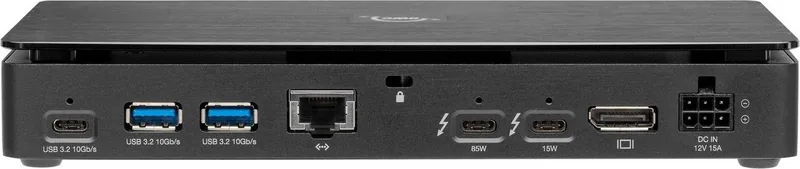
1x RJ-45, 1x Thunderbolt 3 (female), 1x USB-C 3.1 (female), 3x USB-A 3.1 (female), 1x SD card slot, 1x CFexpress 2.0 slot, 1x DisplayPort 1.4 (female)
Transfer
1x RJ-45 (100/1000/2.5G/5G/10GBase-T), 1x Thunderbolt 3 (female, 40 Gb/s, USB-C with DisplayPort, USB PD max. 15 W), 1x USB-C 3.1 (female, 10 Gb/s), 3x USB-A 3.1 (female, 10 Gb/s), 1x SD card slot (SD card, UHS-II), 1x CFexpress 2.0 slot (CFexpress 2.0 Type B, PCIe 3.0 x2, NVMe 1.3), 1x DisplayPort 1.4 (female, max. 3840x2160@120Hz or 7680x4320@60Hz)
Power supply
Power not via connection, AC power required, external power adapter included and required
Dimensions
8.35x1.38x4.25 in (WxDxH)
Weight
1.41 lbs
Case color
black
Compatibility
universal
Features
Metal case, Kensington Security Slot, Audio Video Bridging (AVB), 802.1Qav
Manufacturer warranty
two years
USB spelling
Link
Product Description
Unlock Professional Workflow with the OWC Thunderbolt Pro Dock
The OWC Thunderbolt Pro Dock stands as a pinnacle of connectivity solutions for modern professionals who demand speed, reliability, and versatility. Designed to streamline complex workflows, this 10-port hub transforms a single Thunderbolt connection into a comprehensive workstation interface. Whether you are an editor handling massive 8K video files, a developer managing multiple peripherals, or a creative professional on the go, this dock provides the robust infrastructure needed to keep your productivity flowing without interruption.
At the heart of its design is the ability to support high-speed data transfer and powerful display outputs. The rear panel features a DisplayPort 1.4 capable of driving displays up to 8K resolution, ensuring that your visual work appears crisp and detailed. For network demands, the integrated 10Gb Ethernet port offers lightning-fast local streaming and file sharing, far surpassing standard Gigabit speeds. This makes it an ideal choice for environments where large data sets must be moved quickly across a network.
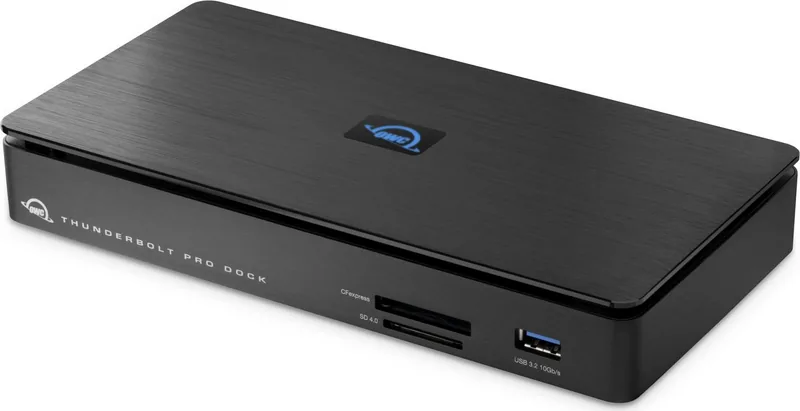
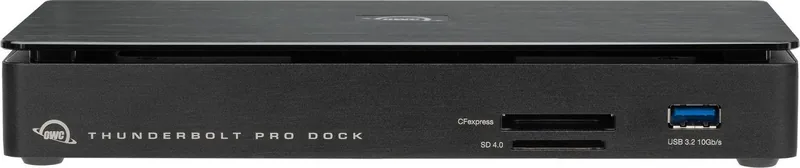
Connectivity is expanded through a variety of ports including USB 3.2 Type-A and Type-C interfaces, all supporting 10Gb/s speeds. Users can also take advantage of dedicated media slots for CFexpress Type B and SD 4.0 cards, allowing for direct ingestion from cameras without needing separate card readers. The inclusion of an 85W Thunderbolt 3 port ensures that laptops receive sufficient power delivery, making it possible to charge compatible MacBook Pro models while connected. Additionally, the dock supports the OWC Drive Ejector application, a unique software tool that allows users to safely eject all connected drives with a single click, adding a layer of safety for mobile professionals.
Building a setup around the OWC Thunderbolt Pro Dock means investing in a system designed for longevity and performance. Its sturdy construction includes a security slot for physical tethering and a mount for ClingOn cable stabilizers to prevent accidental disconnections. With drivers available for both Windows and macOS to enable specific features like Apple Super Drive support or 10Gb Ethernet functionality, this dock integrates seamlessly into existing ecosystems. It is more than just a connector; it is a command center for your digital life.
Key Notes
- The dock requires a specific driver for 10Gb Ethernet on PC systems.
- It does not contain built-in storage but acts as a bridge for external drives.
- Power delivery may vary depending on the number of connected peripherals.
- The included OWC Drive Ejector app simplifies drive management on both Mac and Windows.
- A two-year limited warranty covers manufacturing defects.
Search for 67,706 Manuals online


Type-in Brand or Model