

OWC Thunderbolt 3 mini Dock Manual
PDF manual · 7 Pages
English



Quick check
Incorrect answer, please try again.
Chat with your OWC Thunderbolt 3 mini Dock manual using AI
Get instant AI answers from your OWC Thunderbolt 3 mini Dock manual
Ask anything about the OWC Thunderbolt 3 mini Dock. Answers come from this manual, with the pages they are based on.
Ask a Question
Do you recommend Thunderbolt 3 mini Dock?
Yes NoFrequently Asked Questions
You need a Thunderbolt 3 port. The mini Dock will not function with a plain USB-C host port because it relies on Thunderbolt 3 protocols for video and data aggregation.
Is this answer helpful?
Dual 4K@60Hz support depends on your host hardware and drivers. While each HDMI port can handle 4K@60Hz, the actual combined resolution and refresh rates for dual displays are limited by the host GPU and Thunderbolt 3 controller.
Is this answer helpful?
The USB 3.0 port supplies up to 5V and 0.9A (4.5W) and the USB 2.0 port up to 5V and 0.5A (2.5W). High-power bus-powered drives, tablets, and some devices may not function without additional external power.
Is this answer helpful?
No external AC adapter is required for normal operation since the dock is bus-powered, but some power-hungry peripherals may need their own power or an auxiliary adapter if supported by the enclosure manufacturer.
Is this answer helpful?
Use certified HDMI 2.0 cables between the dock and displays for reliable 4K@60Hz performance. Also ensure your host and display devices support the required HDMI and GPU capabilities.
Is this answer helpful?
Yes. The Gigabit Ethernet port supports Wake-on-LAN, allowing the network to wake a compatible host from sleep or standby when configured properly.
Is this answer helpful?
OWC offers a two-year limited warranty for the Thunderbolt 3 mini Dock. Support is available via phone, email, and chat; check OWC’s support page for contact hours and region-specific numbers.
Is this answer helpful?
Advantages and Disadvantages
Advantages

- Dual HDMI 2.0 outputs support up to 4K@60Hz (subject to host hardware and drivers).
- Bus-powered design: no external AC adapter required for most uses.
- Gigabit Ethernet provides stable wired networking and Wake-on-LAN support.
- Compact, travel-friendly form factor ideal for mobile workers.
- USB 3.0 port supports up to 5 Gb/s transfers and UASP for faster storage access.
Disadvantages

- Requires Thunderbolt 3 host—will not work with plain USB-C ports.
- USB ports provide limited bus power; some drives and tablets won’t be powered.
- Dual-display resolution/refresh depends on host GPU and drivers, which can limit performance.
- Does not support Apple SuperDrive and tablet/iPad charging is not supported.
- Certain features and specs may change with firmware; users must verify updates.
Product Specification
Type
LAN adapter, USB hub, Video adapter
Form factor
1x external wired (connection cable not detachable)
Interface
1x Thunderbolt 3 (plug via cable, 40Gb/s, USB-C with DisplayPort, 7.87in cable length)
Ports
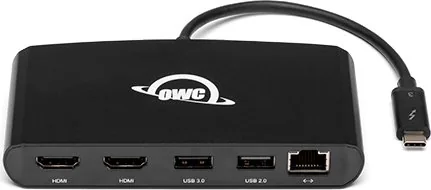
1x RJ-45, 1x USB-A 3.0 (female), 1x USB-A 2.0 (female), 2x HDMI 2.0 (female)
Data Transfer
1x RJ-45 (10/100/1000Base-T), 1x USB-A 3.0 (female, 5Gb/s, 5V/0.9A/4.5W), 1x USB-A 2.0 (female, 480Mb/s, 5V/0.5A/2.5W), 2x HDMI 2.0 (female, max. 2x 3840x2160@60Hz)
Power supply
Power supply only via connection
Dimensions
4.88x0.75x2.56in (WxHxD)
Weight
0.33lb
Housing color
black
Compatibility
universal
Features
Metal housing, HDCP 2.2, PXE boot ROM, Wake on LAN
Manufacturer warranty
two years
USB notation
Link
Product Description
OWC Thunderbolt 3 Mini Dock — Compact Power for Modern Notebooks
The OWC Thunderbolt 3 Mini Dock is a compact, bus-powered docking solution designed for Thunderbolt 3–equipped Mac and Windows notebooks. It expands a single Thunderbolt 3 port into dual HDMI 2.0 outputs, Gigabit Ethernet, and two USB ports without requiring an external AC adapter. The mini Dock targets users who need portable connectivity for high-resolution displays, wired networking, and common USB peripherals while traveling or working in tight desk setups.
Key features and practical use
Equipped with two HDMI 2.0 ports, the mini Dock supports 4K displays at 60Hz per port (depending on host hardware and drivers) and can run dual monitors with resolutions and refresh rates contingent on the host GPU. Gigabit Ethernet provides reliable wired network access and supports Wake-on-LAN. The USB 3.0 port offers up to 5 Gb/s transfer rates and limited bus power (5V, 0.9A), while the USB 2.0 port supports legacy devices at 480 Mb/s. The device requires a Thunderbolt 3 host port—USB-C alone will not work—and certified HDMI 2.0 cables are recommended for full 4K/60Hz performance.
Because it is bus-powered, the mini Dock avoids bulky power bricks, but that also means certain power-hungry bus-powered drives, tablets, or Apple SuperDrive devices may not function without external power. The dock’s firmware and feature set can vary by revision; users are advised to check the product page for firmware and warranty details. OWC provides a two-year limited warranty and multiple support channels including phone, chat, and email.
Design and safety notes
The enclosure is compact and travel-friendly, intended for use within normal operating temperatures (5° C–35° C). OWC cautions against exposing the device to liquids, extreme temperatures, or attempting to open or modify it. The product complies with FCC Class B limits and includes standard health and safety guidance. Changes to specifications or manual details may occur without notice.
Quick summary
The OWC Thunderbolt 3 Mini Dock delivers a portable, no-AC-adapter docking option for users needing dual HDMI outputs, wired Ethernet, and USB connectivity from a single Thunderbolt 3 port. It fits travelers, hybrid workers, and those wanting a compact multiport solution, with the usual caveats around power-limited USB ports and Thunderbolt 3 compatibility.
Notes
- Requires Thunderbolt 3 host—USB-C-only ports are incompatible.
- Use certified HDMI 2.0 cables for 4K@60Hz per port.
- Some bus-powered devices may require external power.
- Firmware and features may change; check OWC support for updates.
- Two-year limited warranty applies.
Search for 67,706 Manuals online


Type-in Brand or Model