

OWC Thunderbolt 3 Dock Manual
PDF manual · 8 Pages
English



Quick check
Incorrect answer, please try again.
Chat with your OWC Thunderbolt 3 Dock manual using AI
Get instant AI answers from your OWC Thunderbolt 3 Dock manual
Ask anything about the OWC Thunderbolt 3 Dock. Answers come from this manual, with the pages they are based on.
Ask a Question
Do you recommend Thunderbolt 3 Dock?
Yes NoFrequently Asked Questions
It is designed for Macs with a Thunderbolt 3 port and macOS 10.12.2 or later. The dock relies on Thunderbolt connectivity for both expansion and display support.
Is this answer helpful?
Yes. The dock is made for multi-device use, with USB ports, audio, Ethernet, SD card access, and Thunderbolt ports for daisy chaining compatible hardware.
Is this answer helpful?
Yes. It can support a single 5K display at 60Hz, and dual-display setups are possible depending on the display types and adapters used.
Is this answer helpful?
Yes, some Apple devices such as the SuperDrive, Apple USB keyboard, and certain iPad charging functions require a driver for full support.
Is this answer helpful?
Yes, the dock supports hot-plugging. For storage devices, always eject or unmount them first to avoid data loss or corruption.
Is this answer helpful?
The dock has no power switch and remains powered as long as it is connected to power. Connected peripherals may sleep with the computer, but the dock itself stays on.
Is this answer helpful?
Advantages and Disadvantages
Advantages

- 14-port design combines modern Thunderbolt, USB, audio, network, and legacy connections.
- Supports daisy chaining and can help build a clean multi-device workstation.
- Includes a high-power USB port, SD slot, and front audio for quick access.
- Can drive a single 5K display at 60Hz and supports flexible display setups.
Disadvantages

- Requires a Mac with Thunderbolt 3 and newer macOS support.
- Apple SuperDrive and some Apple devices need an additional driver.
- No power switch; the dock stays on whenever power is connected.
- USB 3.1 Gen 1 boot support is limited to specific Mac models and OS versions.
Product Specification
Compatibility
Thunderbolt 3
Ports
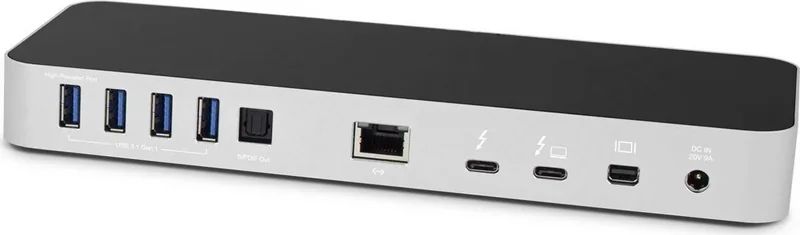
1x Mini DisplayPort, 2x Thunderbolt 3, 1x USB-C 3.1, 5x USB 3.0, 1x Gb LAN, 1x Jack, 1x Toslink
Power Supply
180W, external
Dimensions
9.84x3.50x0.98in
Weight
1.15 lb
Special Features
Card Reader (SD\/SDHC\/SDXC\/microSD\/microSDHC\/microSDXC), USB-C Power Delivery (85W)
Product Description
OWC Thunderbolt 3 Dock, 14-port, Silver
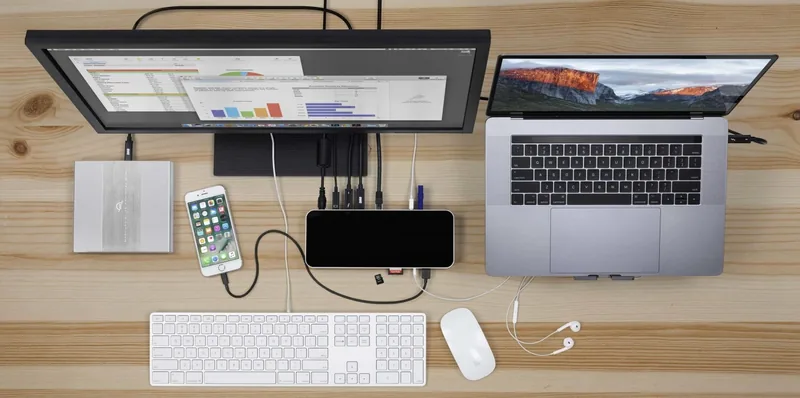
The OWC Thunderbolt 3 Dock, 14-port, silver is built for Mac users who want one compact hub to handle work, media, storage, networking, and displays without clutter. Designed around Thunderbolt 3, it transforms a single connection into a full workstation setup, making it a strong fit for creative professionals, home offices, and anyone who regularly switches between accessories.
At a glance, the dock stands out for its practical mix of modern and legacy connections. You get front-facing convenience with SD card access, a combo audio port, and a high-power USB 3.1 Gen 1 port for charging or fast peripherals. Around back, the dock expands even further with multiple USB ports, Gigabit Ethernet, FireWire 800, S/PDIF digital audio, dual Thunderbolt 3 ports, Mini DisplayPort, and power input. That broad mix makes it especially appealing for users who still rely on older hardware while also needing modern expansion.
Performance and flexibility are the real strengths here. The dock can support a single 5K display at 60Hz, and it also works well in multi-display workflows when the right connection types are used. Thunderbolt daisy chaining lets you connect additional devices in a tidy sequence, helping reduce desk mess while keeping your setup fast and efficient. It also supports hot-plugging, so devices can be connected and removed without disrupting your entire workstation, as long as storage is safely ejected first.
This dock is also thoughtful about everyday usability. Power and data indicators make it easy to see when the dock is active, and the always-on behavior means it remains powered as long as it is plugged in. For users with Apple SuperDrive, older Apple USB keyboards, or legacy iPad charging needs, a driver unlocks extra compatibility. That makes the dock more versatile than a typical USB hub, especially for mixed-environment setups.
If you want a desktop upgrade that balances speed, ports, and compatibility, this silver Thunderbolt 3 dock delivers a polished all-in-one expansion solution. It is especially useful for users who need both modern Thunderbolt workflows and support for older connections.
Notes
- Requires a Mac with Thunderbolt 3 and macOS 10.12.2 or later.
- Some Apple accessories need a driver and the high-power rear USB port.
- Always eject storage before disconnecting to avoid data loss.
- Best suited for users who want a central hub for storage, display, and networking.
Search for 67,706 Manuals online


Type-in Brand or Model