
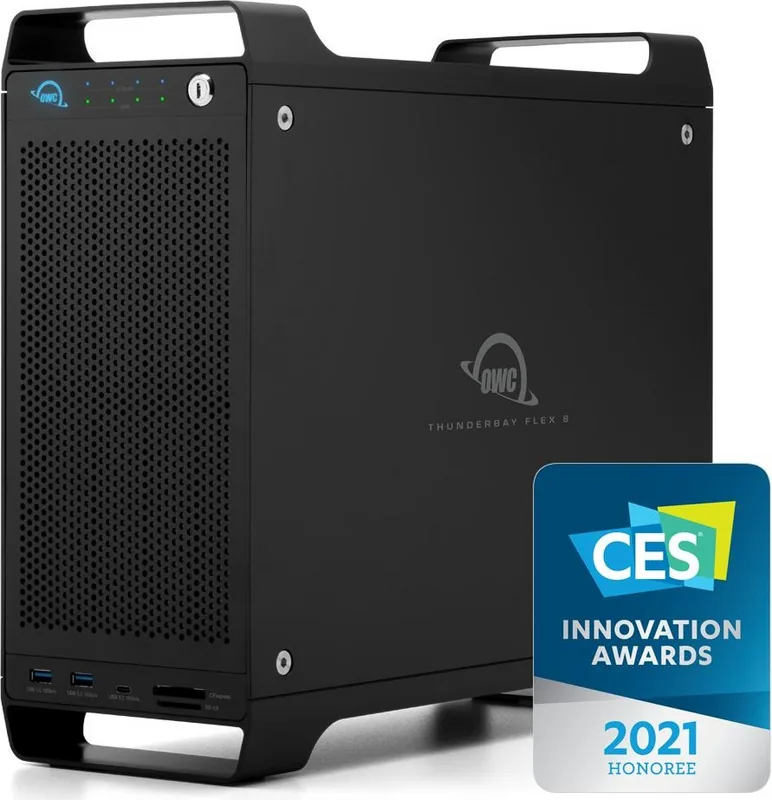
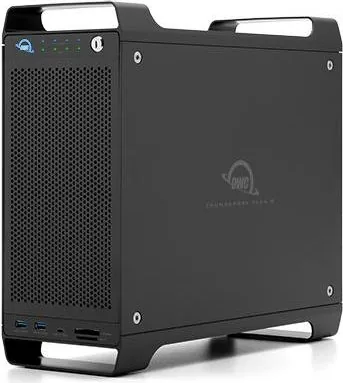
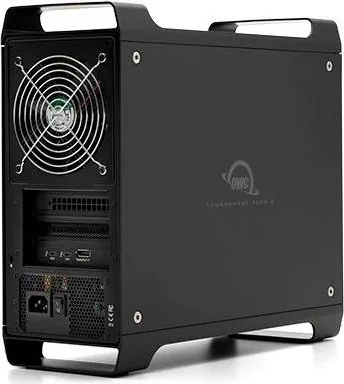
OWC ThunderBay Flex 8 Manual
PDF manual · 10 Pages
English



Quick check
Incorrect answer, please try again.
Chat with your OWC ThunderBay Flex 8 manual using AI
Get instant AI answers from your OWC ThunderBay Flex 8 manual
Ask anything about the OWC ThunderBay Flex 8. Answers come from this manual, with the pages they are based on.
Ask a Question
Do you recommend ThunderBay Flex 8?
Yes NoFrequently Asked Questions
The Flex 8 accepts 2.5" and 3.5" SATA drives in all eight bays and supports U.2/NVMe drives in the top four bays (left-most top bay provides x4 PCIe lanes). It also includes CFexpress Type B and SD (up to SD 4.0) card readers.
Is this answer helpful?
The enclosure has two Thunderbolt 3 ports (one supplies up to 85W host charging) and a DisplayPort 1.4 output. Bandwidth is shared between Thunderbolt and DisplayPort, so driving displays may reduce available throughput for storage and downstream devices.
Is this answer helpful?
SoftRAID is recommended for setting up RAID volumes, drive health monitoring, and achieving optimal performance. Drives can be formatted and used without SoftRAID, but you’ll miss advanced RAID features and predictive disk monitoring.
Is this answer helpful?
Yes. The enclosure includes a mechanical x16 slot wired electrically as x4 PCIe 3.0 and supports half-length, single-width, full-height cards. Ensure the card is Thunderbolt-aware and that drivers are available for your host system.
Is this answer helpful?
Drives are hot-swappable—individual trays can be added or removed without powering off. The enclosure itself does not monitor drive health; use SoftRAID to get drive health alerts and predictive failure monitoring.
Is this answer helpful?
Operating temperatures range from 10°C to 35°C (50°F–95°F); non-operating -40°C to 65°C (-40°F–149°F). Follow anti-static precautions, avoid blocking ventilation, keep liquids away, and unplug during storms or extended storage to prevent damage.
Is this answer helpful?
Warranty varies by configuration: standard enclosures may have a 1-year limited warranty, while units bundled with drives commonly include a 3- or 5-year limited warranty. OWC offers email, phone, and chat support plus an online knowledge base for troubleshooting and resources.
Is this answer helpful?
Advantages and Disadvantages
Advantages

- Eight hot-swappable drive bays supporting 2.5" and 3.5" SATA drives for large, flexible storage pools.
- Top four bays support U.2/NVMe drives with the left-most bay offering x4 PCIe lanes for maximum NVMe speed.
- Dual Thunderbolt 3 ports (one with 85W host charging) plus DisplayPort 1.4 and front USB 3.2 Gen 2 ports for docking and high-speed I/O.
- Integrated CFexpress Type B and SD 4.0 card readers for fast media ingest directly at the enclosure.
- PCIe x16 (electrical x4) expansion slot supports capture, networking, or RAID controller cards for tailored workflows.
Disadvantages

- DisplayPort and Thunderbolt bandwidth are shared; driving displays can reduce storage throughput.
- GPUs are not supported in the enclosure, limiting certain acceleration workflows.
- Some PCIe cards require Thunderbolt-aware drivers and may not be compatible with all hosts.
- U.2/NVMe support limited to top four bays; not all bays provide full NVMe performance.
- Enclosure size and multi-device chaining complexity may require careful setup in dense workspaces.
Product Specification
Form factor
3.5"
Internal connector
8x SATA 6Gb/s (4x SATA/U.2/SFF-8639 NVMe), 1x PCIe 4.0 x16 (x4)
External connector
2x Thunderbolt 3 (40Gb/s), 1x DisplayPort 1.4, 1x USB-C 3.0 (5Gb/s), 2x USB-A 3.0 (5Gb/s)
RAID Level
0/1/4/5/10/JBOD
Fan
2x 4.72in (1x 4.72in, 1600rpm + 1x 4.72in PSU)
Chipset
Intel JHL7440 (Titan Ridge), ASMedia ASM2824, Genesys Logic GL3590
Dimensions
15.35x13.74x5.87in
Weight
20.15lbs
Color
black
Special features
Aluminum housing, On/Off switch, USB-C Power Delivery (85W), integrated Card reader (SD UHS-II/CFexpress 2.0 Type B)
Manufacturer's warranty
one year
Note
Does not support graphics cards!
Product Description
OWC ThunderBay Flex 8 — Powerful, Flexible Storage and Docking
The OWC ThunderBay Flex 8 is a high-capacity, modular storage and docking solution designed for creative professionals, post-production workflows, and power users who need versatile drive configurations and robust connectivity. With eight drive bays that accept 2.5-inch and 3.5-inch SATA drives and U.2/NVMe support in the top four bays, the Flex 8 enables mixed-drive arrays tailored for speed, redundancy, or large-capacity archival needs. Its dual Thunderbolt 3 ports provide fast host connection and device chaining, while a DisplayPort 1.4 output lets you add an 8K display when the host supports it.
The chassis blends storage, expansion, and docking features: front-panel USB 3.2 Gen 2 Type-A and Type-C ports (up to 10Gbps), CFexpress Type B and SD 4.0 card readers for high-speed media ingest, and an x16 mechanical / x4 electrical PCIe slot that accepts half-length, single-width cards for capture, networking, hardware RAID, or additional storage controllers. The Flex 8 ships with essentials like a Thunderbolt 3 cable, power cable, security keys, and a SoftRAID license—SoftRAID brings RAID levels (0, 1, 4, 5, 10), predictive disk failure monitoring, and advanced volume management for professional reliability and performance.
Installation and day-to-day operation are straightforward: tool-assisted drive trays, hot-swap-friendly design, and clear front-panel LEDs for drive activity and status. U.2 support in the top bays delivers the highest NVMe throughput (x4 lanes on the left-most bay), while all bays accept SATA drives for flexible capacity builds. The rear hosts two Thunderbolt 3 ports (one with 85W host charging), DisplayPort, the PCIe slot opening, security slot, and power controls. The Dock Ejector app safely unmounts and ejects all drives with one click on macOS, streamlining busy workflows.
OWC includes safety and usage guidance—anti-static precautions, environmental ranges, and recommendations for drive health monitoring and backups. The unit supports macOS 10.15.1+ and requires Thunderbolt-aware drivers for some PCIe cards; GPUs are not supported as PCIe accelerators in this enclosure. Warranty terms vary by configuration (3-year limited, longer if bundled with drives), and OWC provides technical support, documentation, and an online knowledge base.
Notes
- U.2/NVMe drives are limited to the top four bays; the left-most top bay provides x4 PCIe lanes for maximum NVMe performance.
- DisplayPort 1.4 and Thunderbolt bandwidth are shared; connecting displays may impact overall throughput.
- SoftRAID is recommended for RAID setups, drive health monitoring, and best performance.
Search for 67,706 Manuals online


Type-in Brand or Model