

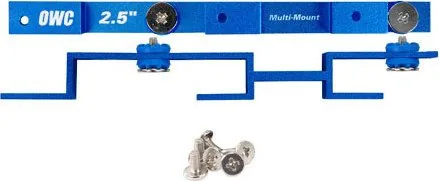
OWC Multi-Mount MM35T25 Manual
PDF manual · 8 Pages
English



Quick check
Incorrect answer, please try again.
Chat with your OWC Multi-Mount MM35T25 manual using AI
Get instant AI answers from your OWC Multi-Mount MM35T25 manual
Ask anything about the OWC Multi-Mount MM35T25. Answers come from this manual, with the pages they are based on.
Ask a Question
Do you recommend Multi-Mount MM35T25?
Yes NoFrequently Asked Questions
It is used to mount storage drives in a way that adapts different sizes of drive bays. It helps fit 2.5-inch and 3.5-inch drives into compatible computer cases and supports flexible storage layouts.
Is this answer helpful?
The frame supports 3.5-inch SATA drives, 2.5-inch SATA drives, and 3.5-inch IDE drives. It can also be configured for two 2.5-inch drives or a mixed 2.5-inch plus 3.5-inch setup.
Is this answer helpful?
Yes. The setup can be installed in the Mac Pro optical bay using the supplied screws and cage mounting points. Careful cable routing is important so the assembly seats correctly without pinching cables.
Is this answer helpful?
Yes, but installation depends on the case design. It can be used in both 5.25-inch and 3.5-inch bays, as long as the correct bracket orientation and screw type are used for the chassis.
Is this answer helpful?
Yes. The 2.5-inch brackets include pre-attached grommets that are designed to reduce vibration. This can help improve stability and may contribute to quieter operation.
Is this answer helpful?
Pay close attention to drive orientation, screw type, and bracket alignment. Working in a static-free area is also important, and it is best to follow anti-static precautions to avoid damage.
Is this answer helpful?
Advantages and Disadvantages
Advantages

- Supports multiple drive combinations, including 3.5-inch, 2.5-inch, and hybrid setups.
- Helps convert unused bays into practical storage space.
- Includes vibration-reducing grommets for 2.5-inch drives.
- Works with both Mac Pro and common PC chassis layouts.
Disadvantages

- Installation requires careful screw selection and correct drive orientation.
- Compatibility depends on available bay type and system layout.
- May require extra parts if your case uses a different mounting style.
- Not ideal for users who want a fully tool-free or plug-and-play solution.
Product Specification
Type
Mounting frame
Height
1x 3.5"
Supported form factors
1x 2.5"
USB type
Link
Product Description
OWC Multi-Mount MM35T25: A Flexible Way to Fit More Storage
The OWC Multi-Mount MM35T25, mounting frame 3.5" to 1x 2.5" Manual points to a simple but useful idea: make drive installation easier without forcing a full system redesign. This mounting frame is built for people who need to adapt different drive sizes inside a desktop or workstation, whether the goal is to add a single 2.5-inch SATA SSD, secure a 3.5-inch hard drive, or combine both in a compact setup. It is the kind of accessory that turns awkward empty bays into practical storage space.
What makes the OWC Multi-Mount interesting is its flexibility. The bracket system supports 3.5-inch SATA and IDE drives, as well as 2.5-inch SATA drives, and it can be used in multiple configurations. You can mount one 3.5-inch drive, one 2.5-inch drive, two 2.5-inch drives, or even a hybrid arrangement with both sizes together. That versatility makes it appealing for users upgrading older machines, building a custom storage layout, or trying to reuse existing hardware more efficiently.
The design also shows attention to everyday installation details. The 2.5-inch brackets include pre-attached grommets for vibration reduction, which can help keep a system quieter and more stable. The included screw kits are matched to different chassis and bay types, so the frame can be installed in common Apple Mac Pro and PC configurations. That said, the process still rewards patience: drive orientation, screw choice, and proper alignment matter, especially when working in tight spaces.
For blog readers looking at practical storage upgrades, this product fits a familiar niche. It is not flashy, but it solves a real problem for users who want to mix drive sizes or repurpose available bays. The OWC Multi-Mount MM35T25 is especially useful when a system has spare optical or hard drive space that would otherwise go unused. In that sense, it is less about aesthetics and more about making storage expansion cleaner, safer, and more adaptable.
Notes
- Always use anti-static precautions during installation.
- Check bay compatibility before choosing screw type and bracket orientation.
- Revisit drive formatting and backup habits after hardware changes.
Search for 67,706 Manuals online


Type-in Brand or Model