
OWC Mercury Elite Pro Dual with 3-Port Hub Manual
PDF manual · 12 Pages
English



Quick check
Incorrect answer, please try again.
Chat with your OWC Mercury Elite Pro Dual with 3-Port Hub manual using AI
Get instant AI answers from your OWC Mercury Elite Pro Dual with 3-Port Hub manual
Ask anything about the OWC Mercury Elite Pro Dual with 3-Port Hub. Answers come from this manual, with the pages they are based on.
Ask a Question
Do you recommend Mercury Elite Pro Dual with 3-Port Hub?
Yes NoFrequently Asked Questions
The Mercury Elite Pro Dual supports RAID 0 (striping), RAID 1 (mirroring), SPAN (concatenation), and Independent mode (each drive appears separately). Choose RAID mode based on whether you prioritize speed, redundancy, mixed drive sizes, or separate volumes.
Is this answer helpful?
Yes. Different sized drives can be used in Independent or SPAN modes. SPAN will combine capacities sequentially but offers no redundancy. For RAID 1 or RAID 0, identical drives (model, capacity, firmware) are recommended to ensure proper operation and rebuilds.
Is this answer helpful?
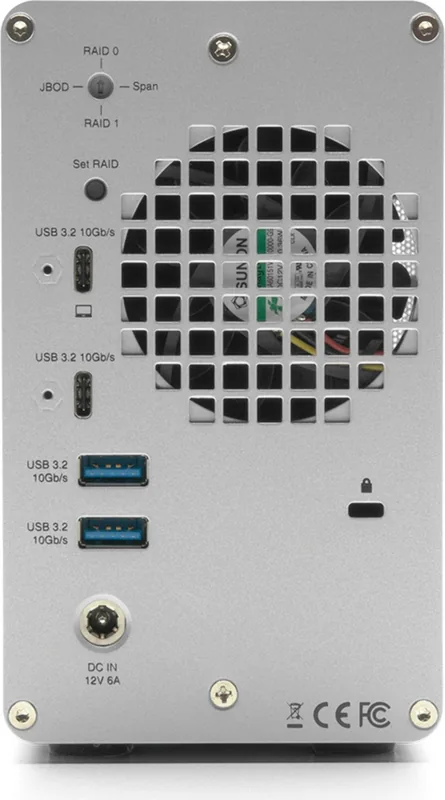
Power off and disconnect the device, rotate the rear RAID selector dial to the desired mode using a small tool, reconnect power, press the RAID Set button until the new volumes appear on the host, and then format as needed via your OS or OWC Drive Guide.
Is this answer helpful?
Connection speed depends on the host: up to 10Gb/s on USB 3.1 Gen 2 or Thunderbolt 3 systems, around 5Gb/s on USB 3.0/Gen 1 hosts, and fallback to USB 2.0 speeds for older ports. Actual throughput also depends on drive performance and RAID configuration.
Is this answer helpful?
A blinking red LED indicates a missing or failed drive. In RAID 1 or Independent mode the remaining data may be intact; replace the failed drive and follow rebuild instructions. In RAID 0, the array data is lost and recovery is unlikely without backups.
Is this answer helpful?
Yes. Always eject or unmount volumes from your operating system before powering off the device to prevent data corruption. Use the OS eject method or OWC Dock Ejector for a single-step safe unmount.
Is this answer helpful?
OWC offers a 3-year limited warranty for units purchased with drives and a 1-year warranty for empty enclosures. Support is available online, by chat, email (responses within 48 hours), and phone during published business hours.
Is this answer helpful?
Advantages and Disadvantages
Advantages

- Multiple RAID modes (RAID 0, RAID 1, SPAN, Independent) to suit speed, capacity, or redundancy needs.
- 10Gbps USB-C host port with integrated 3-port hub (USB-C + 2x USB-A) for expanded connectivity.
- Supports both 3.5" and 2.5" SATA drives, offering flexibility for drive selection and upgrades.
- Simple assembly and rear RAID selector dial with RAID Set button for mode changes without tools.
- Cross-platform compatibility (macOS, Windows, Linux) and Dock Ejector utility for safe unmounting.
Disadvantages

- RAID 0 offers no redundancy—single drive failure results in total data loss for that volume.
- Requires identical drives (model, capacity, firmware) for reliable RAID configurations and rebuilds.
- Device powers off when host sleeps or disconnects, which may interrupt long rebuilds or transfers.
- No built-in hardware encryption; data protection depends on drive-level or OS-level solutions.
- Enclosure modifications or improper installation may void warranty and risk electrical damage.
Product Specification
Form factor
3.5"
Internal connector
2x SATA 6Gb/s
External connector
2x USB-C 3.1 (10Gb/s), 2x USB-A 3.1 (10Gb/s)
RAID level
0/1/JBOD/SPAN
Fan
1x 2.36", 2500rpm
Dimensions
9.41x5.79x3.35in
Weight
3.09lb
Color
silver
Special features
Aluminum housing, external power supply, security lock (Kensington)
Manufacturer warranty
one year
USB notation
Link
Product Description
OWC Mercury Elite Pro Dual Dock, USB-C 3.1 Manual
The OWC Mercury Elite Pro Dual Dock is a versatile dual-bay storage enclosure and USB-C 3.1 dock designed for creators, small studios, and power users who need fast, flexible external storage. Built to accept both 3.5" and 2.5" SATA drives, the Mercury Elite Pro Dual supports multiple RAID modes (RAID 0, RAID 1, SPAN, and Independent) to balance speed, capacity, or redundancy depending on your workflow. With a USB 3.2/USB-C 10Gbps host port and an integrated 3-port hub (one USB-C and two USB-A), it doubles as a convenient peripheral hub while delivering high transfer rates to compatible hosts.
Key features and usage
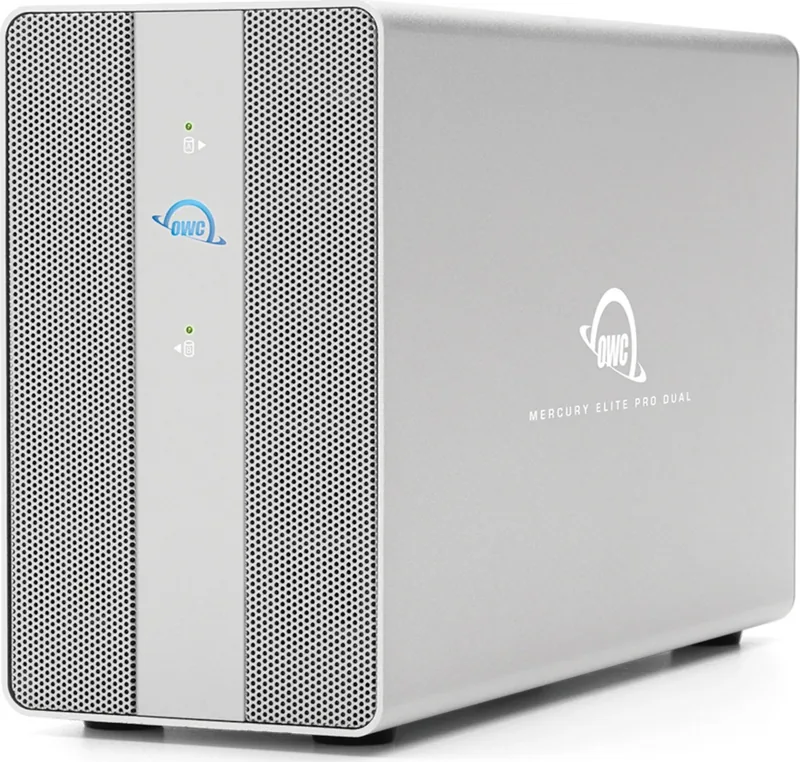
The enclosure ships with the cables and power supply needed to get started and is compatible with macOS, Windows, and Linux, as well as many tablets and mobile devices that expose USB storage. It negotiates connection speeds based on the host (10Gb/s on suitable USB 3.1 Gen 2 or Thunderbolt 3 systems, 5Gb/s on USB 3.0, and backwards to USB 2.0). The front panel LED indicators show power and drive status, while the rear panel contains a RAID selector dial and RAID Set button for changing array modes safely when powered off. OWC also provides a Dock Ejector utility to safely unmount all drives with one click.
Assembly is straightforward: open the enclosure, seat your SATA drives into the chassis, secure them with the provided mounting points, slide the chassis back in, and replace the screws. Important safety and operational notes include using identical drives for RAID arrays, keeping the device ventilated and away from moisture or magnetic interference, and always ejecting volumes properly before powering down to avoid data loss.
Performance and reliability
RAID 0 (striping) delivers the highest throughput by combining both drives into one large volume but offers no redundancy—if one drive fails, data is lost. RAID 1 (mirroring) provides redundancy by duplicating data across drives, enabling rebuilds after a single drive failure. SPAN combines capacities sequentially and allows different drive sizes but provides no redundancy. Independent mode exposes each drive separately and is ideal for mixed-drive setups or single-drive use.
OWC emphasizes backup best practices: keep at least two copies of important data (the device plus another medium). The product includes a limited warranty (three years when bundled with drives; one year for empty enclosures), and OWC support resources and troubleshooting guidance are available online and by phone.
Notes:
- The device requires an active data connection to remain powered on; if the host sleeps or disconnects, the enclosure will power off.
- Use anti-static precautions when installing drives and avoid modifying the enclosure.
- Rebuilds are fastest when the host remains powered and drive-sleep settings are disabled.
Search for 67,706 Manuals online


Type-in Brand or Model