

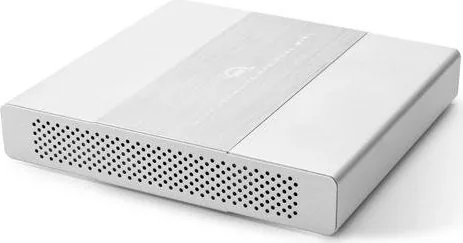

OWC Mercury Elite Pro Dual mini Manual
PDF manual · 14 Pages
English



Quick check
Incorrect answer, please try again.
Chat with your OWC Mercury Elite Pro Dual mini manual using AI
Get instant AI answers from your OWC Mercury Elite Pro Dual mini manual
Ask anything about the OWC Mercury Elite Pro Dual mini. Answers come from this manual, with the pages they are based on.
Ask a Question
Do you recommend Mercury Elite Pro Dual mini?
Yes NoFrequently Asked Questions
Yes, the device is compatible with PC systems featuring a USB-C port. While Mac support is highlighted, Type-A host connections are supported via the included Standard-A to Type-C cable, allowing broad usability across operating systems.
Is this answer helpful?
For RAID 0 and RAID 1, identical model and capacity are required. However, Span Mode allows drives of different capacities to combine storage sequentially. Independent mode also allows varying sizes without combining data.
Is this answer helpful?
Use the rear-mounted rotary dial to align the arrow with the desired setting, such as RAID 0 or 1. You must power on the unit, use the SET button for three seconds, or power off and rotate before turning on to complete the change.
Is this answer helpful?
In RAID 1, the other drive keeps data safe and the array rebuilds once the failed drive is replaced. If it is RAID 0 or Span, data loss may occur. A solid red LED indicates a drive failure on the specific bay.
Is this answer helpful?
Yes, Thunderbolt 3 or 10Gb/s USB-C ports are required for best performance. Connecting through these ports ensures the device achieves the maximum transfer rates of up to 738MB/s for demanding workflows.
Is this answer helpful?
Warranty terms depend on purchase type. If the unit ships with drives, it has a 3 Year OWC Limited Warranty. Enclosures purchased without drives have a 1 Year OWC Limited Warranty.
Is this answer helpful?
Advantages and Disadvantages
Advantages

- High transfer speeds up to 738MB/s for fast data access.
- Supports multiple RAID modes including 0, 1, Span, and Independent.
- Compatible with Mac and PC systems featuring USB-C or Thunderbolt.
- LED indicators provide clear status updates on drive health.
- Can be powered via USB-C bus power or external adapter.
Disadvantages

- Requires identical drive models for RAID 0 and RAID 1 configurations.
- Changing RAID modes requires power and deletes all current data.
- Bus powering may not be sufficient for all host computers.
- Assembly required for enclosure-only versions may void warranty if done wrong.
- Requires active USB connection to stay powered in some sleep modes.
Product Specification
Form Factor
2.5"
Internal Interface
2x SATA 6Gb/s (up to 0.37 in height)
External Interface
1x USB-C 3.1 (10Gb/s)
RAID Level
0/1/JBOD/SPAN
Fan
N/A
Chipset
ASMedia ASM1352
Dimensions
6.06x5.67x1.10 in
Weight
1.79 lbs
Color
silver
Features
Aluminum Case, External Power Supply
Manufacturer Warranty
1 Year
USB Interface
Link
Product Description
High Performance Storage with OWC Mercury Elite Pro
The OWC Mercury Elite Pro Dual mini Dock, USB-C 3.1 Manual serves as the foundation for understanding this robust storage device designed for high-speed Mac and PC workflows. This dual-bay enclosure supports 2.5-inch SATA drives, offering a versatile solution for professionals who need both reliability and speed. Whether you are editing video or managing large databases, performance remains critical for efficiency in your daily tasks.
Rapid Data Transfer Rates
Delivering transfer rates up to 738MB/s, this device utilizes USB 3.1 Gen 2 technology to ensure quick access to large files. For optimal performance, a Thunderbolt 3 or 10Gb/s USB-C port is highly recommended by the manufacturer. Users with legacy Type-A ports can utilize the included adapter cable for connectivity. The unit features a dedicated ON/OFF switch and distinct rear ports for data transmission and DC power input. LED indicators on the front panel provide immediate visual feedback regarding drive activity, displaying solid blue when idle and blinking during active data transfers.
Flexible RAID Configurations
Flexibility is a cornerstone of this system's design. The rear-mounted rotary dial allows users to switch between multiple configurations including RAID 0 for maximum speed, RAID 1 for critical data redundancy, Span for extended capacity without requiring identical drives, or Independent mode for flexible single-drive usage. RAID 0 combines drive capacities to create a larger volume for speed, while RAID 1 mirrors data to protect against failure in case of disk loss. Changing RAID modes destroys existing data, so regular backups are essential before modifying settings on the device.
Installation and Maintenance
Installation is straightforward for enclosure-only purchases. Open the chassis and align the SATA connectors gently to avoid damage to the mechanism. Secure the drives before closing the unit and tightening the rear cover with the provided screws. Pre-installed models should not be opened during the warranty period to avoid voiding coverage protection. Ensure ventilation openings remain clear to maintain operational temperatures between 5 and 42 degrees Celsius to prevent overheating issues.
Power Delivery Options
The device can run on bus power from a compliant USB-C host supporting Power Delivery specifications for convenient portability. However, utilizing an external power supply ensures stability for heavy workloads or scenarios where bus power is limited. Always eject drives safely from the operating system before disconnecting to prevent file corruption. Safe removal protocols are detailed in system guidelines to protect data integrity during routine maintenance tasks for the user.
This product represents robust engineering for demanding environments requiring reliable storage expansion with advanced connectivity.
Search for 67,706 Manuals online


Type-in Brand or Model
Sienna Fox
5 months ago
Will this enclosure accept 15mm hard drives without securing the casing, and has it been verified for stable operation on Linux Mint EXT4 partitions?
Manual.ly
5 months ago
Please note that this case is designed primarily for 12.5mm drives. While 15mm drives may physically fit inside the chassis, the top lid cannot be secured with screws, which leaves the assembly unstable. Regarding file systems, user reports indicate read and write errors specifically on Linux Mint using the EXT4 format. The drive functions without issues on Windows NTFS. We recommend verifying system compatibility before using this enclosure for critical data storage.