
OWC Express 4M2 Manual
PDF manual · 9 Pages
English



Quick check
Incorrect answer, please try again.
Chat with your OWC Express 4M2 manual using AI
Get instant AI answers from your OWC Express 4M2 manual
Ask anything about the OWC Express 4M2. Answers come from this manual, with the pages they are based on.
Ask a Question
Do you recommend Express 4M2?
Yes NoFrequently Asked Questions
The enclosure supports PCIe M.2 SSDs in the 2280 M-Key form factor. You can install from one to four compatible drives, and mixed drive brands or capacities can be used.
Is this answer helpful?
The Express 4M2 is rated for speeds up to 2800 MB/s. Actual performance depends on the installed SSDs, host computer, Thunderbolt connection, storage configuration, and whether the DisplayPort output is in use.
Is this answer helpful?
It supports macOS 10.12 or later and Windows 10 or later on systems with a Thunderbolt 3 port. SSDs with 512-byte sectors require macOS 10.13 or later.
Is this answer helpful?
Yes. It includes a DisplayPort 1.2 output. Using this output can reduce the bandwidth available to the SSDs. Multi-Stream Transport is supported in Windows 10, while Dual-Mode DisplayPort is not supported.
Is this answer helpful?
Yes. All four drive bays are bootable on macOS when compatible drives and system requirements are used.
Is this answer helpful?
Confirm that the Thunderbolt 3 cable is firmly connected. Try another Thunderbolt 3 port or cable, then check that each installed SSD is fully seated and secured inside the enclosure.
Is this answer helpful?
Advantages and Disadvantages
Advantages

- Supports up to four PCIe M.2 NVMe SSDs in the widely used 2280 M-Key format.
- Delivers storage performance rated at up to 2800 MB/s through Thunderbolt 3.
- Dual Thunderbolt 3 ports and DisplayPort 1.2 add connectivity flexibility.
- All four drive bays are bootable on compatible macOS systems.
- Allows mixed SSD brands and capacities for a customizable storage configuration.
Disadvantages

- Requires a computer with a Thunderbolt 3 port for normal operation.
- Using the DisplayPort output reduces bandwidth available to the installed SSDs.
- Installation requires opening the enclosure and temporarily removing the fan housing.
- Does not support Dual-Mode DisplayPort (DP++).
- Users must purchase compatible M.2 SSDs separately.
Product Specification
Form factor
M.2 2280
Internal connection
4x M.2 (PCIe 3.0 x1, NVMe)
External connection
2x Thunderbolt 3 (40 Gb/s), 1x DisplayPort 1.2
RAID level
0/1
Fan
1x
Chipset
Intel DSL6540 (Alpine Ridge)
Dimensions
5.12 x 3.35 x 1.97 in
Weight
1.76 lb
Color
black
Special features
aluminum housing, external power supply
Manufacturer warranty
one year
USB notation
Link
Product Description
OWC Express 4M2, Thunderbolt 3 - Read, Download & Print Free
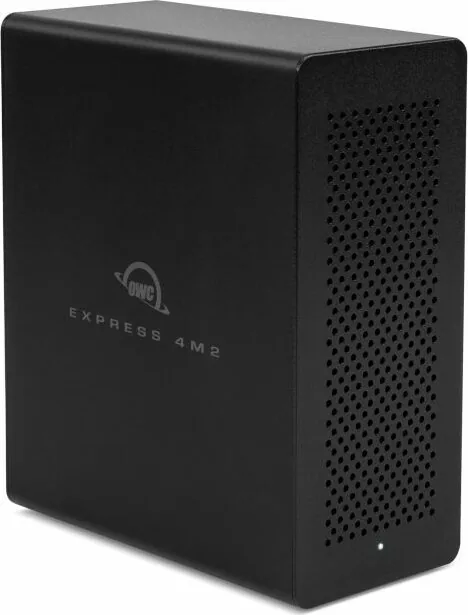
The OWC Express 4M2 is a high-performance external storage enclosure designed for creators, professionals, and power users who need fast, flexible NVMe storage. Built around Thunderbolt 3 connectivity, it supports up to four PCIe M.2 NVMe SSDs in the common 2280 M-Key format. This makes it a practical solution for editing large media projects, managing extensive photo libraries, running demanding workflows, or expanding desktop and laptop storage.
Fast Multi-Drive Storage in a Compact Enclosure
With performance rated at up to 2800 MB/s, the Express 4M2 can help reduce transfer times when working with high-resolution video, large archives, and other data-intensive workloads. Users can install one, two, three, or four compatible SSDs, allowing the enclosure to grow alongside changing storage requirements. Different SSD brands and capacities may be used, offering flexibility when building a custom storage setup.
The enclosure connects through Thunderbolt 3 and includes dual Thunderbolt 3 ports. This configuration supports convenient device connectivity while providing a dedicated high-bandwidth storage option. For best results, connect the Express 4M2 to a Thunderbolt 3 host port that is not sharing bandwidth with neighboring devices.
Display and System Compatibility
In addition to storage expansion, the OWC Express 4M2 includes a DisplayPort 1.2 output for connecting a compatible display. Keep in mind that using the DisplayPort connection reduces bandwidth available to installed SSDs, which may affect storage performance. The unit supports Multi-Stream Transport in Windows 10, but it does not support Dual-Mode DisplayPort.
The Express 4M2 works with macOS 10.12 or later and Windows 10 or later on computers equipped with a Thunderbolt 3 port. All four SSD bays can be used as bootable volumes on macOS. Drives using 512-byte sectors require macOS 10.13 or later.
Straightforward Installation and Everyday Care
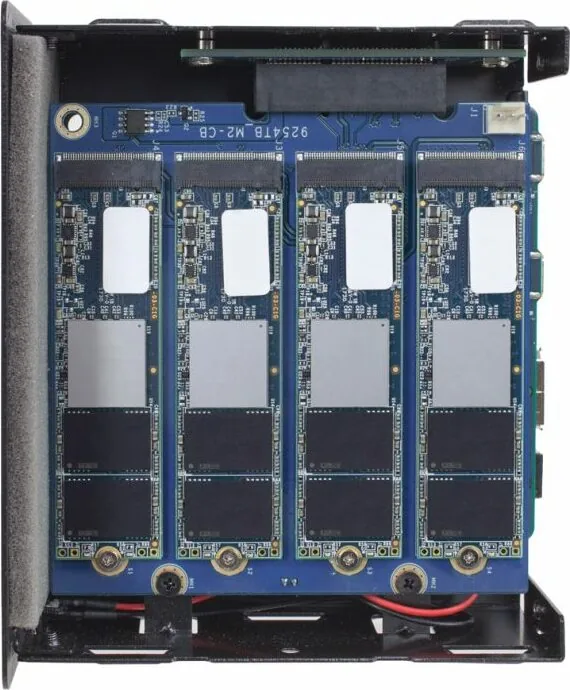
Installing SSDs involves opening the enclosure, removing the fan housing, seating each M.2 drive, securing it with the included mounting screws, and reassembling the unit. Proper anti-static practices are recommended during installation. Its internal fan system helps maintain operating conditions, so ventilation openings should remain unobstructed.
Notes
- Use PCIe M.2 2280 M-Key SSDs only.
- Keep two copies of important data to help protect against data loss.
- Check Thunderbolt cable connections and SSD seating first if the computer does not recognize the enclosure.
- The enclosure includes a one-year OWC Limited Warranty.
Search for 67,706 Manuals online


Type-in Brand or Model