

Oral-B Genius 8000s Manual
PDF manual · 117 Pages
English



Quick check
Incorrect answer, please try again.
Chat with your Oral-B Genius 8000s manual using AI
Get instant AI answers from your Oral-B Genius 8000s manual
Ask anything about the Oral-B Genius 8000s. Answers come from this manual, with the pages they are based on.
Genius 8000s Maintenance Schedule
Replace the brush head every 3 months or sooner if it becomes worn. The blue indicator bristles fade halfway to signal replacement.
Rinse the brush head under running water with the handle switched on. Remove the head, clean both parts separately, and dry before reassembling.
Periodically check the entire product, cords, and accessories for damage. Do not use if damaged; take it to an Oral-B Service Centre.
Periodically check the operation of the pressure sensor by pressing moderately on the brush head during use to ensure the Smart Ring lights up red.
Free maintenance reminders
Timed to your purchase date. Always free, unsubscribe anytime.
Ask a Question
Do you recommend Genius 8000s?
Yes No
Sean Evans
6 months ago
Can multiple family members use the same toothbrush and have their own separate brushing data tracked in the app?
Frequently Asked Questions
Download the Oral-B App from the App Store or Google Play. Ensure Bluetooth is enabled on your phone. Turn on the toothbrush and follow the in-app instructions to pair the devices. Keep the phone within five meters during pairing.
Is this answer helpful?
A red light indicates that you are applying too much pressure while brushing. The motor will slow down or stop pulsating to protect your gums. Reduce your pressure immediately to prevent damage to your enamel and gum tissue.
Is this answer helpful?
A fully charged battery provides up to twelve days of use when brushing twice daily for two minutes each time. Charging takes approximately fifteen hours, though it may take longer if the battery was deeply discharged.
Is this answer helpful?
Oral-B recommends using only genuine Oral-B brush heads. Using third-party heads may void the warranty because they might not fit correctly or could damage the handle mechanism over time.
Is this answer helpful?
Yes, but you must keep the toothbrush more than fifteen centimeters away from your pacemaker while it is turned on. If you suspect interference, deactivate the radio transmission by holding the on and mode buttons simultaneously.
Is this answer helpful?
Replace the brush head every three months or sooner if the bristles appear frayed. The blue indicator bristles fade halfway after three months to signal that it is time for a change.
Is this answer helpful?
Press and hold the on/off button for ten seconds until all indicator lights double blink. This resets the timer and app settings to their original defaults.
Is this answer helpful?
Advantages and Disadvantages
Advantages

- Advanced 3D tracking technology guides brushing to cover all areas
- SmartRing provides clear visual feedback for pressure and modes
- Long battery life supports up to twelve days of regular use
- Includes a convenient charging travel case with smart plug
- Six specialized cleaning modes for various dental needs
Disadvantages

- Requires a compatible smartphone with Bluetooth 4.0 or higher
- Charging time can take up to fifteen hours for a full cycle
- Non-Oral-B brush heads may void the warranty
- App functionality is limited if Bluetooth is disabled on phone
- Travel case requires specific smart plug for charging handle
Product Specification
Type
Electric toothbrush
Power source
Battery (Li-Ion)
Brush head shape
Round
Cleaning modes
5
Timer
4 x 30 seconds
Features
App control (Bluetooth), charging indicator light, battery level display, pressure sensor, storage for 4 brush heads
Runtime
48 min (12 days)
Package contents
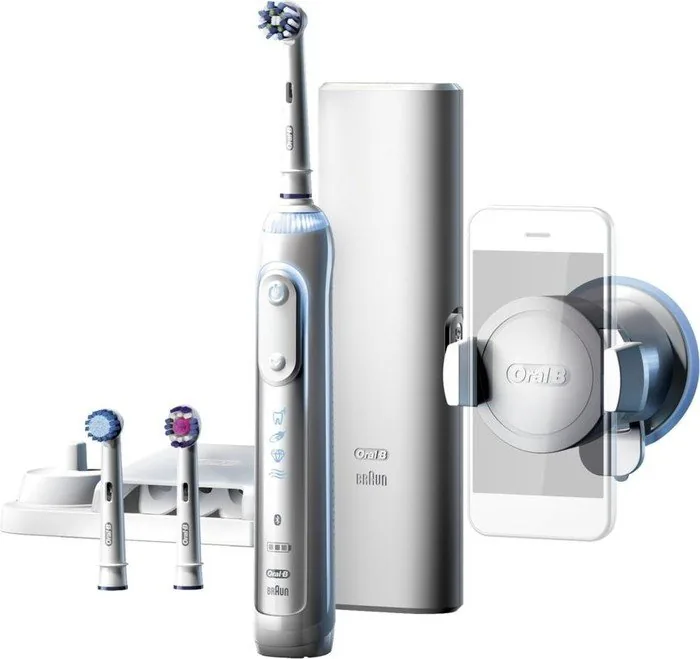
Charging station, case, 3 replacement brush heads (2x CrossAction, 1x Sensitive), smartphone wall mount
Product Description
Discover the Oral-B Genius 8000s Manual Experience
Welcome to the future of oral hygiene with the Oral-B Genius 8000s. This advanced electric toothbrush is designed to provide a professional cleaning experience right in your home. The device features an intelligent pressure sensor that lights up red when you brush too hard, protecting your gums while ensuring effective plaque removal. With its unique 3D tracking technology, the Genius 8000s communicates with your smartphone via Bluetooth to guide you on missed spots during brushing sessions.
The SmartRing display offers visual feedback through color-coded lights, indicating battery life, charging status, and active modes. Users can choose from six distinct cleaning modes including Daily Clean, Pro Clean, Sensitive, Whitening, Gum Care, and Tongue Cleaning. The built-in timer ensures you brush for the dentist-recommended two minutes, with quadrant alerts every thirty seconds for thorough coverage. A full charge typically lasts up to twelve days, making it perfect for travel or busy lifestyles.
Accessories included with this model often feature a premium charging travel case equipped with a smart plug, allowing you to charge your toothbrush anywhere without needing a separate charger. The set also includes a mirror-mounted smartphone holder for hands-free app usage. Proper maintenance involves rinsing the handle and brush head after use and replacing the brush head every three months as indicated by the blue indicator bristles.
Important Usage Notes
Always ensure the radio transmission is deactivated before using the device in restricted areas like airplanes or hospitals. If you have a pacemaker, maintain a distance of at least fifteen centimeters from the operating toothbrush. The device is waterproof but the charging components should never be submerged in water. For optimal battery health, store the unit at room temperature and avoid exposing it to temperatures above fifty degrees Celsius.
Search for 67,706 Manuals online


Type-in Brand or Model
Christiana Buckridge
4 months ago
Does the app's face recognition feature work reliably, or is it too difficult to set up and use daily?
Manual.ly
4 months ago
The position recognition feature using the smartphone camera can be very effective for ensuring thorough cleaning of all areas. However, users should note that it requires some practice to master. You must hold the phone steady in the holder attached to the mirror and keep your head still during brushing for accurate detection. Some users find the initial setup slightly challenging or the requirement to stare at the phone unnatural, but once accustomed to the technique, it provides excellent feedback on your brushing routine. The app also offers other useful features like timers and pressure control reminders that do not require the camera.