
Optoma 4K400x Manual
PDF manual · 55 Pages
English



Quick check
Incorrect answer, please try again.
Chat with your Optoma 4K400x manual using AI
Get instant AI answers from your Optoma 4K400x manual
Ask anything about the Optoma 4K400x. Answers come from this manual, with the pages they are based on.
4K400x Maintenance Schedule
Turn off and unplug the projector. Use compressed air to remove dust, then gently wipe with a special cloth. Do not touch the lens with fingers.
Contact your local dealer or service center to replace the light bulb when the warning message Lamp life exceeded appears.
Reset the dust filter counter after replacing or cleaning the dust filter via the Setup menu.
Free maintenance reminders
Timed to your purchase date. Always free, unsubscribe anytime.
Ask a Question
Do you recommend 4K400x?
Yes NoFrequently Asked Questions
Turn off and unplug unit. Wait 30 mins for cool down. Remove cover and screws. Lift tab and pull module. Clean and insert new unit. Reset lamp hours in menu settings to ensure accurate tracking.
Is this answer helpful?
Yes, it supports front, rear, and ceiling mounting. Ensure at least 10 cm clearance from ceiling. Use recommended mounting kit for warranty safety to prevent damage.
Is this answer helpful?
Native 3840 x 2160 at 60 Hz. Also supports various PC resolutions via HDMI and VGA inputs. 4K UHD content is handled with full HDR support.
Is this answer helpful?
Yes, typically comes with manufacturer warranty. Check official website for specific terms regarding lamp life and replacement policies in your region. Contact local dealer for details.
Is this answer helpful?
Yes, enable 3D mode in menu. Requires passive 3D glasses and 3D content source. Maintain viewing distance of 3 times screen height to ensure safety.
Is this answer helpful?
Use dry air blower and special cloth. Do not use liquids or press hard. Remove batteries from remote if long storage is planned to prevent corrosion.
Is this answer helpful?
Yes, it has a 3.5 mm audio out and S/PDIF output for external sound systems. Internal 10W speaker is included for basic sound needs.
Is this answer helpful?
Advantages and Disadvantages
Advantages

- Supports native 4K UHD resolution for incredibly sharp visuals and detailed imagery in any environment.
- Enhanced Gaming mode reduces input lag to 4.5 milliseconds for competitive play.
- Dual HDMI 2.0 ports with HDCP 2.2 support for full high dynamic range compatibility.
- Lens shift functions allow vertical and horizontal adjustments to center the image.
Disadvantages

- Lamp replacement is necessary over time and involves handling hot components safely.
- 3D viewing requires compatible glasses and proper viewing distance to avoid eye strain.
- No batteries included for remote control as they leak over time if stored too long.
Product Specification
Type
DLP, 1x 0.47"
Light Source
Lamp
Resolution (displayable)
Ultra HD (3840x2160)
Resolution (native)
Full HD (1920x1080)
Brightness
4000 ANSI Lumens (High / Standard / Eco)
Contrast
1,000,000:1
Screen Size
33-300 inches
Throw Distance
3.97-32.48 ft
Throw Ratio
1.50:1-1.66:1
Lens Shift
manual, vertical -0% +10%
Video Inputs
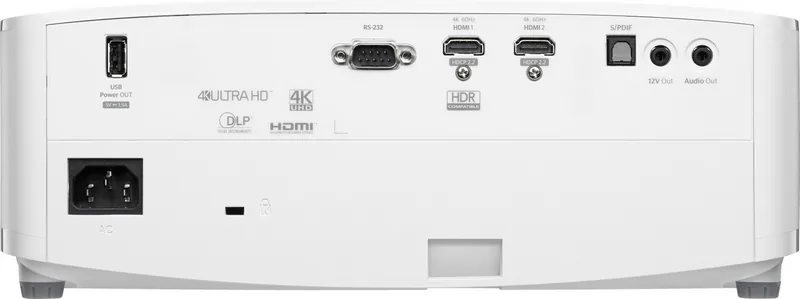
2x HDMI 2.0 In
Audio Ports
1x Digital Audio In (optical), 1x 3.5mm Audio Out
Other Ports
1x USB, 1x RS-232
Features
3D Ready (Active), 4K Upscaling, HDR, HLG, integrated speaker (1x 10W), Pixel-Shift
Lamp Life
4,000 / 10,000 / 15,000 Hours (Standard / Eco / Eco+)
Noise Level
28 / 26 dB(A) (Standard / Eco)
Power Consumption
305 / 220W (Standard / Eco)
Dimensions
12.4 x 4.65 x 10.63 inches (WxHxD)
Weight
8.77 lbs
Warranty
2 Years
Product Description
Experience True Home Cinema at Home with Optoma 4K Projectors
Stepping into the world of high-definition home entertainment begins with the right equipment. The Optoma 4K400x stands out as a powerful choice for users seeking immersive visual experiences without spending a fortune on cinema tickets. To get the most out of this device, understanding its full range of capabilities is essential. Many owners consult the Optoma 4K400x Manual to navigate the complex settings available within the operating system. This guide provides comprehensive information regarding installation, safety, and daily operation.
Image quality remains the cornerstone of any projector purchase. This model supports native 4K UHD resolution, ensuring every detail is sharp and clear. High dynamic range support allows for deeper contrast and more vibrant colors. Gamers will appreciate the enhanced gaming mode which significantly lowers input lag for competitive play. The OSD menu system allows deep customization of gamma, color temperature, and brightness levels. Users can select various modes tailored to movies, sports, or computer work.
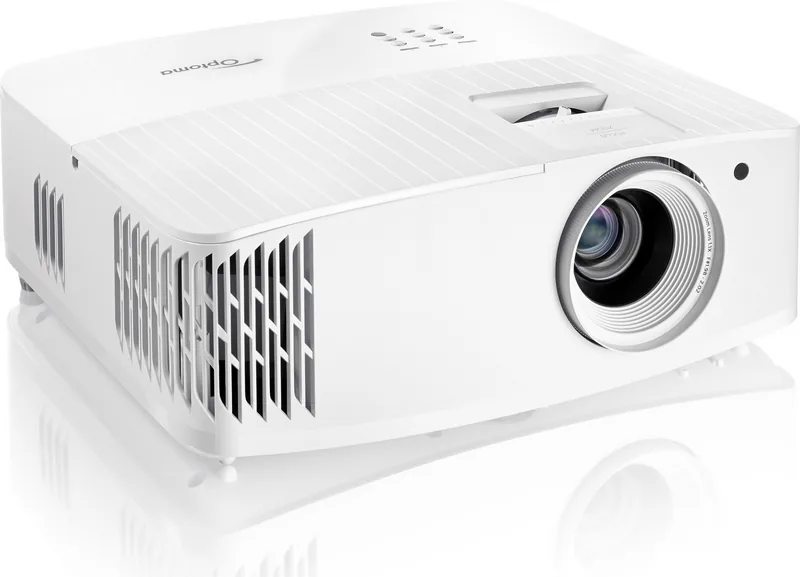
Installation flexibility is another major strength. The unit can be placed on a table or mounted on a ceiling. Lens shift functions allow vertical and horizontal adjustments to center the image without moving the hardware. This is particularly useful for tight spaces where centering the projector is difficult. The optical throw ratio ensures a wide range of screen sizes can be achieved depending on the distance from the wall. Proper airflow is critical during setup. Ventilation openings must remain clear to prevent overheating.
Safety protocols are prioritized throughout the device operation. The lamp generates significant heat, so avoiding direct contact during use is necessary when maintenance is required. The system tracks lamp hours automatically and warns users when replacement is due. 3D viewing capabilities add another dimension to entertainment but require specific safety measures. Users should maintain an adequate viewing distance to reduce eye strain. Parents should supervise children closely during 3D sessions to prevent discomfort or motion sickness.
Maintenance routines extend the lifespan of the unit significantly. Cleaning the lens requires specific cloths and solvents to avoid damage. Air filters may need periodic cleaning depending on the environment. Battery removal from the remote is advised during long-term storage. Connectivity options include dual HDMI ports, USB for updates, and audio outputs for external speakers. RS 232 integration supports professional installation environments. The menu system allows for saving custom settings for different media types efficiently.
Note: Always ensure power is disconnected before internal cleaning or lamp replacement. Regular power cycling helps maintain system health.
This equipment transforms living spaces into private theaters when configured correctly. Contact local dealers for extended warranty information if needed.
Search for 67,706 Manuals online


Type-in Brand or Model