
Ondilo ICO Manual
PDF manual · 20 Pages
English


Quick check
Incorrect answer, please try again.
Chat with your Ondilo ICO manual using AI
Get instant AI answers from your Ondilo ICO manual
Ask anything about the Ondilo ICO. Answers come from this manual, with the pages they are based on.
ICO Maintenance Schedule
Remove ICO from water, take off sensor covers and clean with a damp, non-abrasive cloth. Replace covers before returning to pool.
Dry ICO, switch it off, moisten sponges in sensor caps, place caps on sensors, and store in original packaging.
Free maintenance reminders
Timed to your purchase date. Always free, unsubscribe anytime.
Ask a Question
Do you recommend ICO?
Yes No
Claudia Schmidt
6 months ago
What is the process to return the device if the probe connection fails during the warranty period?

Manual.ly
5 months ago
Thank you for contacting us. If the probe does not connect, please reach out to our support team with your order number. We will assist with firmware updates and pairing troubleshooting. If the unit is confirmed defective, we provide prepaid shipping labels for warranty returns within 12 months of purchase. Once received, we replace the device promptly. Please retain your proof of purchase for verification.
Frequently Asked Questions
The device measures every ten minutes during the first hour of operation and subsequently every hour to maintain accurate water quality data.
Is this answer helpful?
Yes, the unit is designed to float on the water surface safely while continuously monitoring parameters like pH and conductivity.
Is this answer helpful?
Use the included USB cable and charger to power the unit for at least six hours to ensure full operational capacity.
Is this answer helpful?
Yes, it is waterproof but you must not open the cap while it is submerged in water to avoid damaging the internal components.
Is this answer helpful?
The product warranty covers defects for two years, while the sensors are covered for one year from the date of purchase.
Is this answer helpful?
Yes, you must download the companion application for Android or iOS to access your data and configure settings.
Is this answer helpful?
No, you should always use the provided Ondilo charger to prevent damage to the device and ensure safety.
Is this answer helpful?
Advantages and Disadvantages
Advantages

- Automatic continuous water quality monitoring with wireless connectivity.
- Optimizes chemical usage to save money and protect equipment surfaces.
- Provides real-time notifications and historical data trends via smartphone.
- Easy installation with clear setup instructions and companion app support.
- Waterproof design capable of withstanding various environmental conditions.
Disadvantages

- Requires stable Internet connection or Sigfox subscription for full functionality.
- Sensors require monthly cleaning and specific replacement intervals.
- Cannot be opened while submerged without voiding the warranty.
- Battery requires regular charging cycles to maintain operational status.
- Initial setup may require compatibility checks for older mobile devices.
Product Specification
Type
Other
Product Description
Transform Your Pool Care Experience with Smart Monitoring
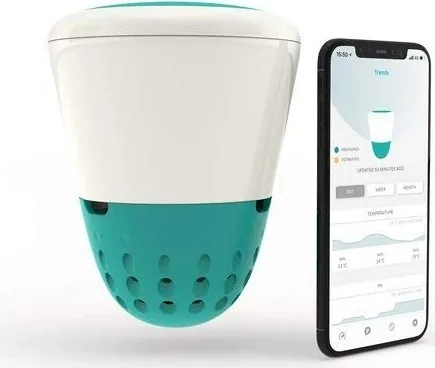
Managing a swimming pool often involves tedious testing routines and guesswork regarding chemical balances. The Ondilo ICO Pool Manual introduces a revolutionary device designed to streamline this process. This intelligent floating sensor continuously tracks water quality, ensuring your pool remains safe without constant manual intervention. It replaces traditional dipsticks with an automated system that works day and night.
How the System Works
Once placed into the pool, the ICO measures critical parameters like pH, oxidation reduction potential, conductivity, and temperature. The blue sensor measures pH, while the orange one handles redox potential. The grey sensor checks conductivity. Data is sent wirelessly to the cloud via Wi-Fi or Sigfox. Users receive real-time updates on their smartphones through a dedicated application. During the first hour of operation, measurements occur every ten minutes. Afterward, it takes measurements every hour.
Smart Recommendations for Chemical Use
One of the standout features is the ability to optimize chemical usage. The device analyzes data and suggests specific dosages for treatments. This helps prevent overuse of chlorine or pH adjusters, saving money and protecting pool surfaces. By maintaining balance, you avoid algae growth and aggressive water conditions that damage equipment. The app displays trends and fluctuations over time to help understand quality shifts. You can predict water quality changes and receive timely notifications.
Connectivity and App Features
The application setup requires creating an account and connecting the device to the network. It offers weather forecasts for your location and daily analysis reports. You can name your pool to track specific water temperatures. Alerts notify you when levels go out of balance. This proactive approach allows you to address issues before they become costly problems. You can also reset the device or replace sensors easily using the provided tools.
Installation and Maintenance
Setting up the device is straightforward. You install the companion app, register your account, and follow the guide. To prepare the ICO, ensure the top cap is secure. Remove sensor caps carefully and clean the probes monthly with a damp cloth. During winter, store it with wet sponges. Charging is simple via the included USB cable, requiring six hours.
Safety and Warranty
Safety is paramount. The unit is waterproof but not a toy. Keep it away from children under six. Warranty covers defects for two years, though probes last one. Always use the specific tool to remove caps. Avoid opening the device while submerged as this voids the warranty. Using third-party chargers may damage the product. It ensures reliable performance across various weather conditions and environmental stress. This technology represents a significant step forward for pool owners.
Search for 67,706 Manuals online


Type-in Brand or Model
Markus Schmitt
7 months ago
The replacement probe does not connect to the main device, but support insists on a water test before accepting a return within warranty. I am frustrated and want to know how to return the defective unit immediately?
Manual.ly
7 months ago
We sincerely apologize for the frustration you have experienced. If the connectivity issue prevents the required test, please contact our dedicated support team with your order details. We can verify the defect remotely and provide a prepaid shipping label for the return or arrange a replacement without waiting for customer-initiated testing methods. Your satisfaction is our priority.