

Free Ondilo Manuals – Read, Download & Print
1 Manuals
Manuals
Categories

Comprehensive Guide to Ondilo Manuals
Introduction to Ondilo Technology and Documentation
Ondilo ECO represents a significant advancement in the realm of home automation and specifically pool management technology. Owning one of these sophisticated devices requires a solid understanding of the accompanying documentation to ensure optimal performance and longevity. This comprehensive guide serves as an overview of Ondilo Manuals, helping users navigate the essential instruction sets required for their installation, configuration, and maintenance. Proper utilization of these manuals is not just about following steps but understanding the underlying logic of the system to prevent potential errors or damages to the equipment. In the modern age of smart homes, connectivity is key, and the manuals provide the bridge between the physical device and the digital interface. Without these documents, the full potential of the system cannot be realized, leaving the user with a device that functions less efficiently than intended. The documentation is designed to be user-friendly while offering depth for those who wish to tweak advanced settings.
Understanding Ondilo Eco Systems and Device Types
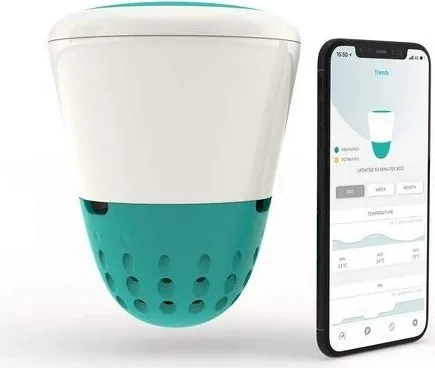
The Ondilo ecosystem primarily focuses on smart monitoring and control for swimming pools. The most common products found in this lineup include the ICO sensor unit and the OPC controller. Each device has its own specific manual tailored to its unique functions. The ICO focuses on water quality monitoring, measuring factors such as pH and chlorine levels accurately. The OPC handles the automation logic, often controlling pumps or chemical dosing systems based on the data collected. Understanding the distinction between these units is vital when selecting the correct user guide from the library of documentation available to the public. Newer models like the ICO PRO offer expanded capabilities and therefore require slightly different documentation. Familiarity with the hardware differences ensures that users download the correct firmware and follow the appropriate wiring diagrams for safety and function.
Locating Official Documentation Resources
Finding the manuals is the first step for any new owner. Most users begin by visiting the official manufacturer website which hosts a central repository for files. There is usually a dedicated support or documentation section where product pages are linked. Users may need to enter their product serial number or select their specific model from a dropdown menu to filter the search. If the website is not immediately helpful for a very old model, contacting customer support via email is a reliable alternative. They can often provide direct links or PDF versions of the documents needed. This ensures that the user is accessing the most recent and accurate information rather than relying on outdated files found elsewhere on the internet. Accessing the correct guide prevents confusion during critical setup phases.
Detailed Installation Procedures and Safety
The installation phase is perhaps the most critical moment where the manual provides safety warnings. Electrical connections near water require strict adherence to guidelines presented in the text. Improper wiring can lead to system failure or hazardous situations for the pool owner. The manual will detail the required voltage, grounding procedures, and proper sealing of connection points. Users should always keep the device accessible during the setup process to refer to diagrams and specifications. Ignoring these physical installation requirements can void the warranty or create safety risks for the pool owner and their family. The guide also covers water flow requirements to ensure sensors are not damaged by high pressure or stagnant water conditions. Proper placement is emphasized to ensure accurate reading of the water chemistry.
Configuration and App Integration Steps
Once hardware is secured, the software setup begins. This phase is detailed in the setup and configuration chapters of the Ondilo Manuals. Users must connect the device to a Wi-Fi network so that it can communicate data to the cloud. The mobile application is the primary interface for this interaction with the pool. Instructions typically cover how to register an account, pair the device via Bluetooth or QR code, and name the device for easy identification within the app network. Successful calibration starts here, ensuring that the sensors provide accurate readings from the very beginning of operation. The manual also explains how to link the system to other smart home platforms for a unified experience. This connectivity is what separates standard monitoring from true automation capability.
Calibration Techniques and Schedules
Calibration is a recurring need for pool sensors to maintain accuracy. The manual provides a schedule and method for this process to keep the data reliable over time. It usually involves exposing the sensor to specific liquid standards or using a calibration kit provided with the device. Skipping this step leads to drift in the data readings over time which makes the automation decisions based on that data unreliable. For example, if the pH sensor reads higher than the actual pH level, the dosing system might add too much acid, potentially damaging the pool plaster or equipment. Therefore, regular calibration as described in the documentation is non-negotiable for serious pool owners who want clear water. The document also suggests storage methods for calibration solutions to ensure they remain effective.
Troubleshooting Common Technical Issues
Every electronic system will encounter issues over time which the manual addresses. The troubleshooting section of the manual is designed to resolve common problems without needing professional intervention. Errors such as sensor communication failures or Wi-Fi disconnections are addressed here with step-by-step logic. The manual provides a flow chart or list of step-by-step checks to isolate the problem into either a network issue or a hardware fault. It distinguishes between issues that require a reset, a firmware update, or a physical hardware replacement. Following this structured approach saves time and frustration for the user. It empowers the user to be the first line of defense for system health and reduces downtime significantly.
Long-Term Maintenance Best Practices
Long-term reliability depends on consistent maintenance routines outlined in the guide. The Ondilo Manuals detail cleaning schedules for the sensors to remove biofilm or debris. Pool water contains contaminants that coat the sensors and affect their ability to read correctly. The guide suggests when to remove the sensor for cleaning and what cleaning agents are safe to use. It warns against using abrasive materials that could scratch the sensing membrane. Regular maintenance prevents costly repairs down the line. Users should also check the status indicators on the device regularly to ensure it is running smoothly. Battery health for any wireless components is also discussed in the maintenance section.
Firmware Updates and Software Support
Firmware updates are another key component mentioned in the documentation. The manufacturer releases updates to fix bugs, improve performance, or add new features to the device. The manual guides users on how to initiate these updates via the app or a computer connection interface. Keeping the firmware current ensures compatibility with the latest smartphone operating systems and security standards. Ignoring updates can sometimes lead to connection drops or integration failures with other smart home ecosystems. Therefore, checking for updates periodically is part of the maintenance routine. The text also warns against interrupting an update process once it has started to prevent software corruption.
Safety Guidelines and Warranty Terms
Safety is a recurring theme throughout all documentation. Electrical safety is paramount when working near a pool water environment. The manual emphasizes turning off power before any physical interaction with the unit. It also discusses chemical safety if the OPC unit controls chemical pumps for dosing. Mixing the wrong chemicals or exposing the unit to direct sunlight when it should be indoors are specific warnings found in the text. Adhering to these safety guidelines ensures that the pool environment remains safe for swimmers and the device remains compliant with local electrical codes. Warranty information is also crucial here. The manual details the coverage period and what is considered normal wear versus manufacturing defects. Registering the product often requires information found in the manual to validate the claim.
Conclusion and Final Recommendations
In summary, Ondilo Manuals are essential tools for maximizing the value of smart pool technology. They cover the entire lifecycle of the product from unboxing to end-of-life maintenance. By taking the time to read and reference these guides, users ensure their investment is protected and their pool water remains optimal. The combination of accurate data, automated control, and user support creates a seamless experience that modern pool owners expect. Consistent reference to the manual reduces errors and enhances the overall reliability of the system. For those new to the technology, starting with the installation guide is the best way to build confidence before diving into advanced settings like API customization. Ultimately, proper use of the documentation ensures a happy swimming experience for everyone.
Search for 67,706 Manuals online


Type-in Brand or Model