
Omnitronic XDP-1501 Manual
PDF manual · 20 Pages
English



Quick check
Incorrect answer, please try again.
Chat with your Omnitronic XDP-1501 manual using AI
Get instant AI answers from your Omnitronic XDP-1501 manual
Ask anything about the Omnitronic XDP-1501. Answers come from this manual, with the pages they are based on.
XDP-1501 Maintenance Schedule
Inspect the unit and power cord periodically for signs of wear or damage. Ensure cables are not crimped or damaged by sharp edges.
If the power plug or device becomes dusty, disconnect from mains and clean with a dry cloth to prevent reduced insulation and electrical shock.
Always unplug the device from the mains before cleaning. Use only a soft, damp cloth; never use solvents or aggressive detergents.
If the remote control is not used for a longer period, remove the AAA batteries to prevent damage from potential battery leakage.
Ask a Question
Do you recommend XDP-1501?
Yes NoFrequently Asked Questions
The unit supports Audio CD, CD-R, CD-RW, and MP3 CDs. It also accepts MP3 files from USB storage devices up to 64 GB. This versatility allows users to play various media in both fixed and portable setups efficiently.
Is this answer helpful?
Yes, the device is designed for 19-inch rack installation requiring 1 HE of space. It also has mounting points suitable for fixed installations, though it can function as a desktop unit provided adequate airflow is maintained through ventilation.
Is this answer helpful?
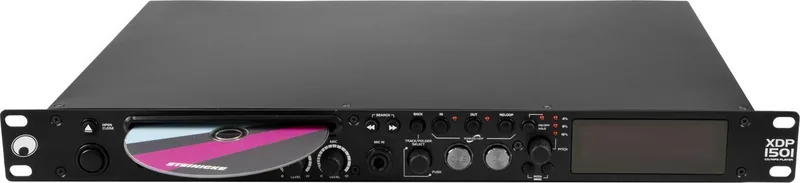
Yes, there is a microphone input jack located on the front panel with a 6.3-mm connector. The level can be adjusted using the rear panel controls to match the user needs without causing feedback issues in the sound system.
Is this answer helpful?
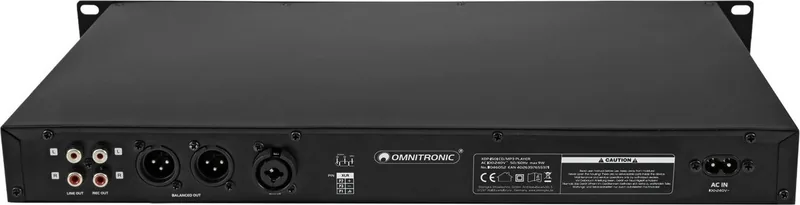
You can use the balanced XLR outputs or unbalanced RCA outputs on the rear panel. These outputs can be used simultaneously for different audio chains. Always ensure the device is powered off before connecting to prevent signal spikes.
Is this answer helpful?
Yes, the remote requires two 1.5-V AAA batteries. They are installed in the battery compartment on the back. Ensure batteries are removed during long periods of non-use to prevent leakage and damage to the electronic components inside.
Is this answer helpful?
If metal parts enter the device, it must be disconnected immediately. Do not attempt to operate it as this can cause short circuits or electric shock. Contact a professional technician for inspection and removal of the object.
Is this answer helpful?
The device should not be used where rain or moisture is present. It requires an environment temperature between -5 and +45 degrees Celsius. Outdoor use requires a sheltered area to protect against weather and potential electrical hazards.
Is this answer helpful?
Advantages and Disadvantages
Advantages

- Supports both CD and USB media for versatile music playback options
- Includes advanced pitch control with +/-4, +/-8, and +/-16 percent ranges
- Features seamless looping and cueing functions for professional DJ use
- Compatible with standard 19-inch racks or desktop use
- Equipped with adjustable microphone input for announcements or live vocals
Disadvantages

- USB storage limited to maximum 64 GB capacity support
- Remote control requires line of sight to function properly
- No Bluetooth connectivity for wireless streaming
- Powers up only via AC mains electricity connection
- Requires specific safety precautions to avoid electrical hazards
Product Specification
Audio Formats
CD-Audio, CD-R/RW, DVD-R/RW, DVD+R/RW, MP3
Tuner
FM, DAB, DAB+, Internet Radio
Audio Connections
2x Stereo Line Out (RCA), Stereo Line Out (XLR), Mic In (0.25" Jack)
Additional Connections
USB-A
Features
Remote Control
Color
Black
Dimensions
18.98x1.77x10.63in (WxHxD)
Weight
6.66 lbs
Product Description
Overview
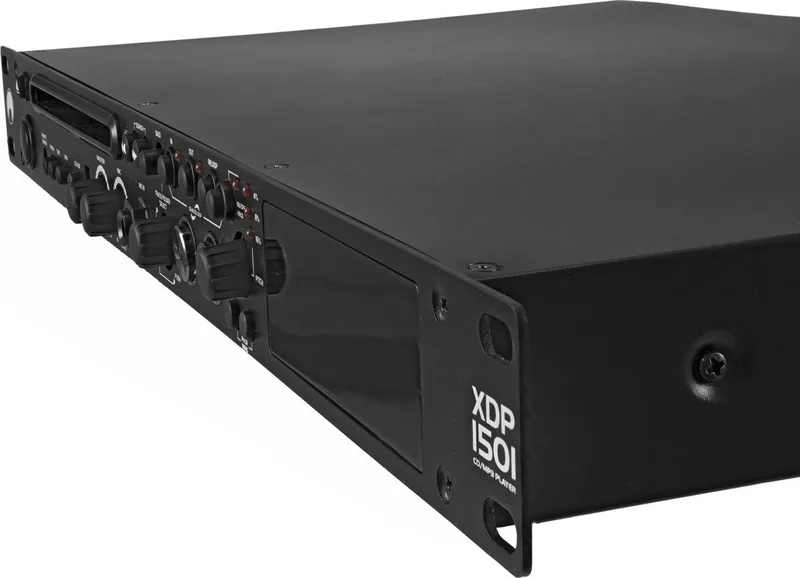
The Omnitronic XDP-1501 stands out as a versatile 1U flat CD player designed for professional fixed installations. Whether you are managing audio in restaurants, dance studios, or retail outlets, this unit delivers precise music control. It handles both standard CDs and USB storage devices seamlessly. Professional users appreciate the included microphone input with adjustable levels via XLR and jack connectors. The Omnitronic XDP-1501 Manual provides detailed insights into operating these advanced features effectively.
Audio enthusiasts will find the pitch control feature particularly useful. It allows speed adjustments of +/-4, +/-8, or +/-16 percent without altering playback quality significantly thanks to pitch bending capabilities. This is essential for DJs mixing tracks during live events. The device supports Seamless Loops and Cueing, ensuring smooth transitions between songs. A bright dot-matrix VFD display shows ID3 tag information for MP3 files alongside standard audio CD data. Time display options include elapsed time, remaining title time, and total remaining time depending on the media type.
Installation is straightforward for rack environments using 19-inch mounting points. It requires 1 HE of rack space but functions well on a desktop too. Airflow through ventilation openings must remain unobstructed to prevent overheating. Power supply supports a wide voltage range from 100 to 240 volts AC, making it suitable for global use. Safety protocols emphasize protecting the unit from moisture and dust to maintain insulation and prevent electrical shock hazards.
Connection flexibility is robust with balanced XLR outputs and unbalanced RCA line inputs. This ensures compatibility with various mixer and amplifier systems. The IR remote control simplifies operation from a distance. For navigation, the search buttons allow frame-accurate positioning within titles. Loop functions can be programmed with high precision down to a single frame. The device includes a 15-second anti-shock buffer to protect discs from skipping due to vibration. Users should refer to the Omnitronic XDP-1501 Manual for specific wiring diagrams and cable connection guidelines to ensure optimal signal quality and minimize interference noise. Regular maintenance involves cleaning with a soft dry cloth and ensuring no foreign objects enter the chassis. Always disconnect power before maintenance.
This compact player combines durability with professional features. Its design focuses on ease of use for both novice and experienced audio operators. By following recommended safety instructions, users can avoid damage and voided warranty claims. The unit weighs 2.9 kg and measures 48 by 4.8 by 27 cm. Environmental considerations urge proper recycling at the end of the product life cycle. Batteries in the remote should be removed during long storage periods. Overall, the hardware represents a solid choice for reliable music playback solutions in commercial settings.
Search for 67,706 Manuals online


Type-in Brand or Model