

NZXT N7 Z790 Manual
PDF manual · 59 Pages
English



Quick check
Incorrect answer, please try again.
Chat with your NZXT N7 Z790 manual using AI
Get instant AI answers from your NZXT N7 Z790 manual
Ask anything about the NZXT N7 Z790. Answers come from this manual, with the pages they are based on.
Ask a Question
Do you recommend N7 Z790?
Yes NoFrequently Asked Questions
It supports Intel 12th and 13th generation Core i9, i7, i5, and i3 processors with the LGA 1700 socket.
Is this answer helpful?
Yes, it supports dual-channel DDR5 memory with a maximum capacity of 128GB across four DIMM slots.
Is this answer helpful?
The motherboard has integrated Wi-Fi 6E and Bluetooth 5.2 for wireless networking and peripheral connections.
Is this answer helpful?
There are three M.2 slots dedicated to storage drives, plus one additional slot for wireless connectivity modules.
Is this answer helpful?
Yes, fan speeds can be adjusted within the NZXT CAM software, provided the software is running on Windows.
Is this answer helpful?
The primary PCIe slot supports PCIe 5.0 x16 mode, ideal for next-generation graphics card speeds.
Is this answer helpful?
No, hardware functions work without it, but CAM is needed for specific control features like RGB and fan management.
Is this answer helpful?
Advantages and Disadvantages
Advantages

- Supports DDR5 memory up to 128GB across four DIMM slots
- Features PCIe 5.0 x16 slot for highest graphics performance
- Integrates Wi-Fi 6E and Bluetooth 5.2 for wireless connectivity
- Includes built-in NZXT RGB connectors and 5V addressable headers
- Provides three M.2 slots for NVMe SSD storage expansion
Disadvantages

- Fan speed control requires NZXT CAM software to be active
- All-metal covers require careful handling during maintenance
- Wi-Fi 6E functionality needs a compatible 6GHz router
- Only four SATA ports available for traditional storage devices
- ATX form factor requires a sufficiently large computer case
Product Specification
Form Factor
ATX
Socket
Intel 1700
Chipset
Intel Z790
CPU Compatibility
Core i-14000, Core i-13000, Core i-12000, Pentium Gold G7000, Celeron G6000
RAM
4x DDR5 DIMM, dual PC5-48000U/DDR5-6000 (OC), Max. 128GB (UDIMM)
Expansion Slots
1x PCIe 5.0 x16, 2x PCIe 4.0 x16 (x4), 2x PCIe 3.0 x1, 1x M.2/M-Key (PCIe 4.0 x4, 2280/2260/2242), 1x M.2/M-Key (PCIe 4.0 x4, 22110/2280/2260/2242), 1x M.2/M-Key (PCIe 4.0 x4/SATA, 2280/2260/2242), 1x M.2/E-Key (PCIe/Intel CNVi, 2230, occupied with Wi-Fi+BT module)
External Ports
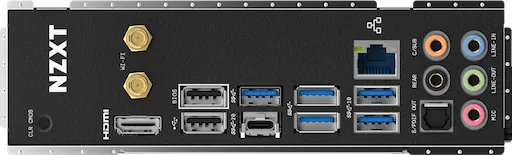
1x HDMI (iGPU), 1x USB-C 3.2 (20Gb/s), 2x USB-A 3.1 (10Gb/s), 3x USB-A 3.0 (5Gb/s), 2x USB-A 2.0 (480Mb/s), 1x 2.5GBase-T (Realtek RTL8125BG), 5x Audio Jack, 1x Toslink, 2x Antenna Connector RP-SMA
Internal Connectors
1x USB-C 3.2 Key-A Header (20Gb/s), 1x USB 3.0 Header (5Gb/s, 2x USB 3.0), 2x USB 2.0 Header (480Mb/s, 4x USB 2.0), 4x SATA 6Gb/s (Z790)
Cooling Headers
1x CPU Fan 4-Pin, 5x Fan 4-Pin, 1x AIO Pump 4-Pin
Lighting Headers
2x 3-Pin ARGB (+5V/DATA/GND, max. 3A), 2x 4-Pin HUE+ (+5V/DATA/GND/DETECT)
Buttons/Switches
Power-Button (Internal), Reset-Button (Internal), Clear-CMOS-Button (External)
Audio
7.1 (Realtek ALC1220)
Graphics
iGPU
Wireless
Wi-Fi 6E (WLAN 802.11a/b/g/n/ac/ax, 2x2), Bluetooth 5.3
RAID Level
0/1/5/10 (Z790)
Power Connectors
1x 24-Pin ATX, 1x 8-Pin EPS12V, 1x 4-Pin ATX12V
VRM
17 Virtual Phases (16+1)
Lighting
N/A
BIOS
1x 32MB (256Mb)
Manufacturer Warranty
3 years
USB Naming
Left
Product Description
Introduction to NZXT N7 Z790
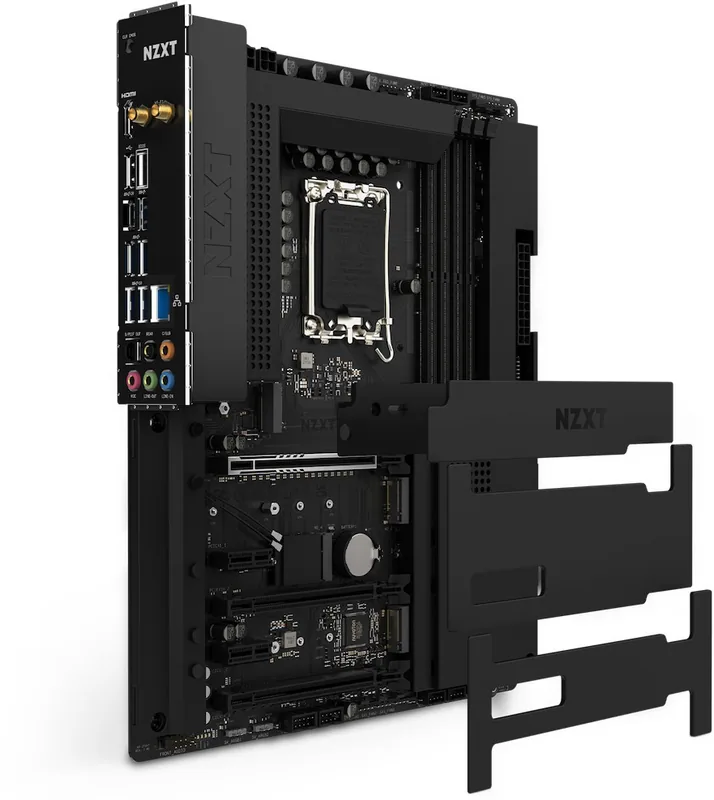
Building a powerful computer system requires a reliable foundation, and the NZXT N7 Z790 offers exactly that for enthusiasts seeking top-tier performance. This flagship motherboard is engineered to support Intel LGA 1700 socket processors, encompassing both the 12th and 13th generation Core i9, i7, i5, and i3 chips. Whether you are gaming or rendering, the architecture ensures compatibility and stability. The aesthetic appeal is immediate with the signature all-metal cover pieces. These removable plates offer a sleek look while protecting the board. During installation, safety is paramount, so users are advised to wear grounding straps to prevent static electricity damage to components.
Performance Specifications
Memory performance is critical for modern workloads, and this board delivers via four DIMM slots supporting DDR5 technology. You can install up to 128GB of dual-channel memory, with support for extreme speeds up to 6000MHz through overclocking profiles. Storage capacity is not an issue with three dedicated M.2 slots for NVMe SSDs, allowing for rapid boot times and file transfers. If you need traditional storage, there are four SATA 6Gb/s ports available. Visual connectivity is equally robust, featuring HDMI 2.1 ports that support up to 4K resolution at 60Hz for integrated graphics or external displays.
Connectivity and Expansion
Wireless freedom is achieved through integrated Wi-Fi 6E capabilities, utilizing the 6GHz band for less congestion. Bluetooth 5.2 handles peripherals seamlessly. The rear panel is packed with convenience, offering multiple USB 3.2 Gen 2 ports and a Type-C interface. For RGB enthusiasts, the board includes dedicated NZXT RGB connectors and 5V addressable headers to sync lighting across your build. Controlling hardware is done via the NZXT CAM software, which manages system stats and fan curves directly from the Windows desktop.
Installation and Cooling
Installation of the graphics card utilizes the primary PCIe 5.0 x16 slot, providing maximum bandwidth for next-generation hardware. Additional PCIe 4.0 slots allow for expansion cards. The board includes physical buttons for clearing CMOS and resetting the system, aiding in troubleshooting. Always ensure power connectors are securely attached to a reliable ATX power supply to maintain stable operation. With its comprehensive feature set and premium design, the NZXT N7 Z790 remains a strong contender for high-end PC builds. Additionally, power management is handled through robust power connectors including a 24-pin ATX connector and an 8-pin plus 4-pin auxiliary power input. This ensures clean voltage delivery to the CPU. Cooling solutions are flexible with specific headers for CPU fans, all-in-one pump liquid coolers, and system fans. The board supports PWM control for precise thermal management. Safety precautions when handling the motherboard are emphasized, including keeping components in static-proof bags until installation. The CPU socket features a specific alignment triangle and notches to ensure correct processor placement. When removing protection caps, care must be taken to store them safely for future transport.
Search for 67,706 Manuals online


Type-in Brand or Model