
NZXT Lift Manual
PDF manual · 22 Pages
English



Quick check
Incorrect answer, please try again.
Chat with your NZXT Lift manual using AI
Get instant AI answers from your NZXT Lift manual
Ask anything about the NZXT Lift. Answers come from this manual, with the pages they are based on.
Ask a Question
Do you recommend Lift?
Yes NoFrequently Asked Questions
Yes. You can use the mouse with up to four onboard profiles stored directly in the device. These profiles include your DPI settings, lighting, and macros, allowing operation on any computer without the CAM software running.
Is this answer helpful?
Press and hold the DPI button (labeled E) for one to three seconds to cycle through the four pre-programmed lighting modes or user-defined profiles saved in the onboard memory.
Is this answer helpful?
The mouse functions as a standard HID device on Mac, but advanced features like macro creation and custom lighting require the NZXT CAM software, which is primarily designed for Windows environments.
Is this answer helpful?
NZXT provides a two-year warranty for keyboards and mice purchased directly from them. This covers manufacturing defects but excludes damage from accidents, misuse, or unauthorized modifications.
Is this answer helpful?
No, the package includes only the mouse, a 2-meter USB cable, and documentation. However, using a mousepad is recommended for the best sensor performance.
Is this answer helpful?
You can configure multiple DPI settings within the CAM software and save up to four distinct profiles on the mouse. Each profile can be assigned specific DPI levels tailored to your needs.
Is this answer helpful?
Advantages and Disadvantages
Advantages

- Ergonomic ambidextrous design suitable for all hand sizes
- High-precision PixArt sensor works on most surfaces
- Four onboard profiles allow offline use without software
- Customizable RGB lighting and macros via CAM software
- Includes durable 2-meter fixed USB cable
Disadvantages

- Fixed cable limits portability compared to wireless options
- Requires NZXT CAM software for full customization features
- Side buttons are not programmable without software
- No wireless charging or battery life concerns but lacks wireless freedom
- Warranty does not cover accidental damage or misuse
Product Specification
Suitability
right hand
Keys
6 (total), 2 (main), 1 (top), 2 (left), 1 (scroll wheel click)
Scroll Wheel
1x 2-way
Tracking
LED red/IR
Resolution
16000dpi, reducible to 100dpi, adjustable in 100dpi steps
Sensor
PixArt PMW 3389
Switches
mechanical switches, Omron D2FC-F-7N, 20 million clicks
Polling Rate
1000Hz, adjustable to 500Hz (wired USB)
Lighting
RGB
Connection
wired (2m), USB-A 2.0
Power Supply
USB
Dimensions (WxDxH)
2.65x1.51x4.99in
Approximate Volume
5.25cu in (approximated shape)
Weight
2.36oz
Features
thumb rest, fabric cable
Product Description
Elevate Your Gaming with the NZXT Lift Mouse
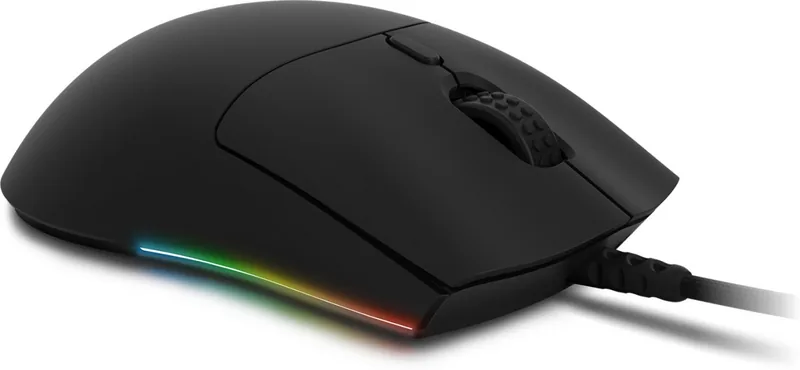
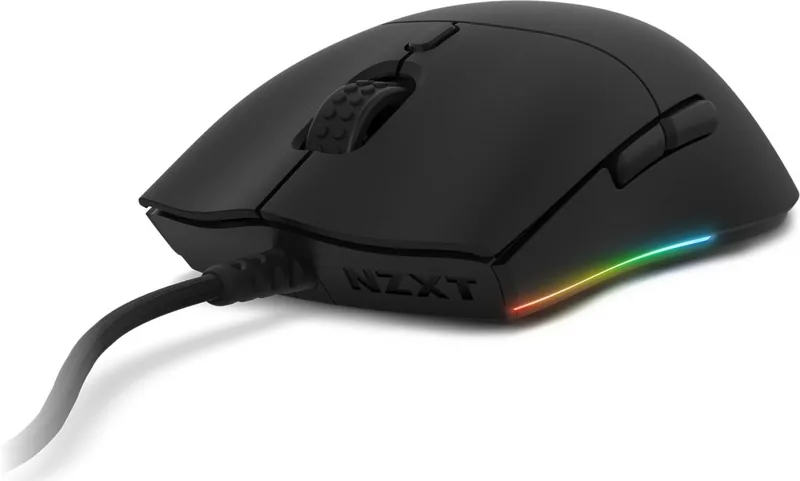
The NZXT Lift Mouse redefines comfort and performance for gamers of all levels. Designed with a lightweight and ergonomic form factor, this peripheral ensures that your hands remain fatigue-free during extended gaming sessions. Whether you are a professional streamer or a casual player, the Lift Mouse adapts to your grip style, offering a truly ambidextrous experience that feels natural from the first click.
At the heart of the Lift Mouse lies a high-precision PixArt sensor capable of tracking accurately on almost any surface. While it performs well on various textures, using a dedicated mousepad is recommended for optimal results. The device features a robust build with clearly defined buttons, including left and right clicks, a DPI/Profile switch button, and side buttons for forward and backward navigation. A fixed 2-meter USB cable connects the mouse to your PC, ensuring stable connectivity without the clutter of wireless charging bases.
Customization is where the Lift Mouse truly shines. Users can toggle through four onboard profiles directly from the hardware by holding the DPI button. These profiles store your preferred DPI settings, macro commands, and RGB lighting configurations, allowing you to switch between setups instantly without needing software running in the background. For deeper customization, the NZXT CAM software allows you to fine-tune every aspect of the mouse, from creating complex macros to designing unique lighting effects that sync with your setup.
The Lift Mouse also offers flexibility with its hardware mode. Once your preferences are saved to the onboard memory, you can take your mouse to any computer and use it with your exact settings intact. This makes it an ideal choice for LAN parties or traveling gamers who need consistency across different machines. With a two-year warranty covering parts and accessories, NZXT stands behind the durability and quality of this premium input device.
Key Features
The NZXT Lift Mouse combines style with substance. Its ambidextrous design caters to both left and right-handed users equally. The sensor technology ensures pixel-perfect tracking, while the customizable profiles allow for personalized gameplay strategies. The inclusion of side buttons adds convenience for browsing and in-game actions, enhancing overall efficiency.
Important Notes
Ensure you download the latest version of NZXT CAM software to access all features. Always keep your proof of purchase safe for warranty claims. If you experience issues, contact support via email or phone as detailed in the warranty section.
Search for 67,706 Manuals online


Type-in Brand or Model