

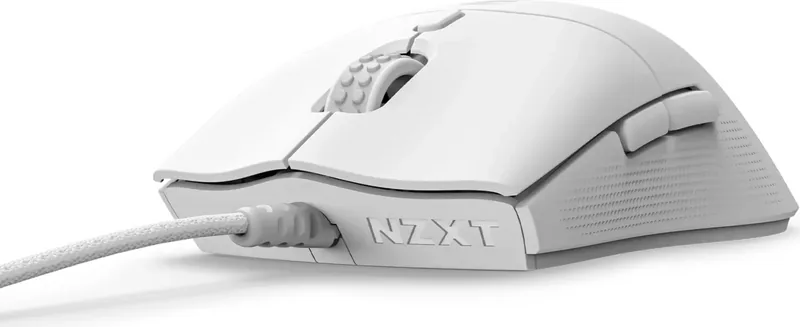
NZXT Lift 2 Symm Manual
PDF manual · 29 Pages
English



Quick check
Incorrect answer, please try again.
Chat with your NZXT Lift 2 Symm manual using AI
Get instant AI answers from your NZXT Lift 2 Symm manual
Ask anything about the NZXT Lift 2 Symm. Answers come from this manual, with the pages they are based on.
Ask a Question
Do you recommend Lift 2 Symm?
Yes NoFrequently Asked Questions
By downloading and activating NZXT CAM Software, users can select desired polling rate settings ranging from 125 Hz up to 8000 Hz directly within the application interface.
Is this answer helpful?
Yes, a short press of the DPI button cycles through default settings from low to high sensitivity. However, further customization requires the NZXT CAM software.
Is this answer helpful?
The package contains one Lift 2 SYMM Mouse and one 2 meter USB Cable attached directly to the unit for immediate connectivity upon unboxing.
Is this answer helpful?
The mouse features four onboard profiles that can be setup and stored via CAM software. These profiles store lighting, macros, and other settings locally on the device.
Is this answer helpful?
Depressing the DPI button for one to three seconds changes to the next stored profile sequentially from number one through number four.
Is this answer helpful?
Yes, NZXT offers a two-year product warranty policy for keyboards and mice covering manufacturing defects and malfunctions under normal use conditions.
Is this answer helpful?
Advantages and Disadvantages
Advantages

- High 8,000 Hz polling rate minimizes latency between physical input and on-screen action for competitive advantage.
- Optical switches prevent mechanical contact wear ensuring consistent actuation feel throughout the lifespan of the device.
- Lightweight symmetrical chassis reduces hand fatigue significantly over time during extended marathon gaming sessions.
- Four distinct onboard profiles store customizations directly on the mouse memory for quick configuration switching.
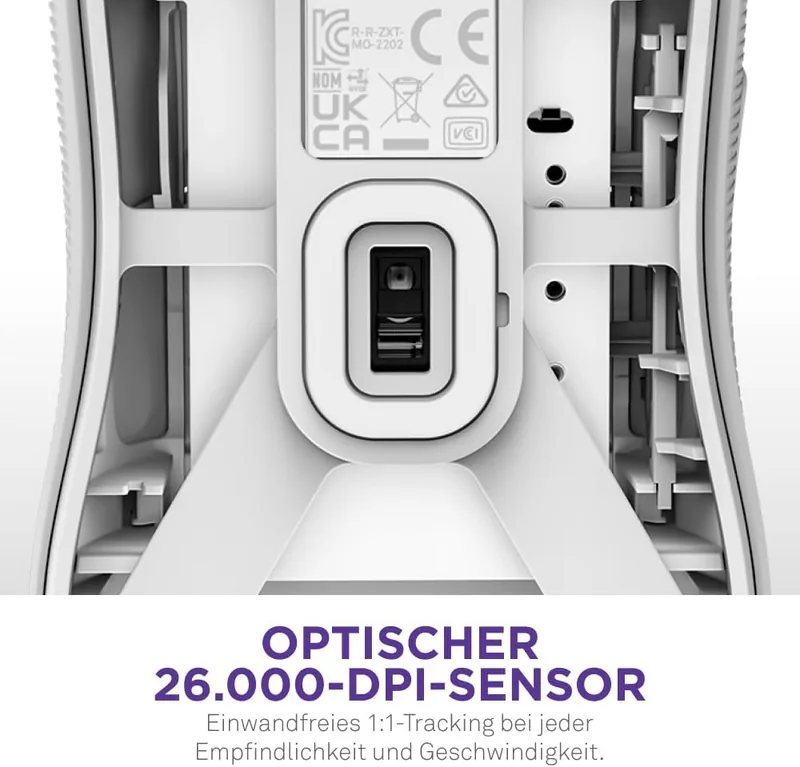
- Formidable 26,000 DPI sensor capability tracks movements providing unparalleled detail allowing microscopic adjustments during gameplay.
Disadvantages

- Relies on wired USB-A cable connection limiting mobility compared to wireless alternatives available in market.
- Mouse pad is recommended for optimal tracking meaning performance may vary inconsistently across other surfaces.
- Requires CAM software download for full customization depth creating initial dependency on external platform tools.
- Polling rate adjustments depend on downloading and activating specific software rather than physical toggle switches alone.
- Global warranty claims may involve shipping costs depending on location and reseller authorization status rules.
Product Specification
Handedness
Right Hand
Buttons
6 (total), 2 (main), 1 (top), 2 (side), 1 (scroll wheel click)
Scroll Wheel
1x 2-way
Optical Tracking
LED-red/IR
Resolution
26000 dpi, adjustable down to 6400/3200/1600/800/400 dpi
Sensor
PixArt PAW 3395
Switches
Optical switches, 100 million clicks
Polling Rate
8000 Hz, adjustable to 4000/2000/1000/500/250/125 Hz
Lighting
N/A
Connection
Wired (6.56 ft), USB-A 2.0
Power Supply
USB
Dimensions (WxHxD)
2.64 x 1.51 x 4.99 in
Approximate Volume
5.19 cu in (approximate shape)
Weight
2.05 oz
Features
NVIDIA Reflex Compatible, Onboard Memory, Non-slip Surface (Rubberized Sides), Braided Cable
Product Description
Unlock True Potential With NZXT Lift 2 Symmetric
If you are seeking ultimate precision and speed in your gaming arsenal, look no further than the NZXT Lift 2 Symmetric. It is engineered specifically for professionals and enthusiasts alike who demand reliability without compromise. We encourage every owner to read the detailed information provided in the NZXT Lift 2 Symmetric Manual to maximize their experience. Understanding every feature ensures you utilize the hardware exactly as intended for peak results on the battlefield.
Ergonomic Lightweight Construction
The physical design prioritizes comfort during marathon gaming sessions or long streaming events. Its lightweight symmetrical chassis reduces hand fatigue significantly over time. Both left and right-handed gamers benefit from the balanced form factor included here. Crucially, the internal components utilize advanced optical switches which prevent issues related to mechanical contact wear. This choice guarantees consistent actuation feel throughout the lifespan of the device. The external shell protects sensitive electronics while offering a premium texture grip for secure control.
Cutting Edge Sensing Capabilities
Inside the unit rests a formidable sensor capable of tracking movements at 26,000 DPI levels. This resolution provides unparalleled detail allowing microscopic adjustments during gameplay. Beyond resolution, the polling rate reaches 8,000 Hz under optimal conditions set through software. Such rapid communication cycles minimize latency between physical input and on-screen action. Adjusting these parameters is simple using the single button located near the scroll wheel. You can cycle through various sensitivity presets to match different game genres instantly.
Powerful Software Integration
Configuration is deeply integrated with the proprietary CAM software suite for flexible management. Owners gain access to four distinct onboard profiles that store customizations directly on the mouse memory. This independence means you do not need the program running constantly to maintain your settings. Macros and complex key sequences can be programmed and saved within these profile slots effectively. Additionally, lighting effects remain active without needing continuous driver interaction once programmed.
Installation And Global Standards
Connecting the device requires plugging the attached USB-A cable into a compatible port on your computer. Setup occurs automatically thanks to plug-and-play functionality for immediate usage. While functional on many surfaces, a mouse pad enhances tracking precision consistently across materials. NZXT backs this product with a robust two-year global warranty policy protecting your investment. Furthermore, manufacturing adheres to strict RoHS regulations concerning hazardous substance reduction worldwide. Enjoy superior performance backed by comprehensive support resources.
Search for 67,706 Manuals online


Type-in Brand or Model