차트를 사용하여 GPU 브래킷의 구멍을 확인하고 그래픽 카드에 필요한 고정 브래킷을 준비합니다.
使用螺丝和垫圈安装固定支架,可防止显卡损坏。
グラフィックスカードの損傷を防ぐため、ネジとワッシャーを使用して保持ブラケットを取り付けます。
나사와 와셔를 사용하여 고정 브래킷을 장착해 그래픽 카드가 손상될 위험을 방지합니다.
/2
%
Quick check
I'm not a robot
Incorrect answer, please try again.
Chat with your NZXT Kraken G12 manual using AI
Get instant AI answers from your NZXT Kraken G12 manual
Ask anything about the NZXT Kraken G12. Answers come from this manual, with the pages they are based on.
Ask a Question
0/1000
Do you recommend Kraken G12?
YesNo
0
Lena Krueger
10 months ago
Is the NZXT Kraken G12 adapter actually compatible with most GPUs, and will it cool the RAM and VRM well or do I need extra heatsinks/mods?
0
Manual.ly
10 months ago
In many builds the NZXT G12 works well and can greatly reduce GPU temps while staying quiet, especially when you tune fan and pump speeds or swap the G12 fan. However, real-world reports show compatibility is not universal: the included brackets and drilling points may not match certain GPU designs (including some Gigabyte models), so you may need to cut/adjust parts and re-drill for a correct fit. Also, the G12 fan mainly helps with the GPU core, so RAM area cooling can be insufficient unless you add small RAM heatsinks (and you may want heatsinks for VRM depending on clearance). Before ordering, check the NZXT compatibility list and confirm your GPU mounting holes, plus make sure your AIO tubing length works in your case.
M: OA-GPT-5-NAN
M: OA-GPT-5-NAN
Frequently Asked
Questions
A
It is a GPU mounting bracket that lets you attach a compatible liquid cooler to a graphics card. The goal is to improve cooling, reduce noise, and support custom PC thermal upgrades.
Is this answer helpful?
A
It is designed for experienced DIY users. The installation involves removing the stock GPU cooler, fitting the bracket, attaching the pump, and managing cables carefully.
Is this answer helpful?
A
Yes, it includes retention hardware for both Nvidia and AMD layouts. You still need to confirm that your specific graphics card and cooler combination are compatible.
Is this answer helpful?
A
No, thermal paste is not included. You need to use the paste already on your liquid cooler or prepare additional thermal paste before installation.
Is this answer helpful?
A
It may. The instructions warn that removing the stock cooler can void the graphics card warranty, so users should understand the risk before installing it.
Is this answer helpful?
A
The kit includes the GPU bracket, fan, retention brackets, screws, washers, foam pieces, cable ties, and other mounting accessories needed for installation.
Is this answer helpful?
A
It is best for advanced PC builders who want to improve GPU cooling with a liquid cooler and are comfortable handling hardware installation steps.
Is this answer helpful?
M: OA-GPT-54-NAN
Advantagesand
Disadvantages
Advantages
Supports liquid cooling for better GPU temperature control and potential noise reduction.
Includes mounting hardware for Nvidia and AMD, making it versatile for many builds.
Black design offers a clean, low-profile look that suits modern setups.
Cable ties and foam pieces help improve fit, stability, and cable management.
VS
Disadvantages
Installation is advanced and requires care, so it may not suit beginners.
Removing the stock cooler can void the graphics card warranty.
Thermal paste is not included, so extra preparation is needed.
Compatibility depends on the GPU and cooler setup, which may limit some users.
M: OA-GPT-54-NAN
Product
Specification
Type
Upgrade Kit
Color
black (matte)
M: OA-GPT-54-NAN
Product
Description
NZXT Kraken G12 Black: A Practical Way to Upgrade GPU Cooling
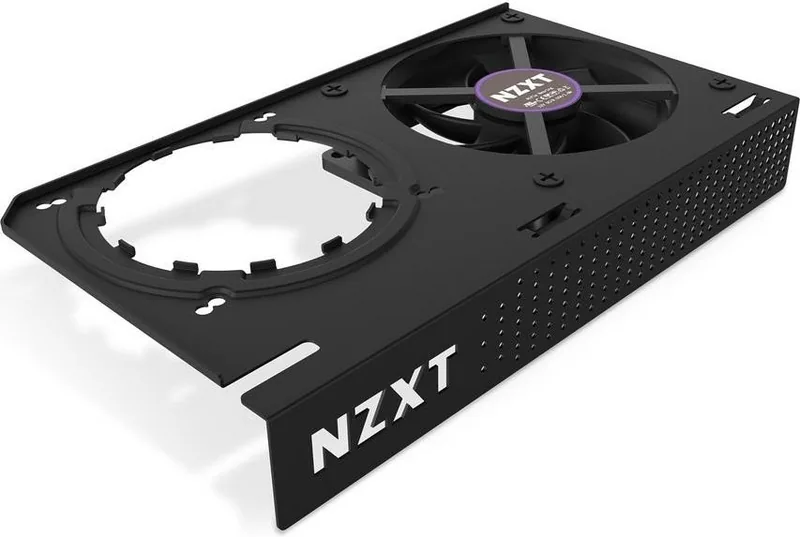
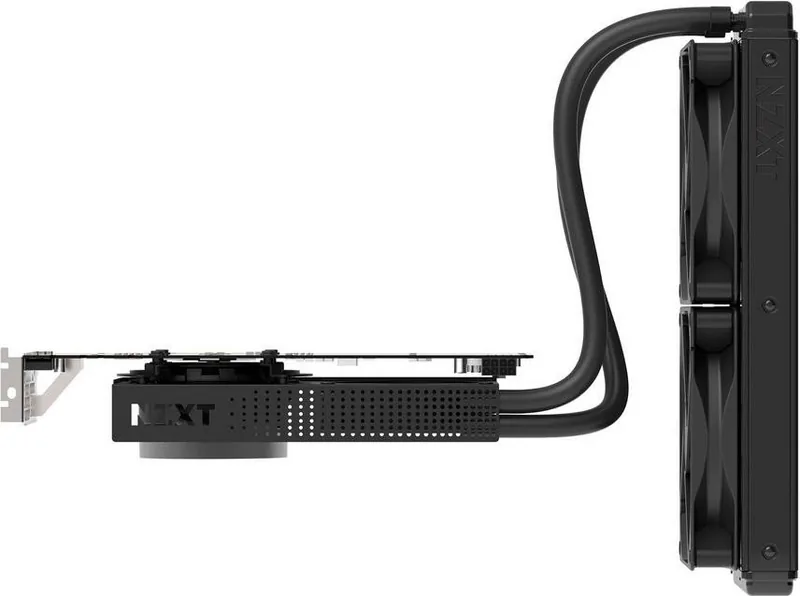
The NZXT Kraken G12 black Manual points to a compact but ambitious mounting kit built for users who want to push a graphics card beyond stock cooling. Designed for experienced DIY builders, the black G12 bracket helps adapt a compatible liquid cooler into a GPU-focused cooling setup. It is not a simple plug-and-play accessory, but that is exactly what makes it interesting: it opens the door to lower temperatures, quieter operation, and more flexible cooling for custom PC builds.
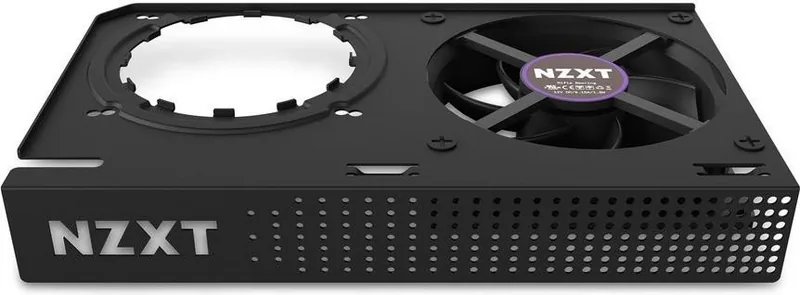
At its core, the Kraken G12 is a GPU mounting bracket with a fan and hardware designed to support an AIO liquid cooler. The included parts such as retention brackets, screws, washers, foam pads, cable ties, and the GPU bracket itself show that NZXT built this kit with compatibility and stability in mind. The black finish also gives it a clean, understated look that blends well in most builds.
One of the strongest themes in the instructions is precision. The kit requires the user to remove the original graphics card cooler, prepare the bracket correctly, and align the pump and fan assembly carefully. That means the product is aimed at enthusiasts who are comfortable handling PC hardware and following detailed installation steps. The mounting system is designed to work with both Nvidia and AMD layouts, which adds flexibility for a wide range of cards.
Cooling performance is the main appeal here. By replacing the stock cooler with liquid cooling support, users can potentially reduce GPU temperatures and improve thermal headroom during gaming, rendering, or long workloads. The added fan on the bracket helps with airflow around the card and surrounding components, while the cable management features keep the build tidy.
Still, this is not a product to choose casually. The instructions repeatedly warn that removing the stock cooler may void the GPU warranty, and NZXT clearly limits its own warranty to the bracket and accessories only. Thermal paste is also not included, so users need to prepare that separately before installation. In short, the Kraken G12 black is a smart solution for advanced builders who want more control over GPU thermals and are ready for the responsibility that comes with a custom cooling setup.




Lena Krueger
10 months ago
Is the NZXT Kraken G12 adapter actually compatible with most GPUs, and will it cool the RAM and VRM well or do I need extra heatsinks/mods?
Manual.ly
10 months ago
In many builds the NZXT G12 works well and can greatly reduce GPU temps while staying quiet, especially when you tune fan and pump speeds or swap the G12 fan. However, real-world reports show compatibility is not universal: the included brackets and drilling points may not match certain GPU designs (including some Gigabyte models), so you may need to cut/adjust parts and re-drill for a correct fit. Also, the G12 fan mainly helps with the GPU core, so RAM area cooling can be insufficient unless you add small RAM heatsinks (and you may want heatsinks for VRM depending on clearance). Before ordering, check the NZXT compatibility list and confirm your GPU mounting holes, plus make sure your AIO tubing length works in your case.