
NZXT H9 Series Manual
PDF manual · 38 Pages
English



Quick check
Incorrect answer, please try again.
Chat with your NZXT H9 Series manual using AI
Get instant AI answers from your NZXT H9 Series manual
Ask anything about the NZXT H9 Series. Answers come from this manual, with the pages they are based on.
Ask a Question
Do you recommend H9 Series?
Yes NoFrequently Asked Questions
The NZXT H9 Elite supports ATX, micro-ATX, and mini-ITX motherboards. It allows for flexible installation options to accommodate various system sizes within the dual-chamber design.
Is this answer helpful?
New NZXT computer cases come with a two-year warranty for parts. Proof of purchase is required for service. Warranty coverage may vary by region.
Is this answer helpful?
The case provides a maximum GPU clearance of 435mm. This allows for the installation of most high-end graphics cards without issues.
Is this answer helpful?
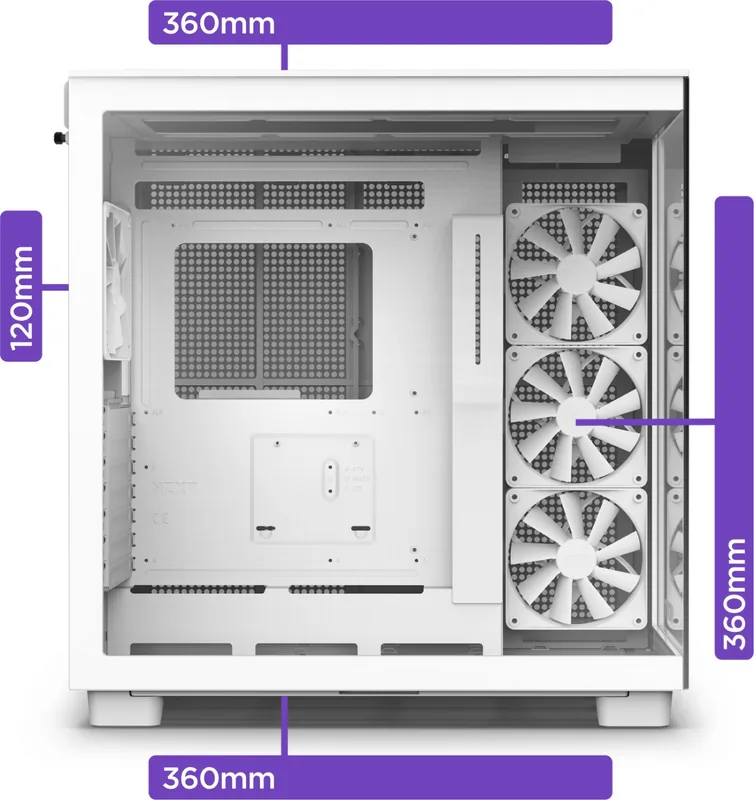
Yes, the case supports top-mounted radiators up to 360mm. It also supports multiple 140mm fans or 360mm options for AIO coolers.
Is this answer helpful?
Yes, the front I/O module includes a USB 3.2 Gen2 Type-C port. It also features standard USB ports and a power switch.
Is this answer helpful?
You can contact support via phone, email at [email protected], or visit the NZXT Support site online for detailed assistance.
Is this answer helpful?
Advantages and Disadvantages
Advantages

- Supports top-mounted 360mm radiators and bottom radiators for superior cooling
- Integrated RGB and Fan Controller allows centralized customization of lighting
- Separate PSU chamber design minimizes heat transfer to other components
- Tempered glass panels provide excellent visual clarity for showcase builds
Disadvantages

- PSU clearance is limited to 200mm which restricts larger power supplies
- Complex assembly process requires careful handling of multiple components
- Large footprint requires ample desk space or floor area for placement
Product Specification
External Bays
N/A
Internal Bays
2 x 2.5"/3.5" (horizontal, drive rails), 4 x 2.5"
Ports
1 x USB-C 3.1 (10 Gb/s, 20-Pin Key-A Header), 2 x USB-A 3.0 (5 Gb/s), 1 x 3.5mm Jack (Line-In/Out)
PCIe Slots
7
Fan (Front)
N/A
Fan (Rear)
1 x 4.72", 1200 rpm, 0.04" H2O, 62.17 CFM, 25.1 dB(A)
Fan (Left)
N/A
Fan (Top)
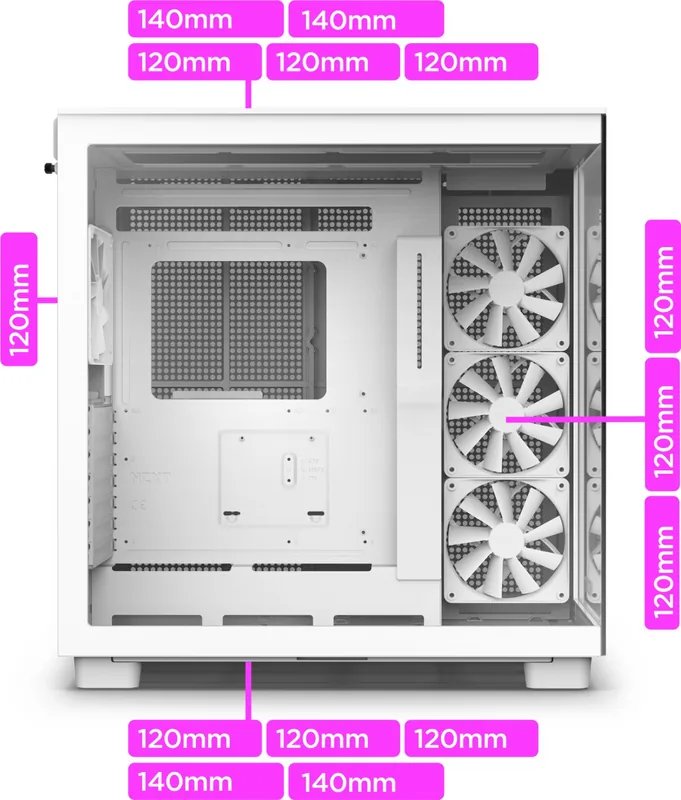
3 x 4.72" (optional) or 2 x 5.51" (optional)
Fan (Bottom)
3 x 4.72" (optional) or 2 x 5.51" (optional)
Fan (Other)
N/A
Radiator Sizes
N/A front, 4.72"/5.51"/9.45"/11.02"/14.17" top, 4.72" rear, 4.72"/9.45"/14.17" right
Motherboard
Up to ATX
Supported Motherboards
Mini-ITX (6.7"x6.7")/Micro-ATX (9.6"x9.6")/ATX (12"x9.6")
Power Supply
ATX (max. 7.87" deep)
Power Supply Position
Top (vertical)
CPU Cooler
Max. 6.50" Height
Graphics Cards
Max. 17.13"
Dimensions (WxHxD)
11.42" x 19.49" x 18.35"
Volume
2.36 cu. ft.
Case Type
Mid-Tower
Front
Solid, Glass
Bottom
Partially enclosed, mostly fan grille, dust filter (outside)
Left
Solid, Glass
Right
Partially enclosed, Mesh, mostly fan grille, dust filter (inside)
Front I/O Location
Case side: top, Height: Front, Position: right
USB Notation
Left
Product Description
Discover the NZXT H9 Elite Premium Experience
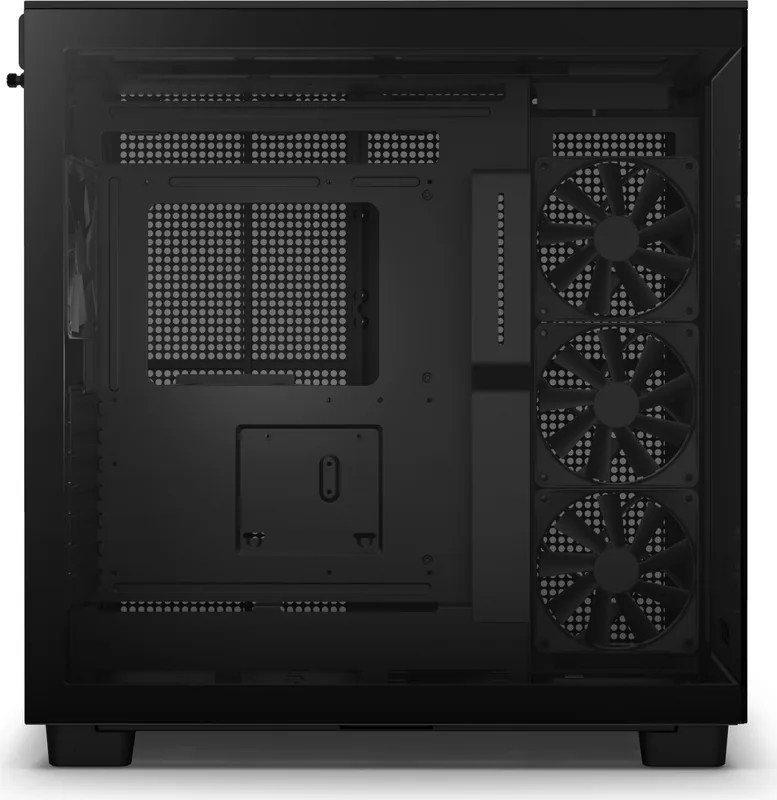
The NZXT H9 Series redefines high performance cooling with a sophisticated dual-chamber architecture. Designed for enthusiasts, this mid-tower case offers unparalleled airflow and visual clarity. The tempered glass panels showcase your builds while the internal layout prioritizes cable management and component clearance. Users seeking maximum efficiency will appreciate the extensive support for radiators and fans. The build quality reflects a premium standard that stands out in any workspace. This setup ensures reliability and aesthetics.
Advanced Cooling Capabilities
Temperature management is crucial for performance during demanding tasks. The H9 Elite supports top-mounted radiators up to 360mm and bottom radiators of similar size. Side-mounted cooling is available with options for 120mm up to larger units. CPU clearance reaches 165mm, ensuring compatibility with large air coolers. GPU lengths of up to 435mm are accommodated comfortably within the main chamber. This flexibility allows builders to customize their thermal solution precisely for high-end hardware.
Installation and Control Systems
Control over lighting and fan speeds is centralized via the integrated RGB and Fan Controller. This hub connects to the motherboard to enable custom software control. The included accessories simplify the building process significantly. Installation steps are clearly defined for motherboard mounting, drive cages, and power supply placement. Referencing the NZXT H9 Series Manual helps utilize the cable bars effectively to hide clutter. These bars keep cables organized in dedicated front I/O and SATA channels.
Dimensions and Hardware Specifications
The case houses ATX, micro-ATX, and mini-ITX motherboards easily. It supports up to seven expansion slots for graphics cards and other add-ons. For storage, users can install four plus two 2.5 SSDs and two 3.5 HDDs. Front I/O includes a USB Type-C port and standard USB ports. The power supply sits in a separate chamber with a 200mm clearance limit. This design minimizes heat transfer to other sensitive system components. Extended warranty options are available for specific components like power supplies.
Important Notes
Warranty coverage varies by regional laws and product type. Always verify fitment before purchasing new hardware components. Support services are accessible through the official portal for troubleshooting. Check the specific policy for computer cases which covers two years for parts.
Search for 67,706 Manuals online


Type-in Brand or Model