
NZXT Aer RGB 2 Manual
PDF manual · 26 Pages
English



Quick check
Incorrect answer, please try again.
Chat with your NZXT Aer RGB 2 manual using AI
Get instant AI answers from your NZXT Aer RGB 2 manual
Ask anything about the NZXT Aer RGB 2. Answers come from this manual, with the pages they are based on.
Ask a Question
Do you recommend Aer RGB 2?
Yes NoFrequently Asked Questions
It is best used as a high-airflow PC case fan with customizable RGB lighting. It suits builders who want cooling performance, clean cable routing, and a coordinated visual theme inside their system.
Is this answer helpful?
NZXT CAM is needed to unlock full control of the RGB and fan controller. The fan can still be installed normally, but CAM is the main software for lighting customization and system management.
Is this answer helpful?
Yes. The fan supports daisy-chaining, so you can connect one fan to another using the proper fan-to-fan cable. This helps reduce cable mess and makes multi-fan setups easier to manage.
Is this answer helpful?
Not in the same channel. The instructions warn that Aer RGB 2 fans and newer NZXT RGB accessories should not be mixed with older HUE+ LED strips or older Aer RGB fans on one channel.
Is this answer helpful?
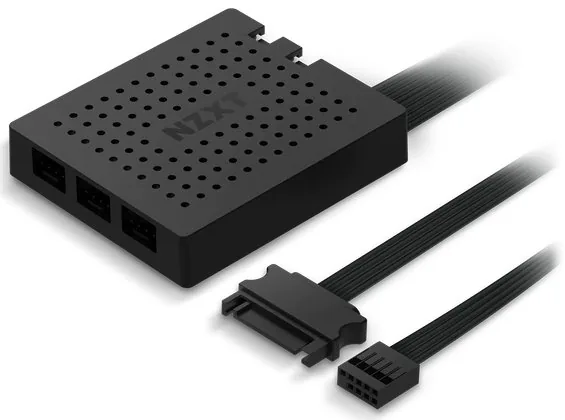
You typically need SATA power, an internal USB 2.0 header, a motherboard fan header or fan controller connection, and the included NZXT RGB cabling. A controller is required for full RGB control.
Is this answer helpful?
The 140mm size is a good choice for users who want strong airflow with potentially lower noise than smaller fans at similar output levels. It is well suited to larger cases and balanced cooling builds.
Is this answer helpful?
Check that your PC is powered off, confirm available headers and controller ports, and make sure your NZXT accessories are compatible. Following the connection order helps avoid installation problems.
Is this answer helpful?
Advantages and Disadvantages
Advantages

- Daisy-chain support reduces cable clutter and simplifies multi-fan RGB setups.
- Works with NZXT CAM for centralized lighting and controller management.
- Includes clear installation guidance for power, USB, and RGB connections.
- Designed to integrate neatly with other compatible NZXT accessories.
Disadvantages

- Full control depends on NZXT CAM software and a compatible controller.
- Older NZXT RGB products cannot be mixed in the same channel.
- Installation requires careful connection order to avoid setup issues.
- Extra controller and accessory hardware may be needed for larger builds.
Product Specification
Dimensions
5.51x5.51x1.02in (WxHxD)
Rotational Speed
500-1500 rpm
Airflow
30.37-91.16 CFM (51.6-154.9 m³/h)
Air Pressure
0.01-0.06 inH2O
Noise Level
22-33 dB(A)
Fan Bearing
Fluid Dynamic Bearing (FDB)
Voltage Range
12V
Lighting
RGB (8 LEDs)
Manufacturer's Warranty
2 Years
Product Description
NZXT Aer RGB 2 140 Manual: A Smart Cooling Upgrade for Modern Builds
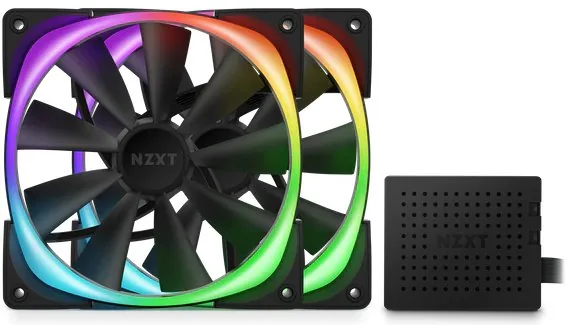
The NZXT Aer RGB 2 140 brings together airflow, style, and flexible control in a way that suits both first-time builders and experienced PC enthusiasts. If you are looking for a fan that does more than move air, this model stands out with its customizable lighting, clean cable management, and support for NZXT’s ecosystem. The NZXT Aer RGB 2 140 Manual helps users understand how to connect the fan, pair it with the RGB and Fan Controller, and expand lighting across a build without unnecessary guesswork.
One of the biggest strengths of the Aer RGB 2 140 is its daisy-chain design. The fan can connect to another Aer RGB 2 fan and then extend to compatible NZXT RGB accessories, making it easier to create a coordinated lighting setup with fewer visible cables. This is especially useful in compact cases where cable clutter can quickly ruin the look of a carefully planned interior.
The fan also relies on NZXT CAM software for control. Through CAM, users can adjust lighting behavior and manage fan-related settings from a single interface. That makes the product feel more polished and approachable, especially for builders who want a balanced mix of automation and customization. The included controller connection and internal USB support show that the system is built for practical installation rather than flashy complexity.
From a build-quality perspective, the Aer RGB 2 140 is designed to be part of a reliable cooling solution while also serving as a visual centerpiece. The installation steps emphasize connecting SATA power, USB, fan headers, and RGB channels in the correct order, which helps the fan operate smoothly and consistently. The manual also notes compatibility limits, reminding users not to mix newer NZXT RGB accessories with older HUE+ strips or older Aer RGB fans in the same channel.
For blog readers comparing RGB fans, this model makes a strong case as a premium option for users who value both performance and aesthetics. It is not just about lighting effects; it is about building a tidy, expandable, and software-controlled system that can grow with your setup.
Notes
- Use NZXT CAM for full lighting and controller management.
- Connect Aer RGB 2 fans first when chaining multiple accessories.
- Keep the channel compatibility rules in mind during installation.
- Warranty and support details vary by region and purchase source.
Search for 67,706 Manuals online


Type-in Brand or Model