
NVIDIA Mellanox Spectrum SN2100 Manual
PDF manual · 76 Pages
English



Quick check
Incorrect answer, please try again.
Chat with your NVIDIA Mellanox Spectrum SN2100 manual using AI
Get instant AI answers from your NVIDIA Mellanox Spectrum SN2100 manual
Ask anything about the NVIDIA Mellanox Spectrum SN2100. Answers come from this manual, with the pages they are based on.
Ask a Question
Do you recommend Mellanox Spectrum SN2100?
Yes NoFrequently Asked Questions
The SN2100 supports 10/25/40/50/56/100GbE on its QSFP28 ports. Ports can be split using breakout cables to provide 2x50G or 4x25G lanes per QSFP28, and QSFP-to-SFP adapters increase flexibility for mixed-speed deployments.
Is this answer helpful?
The SN2100 supports Mellanox Onyx (MLNX-OS) and Cumulus Linux. It also supports the ONIE installer for zero-touch installation of compatible network OS images, enabling open networking and automation workflows.
Is this answer helpful?
Initial configuration is typically done via the RS232 console (use the supplied DB9-to-RJ45 harness) to run the setup wizard. Alternatively, enable DHCP on the mgmt0 interface to receive an IP and then SSH into the management port; use the console for recovery if DHCP is disabled remotely.
Is this answer helpful?
SN2100 units come in P2C or C2P airflow variants. Ensure all devices in the same rack use the same airflow orientation to maintain proper cooling. Mismatched airflow can raise internal temperatures and trigger warnings or shutdowns.
Is this answer helpful?
Hot-swap capability depends on the specific model and SKU. Some Spectrum series models support replaceable FRUs; however, certain SN2100/SN2010 SKUs include non-replaceable power supplies and fan modules. Check the ordering part number and manual for details.
Is this answer helpful?
Software and firmware updates are available from the NVIDIA/Mellanox support site. Use the provided CLI, GUI, USB, or remote server methods described in the Onyx or Cumulus documentation. Follow the upgrade procedure carefully to avoid boot failures.
Is this answer helpful?
SN2100 supports QSFP28 passive and active copper cables, AOCs, and optical transceivers. Splitter (breakout) cables allow 1x100GbE to become 2x50GbE or 4x25GbE. Verify cable length and power requirements for high-power optics per the manual.
Is this answer helpful?
Advantages and Disadvantages
Advantages

- High port density with 16 QSFP28 ports supporting up to 100GbE per port
- Flexible speed mapping and splitter cable support for 2x50G or 4x25G per port
- Supports open OS options: Cumulus Linux and Mellanox Onyx for programmability
- Short-depth design ideal for space-constrained racks and edge deployments
- Low-latency Mellanox Spectrum ASIC delivers high throughput and efficiency
Disadvantages

- Some SKUs have non-replaceable fans and PSUs, limiting hot-swap options
- Airflow must match other rack devices (P2C vs C2P) to avoid thermal issues
- Rail kits and certain mounting accessories may be sold separately
- Initial mgmt changes may drop remote sessions — console access often required
- High-power transceiver support varies by port and software version
Product Specification
Function
Switch
Type
Standalone, Rackmount (via optional mounting bracket)
Network ports
16x QSFP28
Speeds
16x QSFP28 (1G/10G/25G/40G/50G/56G/100Gb/s)
PoE
N/A
Backplane
3.2Tb/s, 2.38Gp/s, 9KB Jumboframes, 16MB packet buffer
Officially supported standards
802.1AB, 802.1AX, 802.1D, 802.1Q, 802.1Qaz, 802.1Qbb, 802.1w, 802.1p, 802.1Q, 802.1s, 802.1w, 802.3x, 802.3ad, 802.3ae, 802.3ba, 802.3x, IGMPv3
Configuration
Web interface, console, serial (USB Mini-B, RJ-45), network (RJ-45, dedicated, 10/100/1000Base-T)
Cooling
active (rear to front)
Dimensions (WxHxD)
7.87x1.73x20.00in, 1U
Weight
10.01 lb
Color
black
Special features
Metal housing, removable mounting brackets, redundant power supply (redundant power input)
Manufacturer warranty
one year
Note
For this device, "link aggregation" was officially specified with the obsolete standard IEEE802.3ad. Since 2008, the function is no longer managed by IEEE "Working Group 3" (IEEE 802.3, CSMA/CD - Ethernet), but by "Working Group 1" (IEEE 802.1, High Level Interface - Internetworking) and technically defined unchanged via IEEE 802.1AX.
Product Description
NVIDIA Mellanox SN2000 Spectrum SN2100 Desktop 100G Managed Switch, 16x QSFP28, P2C Airflow, Cumulus OS Manual
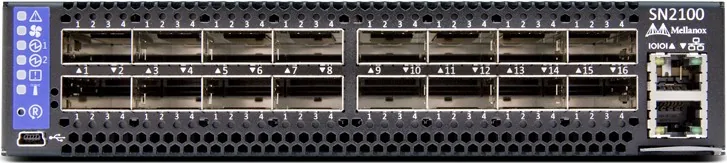
The NVIDIA Mellanox SN2000 Spectrum SN2100 is a compact, high-performance desktop 1U switch designed for modern data center and edge deployments. Equipped with 16 QSFP28 ports, the SN2100 delivers flexible link speeds—supporting 10/25/40/50/56/100GbE—allowing teams to tailor port speeds via QSFP-to-SFP adapters or splitter (breakout) cables. The unit pairs Mellanox Spectrum silicon with an x86 management CPU, offering low latency switching and the ability to run alternative network OS options such as Cumulus Linux or Mellanox Onyx (MLNX-OS).
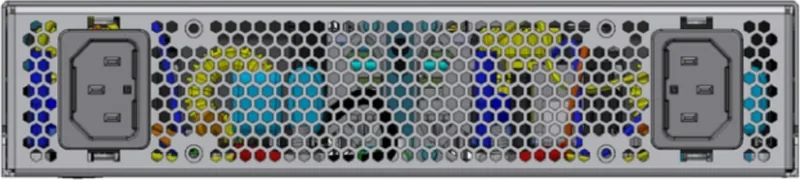
The SN2100 is engineered for dense rack and short-depth installations. It supports both P2C (power side inlet to connector side outlet) and C2P airflow variants, with rail kit options for flexible mounting and side-by-side or single-switch installations. Redundant power supplies (hot-swappable on some models) and multi-fan modules deliver reliable operation, while front and rear LEDs provide clear status on system health, fans, and PSUs. The desktop/short-depth form factor, combined with high port density, makes the SN2100 suitable as a Top-of-Rack (ToR) switch, spine device in compact fabrics, or for edge sites where space and power budgets are constrained.
Operational management is provided through onboard Mellanox Onyx or Cumulus Linux. Initial bring-up can be completed via the serial RS232 console (DB9-to-RJ45 harness), or remotely via the mgmt Ethernet port (mgmt0). The switch supports ONIE for zero-touch OS install, USB for image updates, and standard methods for firmware and software upgrade. Splitter cable support allows each QSFP28 port to become 2x50G or 4x25G lanes, enabling versatile topology and cabling choices without changing hardware. SN2100’s thermal and airflow considerations are documented for rack integration to ensure proper cooling and consistent operation.
Typical uses include high-performance server aggregation, leaf/spine fabrics in dense racks, test labs, and service provider edge deployments. The SN2100’s combination of Spectrum ASIC performance, flexible port-speed mapping, and support for open network OS options makes it attractive for organizations seeking low-latency, programmable switching in a small footprint.
Notes:
- The SN2100 supports splitter (breakout) cables; when splitting, some port mappings may block adjacent ports depending on the model and split mode.
- Use the provided console harness for first-time configuration; disabling DHCP on mgmt0 via SSH can drop remote sessions—use the console for recovery.
- Verify airflow direction (P2C vs C2P) across rack equipment to avoid cooling issues.
Pros and Cons
Pros:
- High port density: 16 QSFP28 ports supporting up to 100GbE each, ideal for dense aggregation.
- Flexible speed mapping: native support for 10/25/40/50/100GbE via QSFP adapters and splitter cables.
- Open OS options: supports Cumulus Linux and Mellanox Onyx for programmability and integration.
- Compact short-depth design: suitable for space-constrained racks and edge deployments.
- Low latency Spectrum ASIC: engineered for high throughput and minimal latency.
Cons:
- Fan and PSU FRU support varies by model: SN2100/SN2010 have non-replaceable fans/PSUs in some SKUs.
- Airflow sensitivity: mismatched airflow in racks can cause thermal issues; planning required.
- Rail kits often sold separately: SN2100 may require additional purchase for mounting hardware.
- Initial setup requires console access for safe DHCP/static IP changes to mgmt interface.
- High-power transceiver support depends on port and software version; check compatibility.
Most important Pros (top 3):
- 16 QSFP28 ports deliver flexible 10/25/40/50/100GbE connectivity for dense deployments.
- Supports Cumulus Linux and Onyx, enabling open networking and advanced automation.
- Short-depth, high-throughput design fits constrained racks while providing 3.2Tb/s switching.
Most important Cons (top 3):
- Some models have non-replaceable FRUs, limiting on-site hot-swapability for fans/PSUs.
- Airflow must match across rack devices (P2C vs C2P) to avoid over-temperature events.
- Rail kits and mounting accessories may not be included and require separate purchase.
FAQ
{ "question": "What port speeds does the SN2100 support?", "answer": "The SN2100 supports 10/25/40/50/56/100GbE per QSFP28 port. Ports can be reconfigured or split using QSFP-to-SFP adapters and splitter (breakout) cables to achieve 2x50G or 4x25G mappings." }, { "question": "Which network operating systems can run on the SN2100?", "answer": "The SN2100 is supported with Mellanox Onyx (MLNX-OS) out of the box and also supports Cumulus Linux. It also supports ONIE for zero-touch installation of other compatible network OS images." }, { "question": "How do I perform initial configuration of the SN2100?", "answer": "Use the RS232 Console (DB9-to-RJ45 harness) for first-time setup to run the configuration wizard. Alternatively, enable DHCP on the mgmt0 interface to obtain an IP address, then SSH into the management port to complete configuration." }, { "question": "What should I consider about airflow when installing the SN2100?", "answer": "Confirm the SN2100 airflow variant (P2C or C2P) and ensure all rack devices share the same airflow direction. Mismatched airflow reduces cooling efficiency and can trigger over-temperature conditions; plan rack layout accordingly." }, { "question": "Can I hot-swap power supplies and fans on the SN2100?", "answer": "Hot-swap capability depends on the specific model and SKU. Some SN2100 units have non-replaceable fans and PSUs, while other Spectrum series models offer hot-swappable FRUs. Check the exact ordering part number and manual for FRU replaceability details." }, { "question": "How are firmware and OS upgrades handled?", "answer": "Software and firmware updates are delivered via the Mellanox support site. Mellanox Onyx and Cumulus Linux provide documented upgrade procedures using CLI, GUI, or USB/remote image installs. Follow the upgrade guides to avoid boot or compatibility issues." }
Search for 67,706 Manuals online


Type-in Brand or Model