
NVIDIA Mellanox ConnectX-5 EN Manual
PDF manual · 79 Pages
English


Quick check
Incorrect answer, please try again.
Chat with your NVIDIA Mellanox ConnectX-5 EN manual using AI
Get instant AI answers from your NVIDIA Mellanox ConnectX-5 EN manual
Ask anything about the NVIDIA Mellanox ConnectX-5 EN. Answers come from this manual, with the pages they are based on.
Ask a Question
Do you recommend Mellanox ConnectX-5 EN?
Yes NoFrequently Asked Questions
It combines high Ethernet throughput, low-latency design, and hardware offloads that reduce CPU overhead. That makes it well suited for enterprise networks, virtualized hosts, storage workloads, and HPC systems.
Is this answer helpful?
Yes. Depending on the model, it supports speeds from 1 GbE up to 100 GbE. Some versions are single-port, while others are dual-port, giving flexibility for different deployment needs.
Is this answer helpful?
The adapter uses QSFP28 connectors. These support compatible copper and optical media, making the card adaptable to different cabling and switch environments.
Is this answer helpful?
PCIe 3.0 x16 works well for many configurations, but dual 100 GbE operation can exceed its practical bandwidth in some models. PCIe 4.0 variants are better for the highest-throughput setups.
Is this answer helpful?
The text lists support for Linux distributions, Windows, FreeBSD, and VMware, with dedicated driver stacks such as MLNX_OFED for Linux and WinOF-2 for Windows.
Is this answer helpful?
The port LEDs indicate link status and traffic activity. Off means no link, solid green means a valid link, and blinking green shows active traffic. Amber blinking can indicate beaconing or a link issue.
Is this answer helpful?
Yes. Firmware updates can add features, improve compatibility, and fix issues. The adapter can be updated through Mellanox tools during installation or manually with firmware utilities.
Is this answer helpful?
Advantages and Disadvantages
Advantages

- High Ethernet performance with support for speeds from 1 GbE up to 100 GbE, depending on the model.
- QSFP28 connectivity offers flexible support for copper and optical links in modern server deployments.
- Advanced offloads like RDMA, RoCE, VXLAN, and NVGRE reduce CPU load and improve efficiency.
- Works across Linux, Windows, and VMware with dedicated driver and firmware support.
- Built for data centers, HPC, and virtualized environments that need scalable, low-latency networking.
Disadvantages

- Some dual-100G use cases require PCIe 4.0 to avoid host-bus bandwidth limits.
- Setup may involve driver installation, firmware updates, and platform-specific configuration steps.
- Power and airflow requirements must be planned carefully for stable operation.
- Feature availability can depend on the OS, driver stack, and firmware version.
- Not every model supports the same maximum speed or port count, so selection matters.
Product Specification
Type
LAN adapter
Form factor
1x PCIe card (interchangeable bracket: full height and low profile bracket included)
Connection
1x PCIe 3.0 x16
Connection
1x QSFP28
Transmission
1x QSFP28 (1G/10G/25G/40G/50Gb/s)
Power supply
Power supply only via connection
Chipset
Mellanox ConnectX-5 EN (LAN adapter, QSFP28)
Dimensions
5.59x2.72in (WxH, without bracket)
Features
VLAN, LACP, VXLAN, NVGRE, GENEVE, RoCE, SR-IOV, NVMe over Fabric (NVMe-oF), MPLS, iSCSI, iSER, NC-SI, PXE-Bootrom
Manufacturer warranty
one year
Product Description
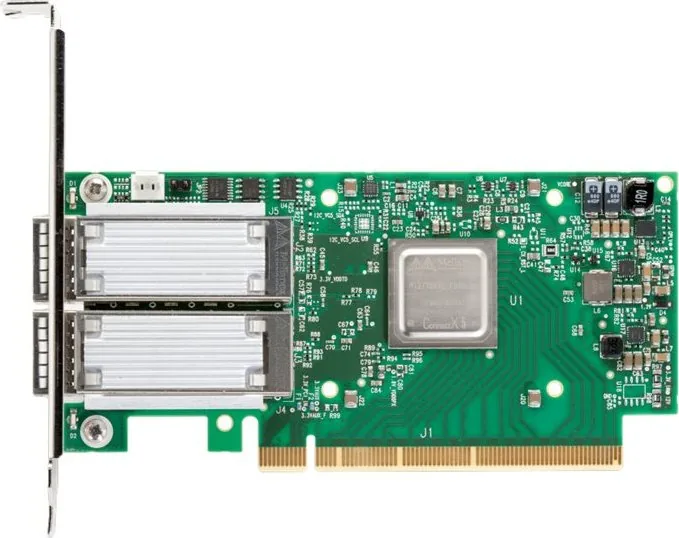
NVIDIA Mellanox ConnectX-5 EN 50G LAN Adapter, QSFP28, PCIe 3.0 x16
The NVIDIA Mellanox ConnectX-5 EN 50G LAN adapter, QSFP28, PCIe 3.0 x16 Manual highlights a family of Ethernet adapters built for demanding server environments where speed, efficiency, and stability matter. Designed for enterprise data centers, high-performance computing, and embedded workloads, this adapter line balances compact hardware with advanced network acceleration features.
A closer look at the adapter
At its core, the ConnectX-5 platform delivers flexible Ethernet connectivity through QSFP28 ports and support for a wide range of link speeds. Depending on the model, it can operate from 1 GbE up to 100 GbE, making it a versatile choice for environments that may grow over time. The single-port and dual-port options also help match different server and throughput needs.
The PCI Express interface is another major strength. With PCIe 3.0 x16 support, and in some variants PCIe 4.0 compatibility, the adapter is engineered to move data efficiently between the network and the host system. This matters for workloads that depend on low latency, strong packet handling, and consistent bandwidth under pressure.
Performance and smart offloads
What makes this adapter especially attractive is its set of acceleration features. It supports RDMA and RoCE for low-latency communication, overlay network offloads such as VXLAN and NVGRE, and virtualization technologies like SR-IOV. These capabilities reduce CPU overhead and help servers devote more cycles to actual application work.
The adapter also includes support for Open vSwitch offload, QoS, congestion control, and storage acceleration features. In practical terms, that means better efficiency in virtualized, cloud, and storage-heavy infrastructures where network traffic is increasingly complex.
Deployment and management
The product family is supported across Linux, Windows, and VMware environments, with dedicated driver stacks and firmware tools. Installation guidance covers bracket changes, card seating, cable handling, firmware updates, and troubleshooting. LED indicators help confirm link state and traffic activity, while airflow and power notes ensure the adapter is deployed in suitable chassis conditions.
Notes
- Full performance depends on the selected model, PCIe generation, and server platform.
- Firmware and driver versions should be kept current for the best compatibility.
- Cable type, airflow, and power budget can affect real-world operation.
In short, the ConnectX-5 EN series is a strong fit for teams that need a reliable, high-speed network adapter with broad compatibility and advanced offload capabilities.
Search for 67,706 Manuals online


Type-in Brand or Model