
NAD M10 Manual
PDF manual · 14 Pages
English



Quick check
Incorrect answer, please try again.
Chat with your NAD M10 manual using AI
Get instant AI answers from your NAD M10 manual
Ask anything about the NAD M10. Answers come from this manual, with the pages they are based on.
Ask a Question
Do you recommend M10?
Yes NoFrequently Asked Questions
The M10 supports common compressed and lossless formats including MP3, AAC, FLAC, WAV, AIFF, ALAC, OGG, and high-resolution formats such as MQA and DSD. It also integrates with BluOS to access services like Spotify, TIDAL, Qobuz, Amazon Music and internet radio services subject to change.
Is this answer helpful?
Use the BluOS Controller App on Android or iOS and follow the Easy Setup Wizard to add the player and select your home Wi‑Fi network. Alternatively, join the M10 hotspot, open http://10.1.2.3 in a browser and use the Control Panel to configure Wi‑Fi manually; then reconnect your device to your home network.
Is this answer helpful?
Dirac Live is a room correction system built into the M10 that measures and corrects frequency and impulse response across listening positions. It reduces room modes, tightens bass, improves imaging and produces a more natural, transparent soundstage when set up properly using the Dirac measurement and correction workflow.
Is this answer helpful?
You can factory reset via the front-panel display: Settings → Other → Factory Reset. To force reset, power down, hold the rear Standby button while reconnecting mains, keep holding until the NAD logo blinks red (about 30s), then release. All custom settings and network data are erased.
Is this answer helpful?
Leave at least 10 cm clearance on left, right, rear and top for ventilation, avoid liquids and open flames, use recommended mains connections and earth grounding, and route power cords to avoid pinching. Follow the manual’s safety instructions to prevent damage or hazard.
Is this answer helpful?
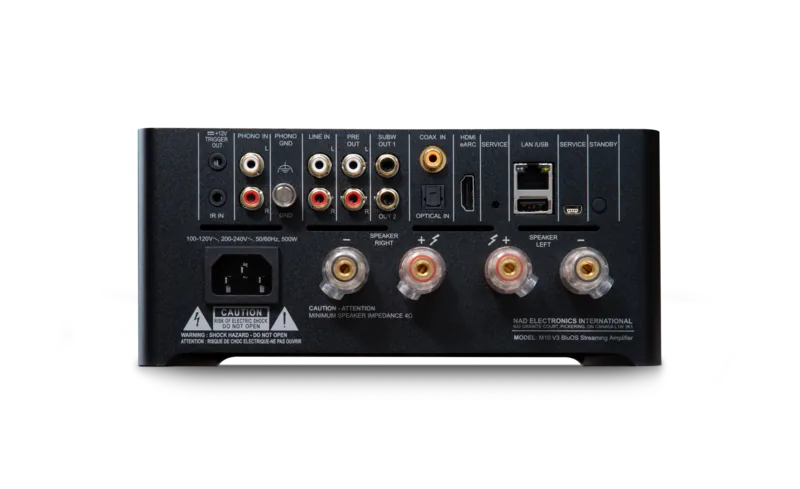
Yes. The M10 provides PRE OUT for use as a preamplifier to external amps and dedicated SUBW outputs (SUBW 1/2) that send low-frequency information (up to 80 Hz) to powered subwoofers for system integration.
Is this answer helpful?
If firmware upgrade fails or the unit behaves abnormally, perform a factory reset (front-panel or force method). If problems persist, unplug and seek qualified service. Also ensure network stability and check the NAD support site for firmware and troubleshooting guidance.
Is this answer helpful?
Advantages and Disadvantages
Advantages

- Supports high-resolution formats (MQA, DSD, FLAC, WAV) and includes MQA decoding and indicators.
- Integrated Dirac Live room correction improves clarity, imaging and low-frequency control.
- Compact integrated design with 100W per channel, Bridge Mode for higher output and flexible I/O (HDMI ARC, optical, coax, USB, analog).
- BluOS ecosystem compatibility gives access to major streaming services and multiroom control via mobile and desktop apps.
- Two-way Bluetooth aptX HD, subwoofer outputs and pre-out offer versatile connectivity for modern setups.
Disadvantages

- High-end features and premium price may be excessive for entry-level listeners with simple systems.
- Bridge Mode requires careful speaker impedance consideration; low-impedance speakers may trigger thermal protection.
- Touch-panel and app reliance may be less appealing to users preferring traditional physical controls.
- Firmware updates and network dependencies may require occasional troubleshooting with routers or ISP.
- Limited video functionality—HDMI ARC supports audio only, no video output from the M10.
Product Specification
Type
Streaming Amplifier
Power
100W (4Ω)
D/A Converter
24bit/192kHz
Tuner
Internet Radio
Audio Formats
AAC, AIFF, ALAC, FLAC, MP3, MQA, OGG/Vorbis, WAV, WMA
Streaming Clients
Apple AirPlay 2, Roon
Audio Connections
Digital Audio In (coaxial), Digital Audio In (optical), 2x Stereo Line In (RCA), Pre Out (RCA), 2x Sub Out (RCA)
Other Connections
USB-A, HDMI In, RJ-45
Wireless
Bluetooth, aptX, aptX HD, Wi-Fi (WLAN)
Special Features
Speaker Outputs
Color
black
Dimensions
8.46x3.94x10.24in (WxHxD)
Weight
11.02lb
Product Description
NAD M10 Manual — BluOS Streaming Amplifier
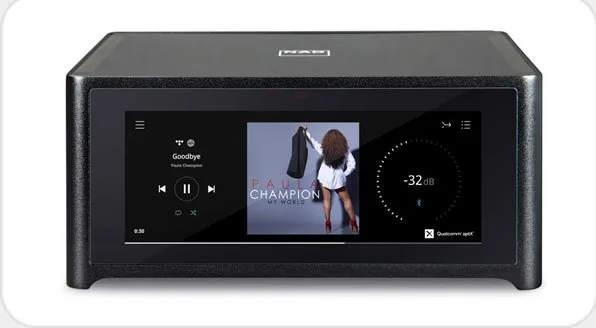
The NAD M10 is a compact, high-performance streaming integrated amplifier designed for modern audio systems. Combining class-leading amplification, advanced digital decoding and a refined user interface, the M10 delivers rich, transparent sound for both casual listening and critical audiophile use. It supports wired and wireless network connections, the BluOS ecosystem, and a broad selection of streaming services and file formats, including MQA and DSD for high-resolution playback.
Key features and overview
The M10 offers 100W per channel into 8 ohms with robust dynamic capability, low distortion and a high damping factor for controlled bass. Its hybrid architecture pairs precision digital-to-analog conversion with powerful amplifier stages, while the Bridge Mode allows for higher output when paired with external amplifiers. The unit includes multiple inputs — analog, optical, coaxial, HDMI ARC, USB and LAN — plus subwoofer outputs and pre-outs for flexible system integration. Bluetooth aptX HD is built in for high-quality wireless audio and two-way Bluetooth modes support both receive and headphone functions.
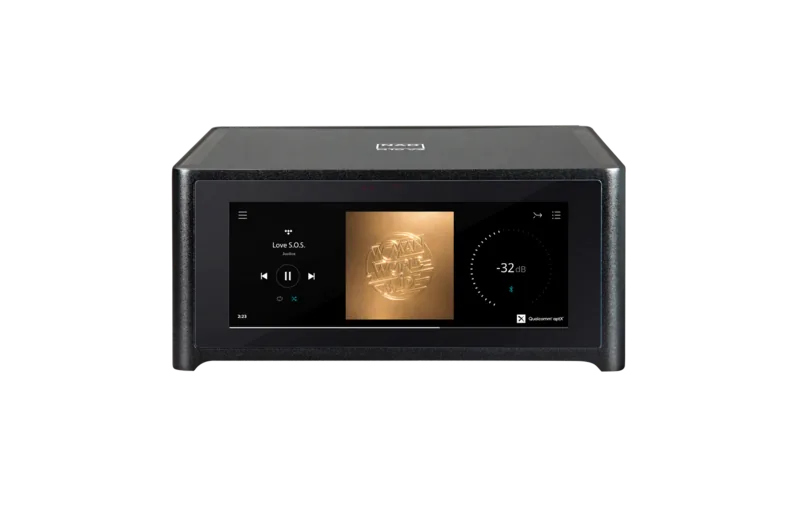
A distinctive aspect of the M10 is its integration of MQA decoding and Dirac Live room correction. MQA playback preserves master-quality recordings end-to-end, with front-panel indicators showing provenance. Dirac Live calibrates frequency and impulse response to improve imaging, depth and low-frequency control in real listening environments. The touch-panel display and the BluOS Controller App provide intuitive control, source selection and access to streaming services like Spotify, TIDAL, Qobuz and many others.
Setup and operation
Setup is straightforward with a Quick Setup Guide that outlines wired or wireless network configuration and BluOS app pairing for Android and iOS. A web-based manual Wi‑Fi setup is available for desktops. The front panel touch display provides playback, metering and MQA/Dirac status, while a rear-panel layout offers IR input, 12V trigger, analog and digital inputs, speaker terminals and USB for mass-storage playback. The manual details factory reset procedures, ventilation and safety guidance, and firmware upgrade reminders.
Who it’s for
The M10 suits users who want a space-efficient, all-in-one streaming amplifier with audiophile credentials. It's ideal for those who value modern streaming convenience, high-resolution audio support, and room-correction capability without a large component stack.
Notes
- Ensure adequate ventilation (at least 10 cm clearance each side, rear and top).
- Keep firmware updated via the NAD product page for best performance and compatibility.
- Save original packaging for safe transport and service.
Search for 67,706 Manuals online


Type-in Brand or Model