
Nacon Revolution X Manual
PDF manual · 48 Pages
English



Quick check
Incorrect answer, please try again.
Chat with your Nacon Revolution X manual using AI
Get instant AI answers from your Nacon Revolution X manual
Ask anything about the Nacon Revolution X. Answers come from this manual, with the pages they are based on.
Ask a Question
Do you recommend Revolution X?
Yes NoVideo Manual
Nacon Revolution X. PC Xbox Wired Pro Controller. Hardware and Software demo
Frequently Asked Questions
Yes. The Revolution X is a wired controller compatible with Xbox Series X|S, Xbox One and Windows 10/PC. It connects via the detachable 3m USB cable and is plug-and-play on Windows.
Is this answer helpful?
The controller stores up to four custom profiles. Use the rear switch to select Classic or Advanced modes and press the profile button to cycle profiles; for advanced edits install the Revolution X app from the Microsoft Store.
Is this answer helpful?
Most buttons can be reassigned through the Revolution X app, but system buttons such as View, Menu, Xbox and Share are exceptions and cannot be remapped.
Is this answer helpful?
In Classic mode: set the profile switch to Classic, hold the profile button 3 seconds, select S1–S4 to program, press the desired button to link (LED blinks 3 times to confirm), then hold the profile button 3 seconds to exit.
Is this answer helpful?
Download the free Dolby Access app from the Microsoft Store, connect the controller, and the app will recognize the device and enable Dolby for connected headsets.
Is this answer helpful?
Package contents: controller, quick start guide, warranty/compliance information, Dolby activation card, travel pouch, 3m braided USB cable and spare joystick caps/weights. The product includes a two-year manufacturer warranty; keep your proof of purchase.
Is this answer helpful?
Yes. The controller is for indoor use only, must not be exposed to moisture or extreme conditions, and the maximum recommended operating temperature is 35 °C. Follow cleaning and safety guidelines in the manual.
Is this answer helpful?
Advantages and Disadvantages
Advantages

- Highly customizable with up to 4 stored profiles and deep tuning via the Revolution X app.
- Plug-and-play on Windows and native wired compatibility with Xbox Series X|S and Xbox One.
- Detachable 3m braided USB cable, interchangeable stick caps and adjustable weights for personalization.
- Dedicated programmable shortcut buttons and profile switching with visible LED indicators.
- Supports headset audio via a 3.5mm jack and Dolby activation through Dolby Access.
Disadvantages

- Wired-only design limits mobility compared to wireless controllers.
- Some advanced customizations require the Windows app; on-device configuration is limited to Classic mode.
- Certain system buttons (View, Menu, Xbox, Share) cannot be reassigned.
- Controller not intended for users lacking experience or young children; cable may pose safety risks.
- Maximum operating temperature limit (35 °C) and indoor-only usage restrict some environments.
Product Specification
Type
Gamepad
Compatibility
PC, Xbox Series X, Xbox One
Connectivity
wired (9.84 ft), USB
Power Supply
USB
Buttons
18 (total), 4 (function buttons), 4 (action buttons), 2 (trigger), 2 (shoulder buttons), 2 (analog sticks), 4 (rear)
Analog Sticks
1 concave (left above D-pad), 1 concave (right below action buttons)
D-pad
concave
Special Features
0.14 in jack, 2 vibration motors, programmable buttons
Product Description
Nacon Revolution X Controller (PC/Xbox SX/Xbox One) Manual
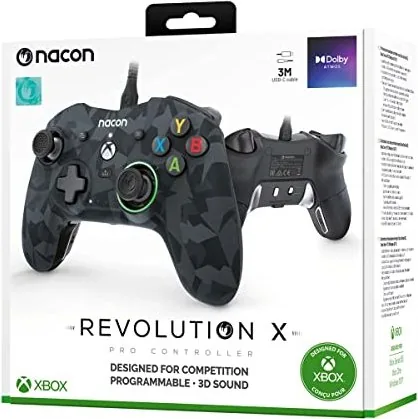
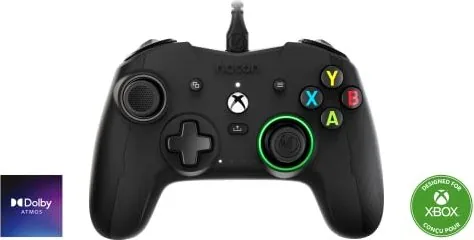
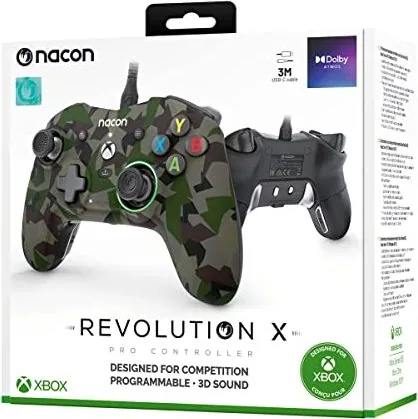
The Nacon Revolution X Controller (PC/Xbox SX/Xbox One) is a wired, competition-focused controller built for Xbox Series X|S, Xbox One and Windows 10/PC. Featuring asymmetric analog sticks with adjustable amplitude (44°–30°), a detachable 3m braided USB cable, and a 3.5mm headset jack, it targets players who want a customizable, tournament-ready peripheral. The controller weighs 260g (without cable or extra weights) and includes additional hardware in the box: two spare joystick caps, three pairs of weights, a travel pouch and a storage box.
Key features and functionality
The Revolution X offers up to four programmable profiles that can be switched using a rear switch and a profile selector. Four dedicated shortcut buttons (S1–S4) are configurable either directly on the controller in Classic mode or through the Revolution X app (Advanced mode) available from the Microsoft Store. The app allows deep personalization: stick response curves and dead zones, trigger dead zones, vibration levels, D-pad mode (8-way or 4-way), button remapping (except View, Menu, Xbox, Share) and firmware updates.
Plug-and-play support ensures automatic driver installation on Windows, while the white status LED indicates a ready connection on Xbox. The controller includes a ring LED around the right stick and profile LEDs to show the active profile. Dolby audio for headsets can be enabled via the free Dolby Access app from the Microsoft Store.
Build and ergonomics
Ergonomically shaped for long sessions, the Revolution X emphasizes comfort and competitive control. It ships with interchangeable stick caps and optional weights so players can tailor balance and feel. Nacon recommends regular breaks to avoid fatigue and warns against exposure to liquids, extreme temperatures, or heavy dust. The manual details safe usage, cleaning instructions and a two-year manufacturer warranty.
Packaging and support
The package contains the controller, quick start guide, warranty and compliance info, Dolby activation card, 3m braided cable, travel pouch and spare parts. Technical support contacts and regional hotlines are provided for warranty and troubleshooting.
Notes
- Controller stores up to four custom profiles. Use the Revolution X app for advanced configuration.
- Shortcut keys can be programmed on-device in Classic mode; use the app in Advanced mode.
- Dolby Access activation requires the Microsoft Store app and a connected controller.
- Keep proof of purchase and original packaging for warranty claims.
Search for 67,706 Manuals online


Type-in Brand or Model