

Nacon GM-500ES Manual
PDF manual · 28 Pages
English



Quick check
Incorrect answer, please try again.
Chat with your Nacon GM-500ES manual using AI
Get instant AI answers from your Nacon GM-500ES manual
Ask anything about the Nacon GM-500ES. Answers come from this manual, with the pages they are based on.
Ask a Question
Do you recommend GM-500ES?
Yes NoFrequently Asked Questions
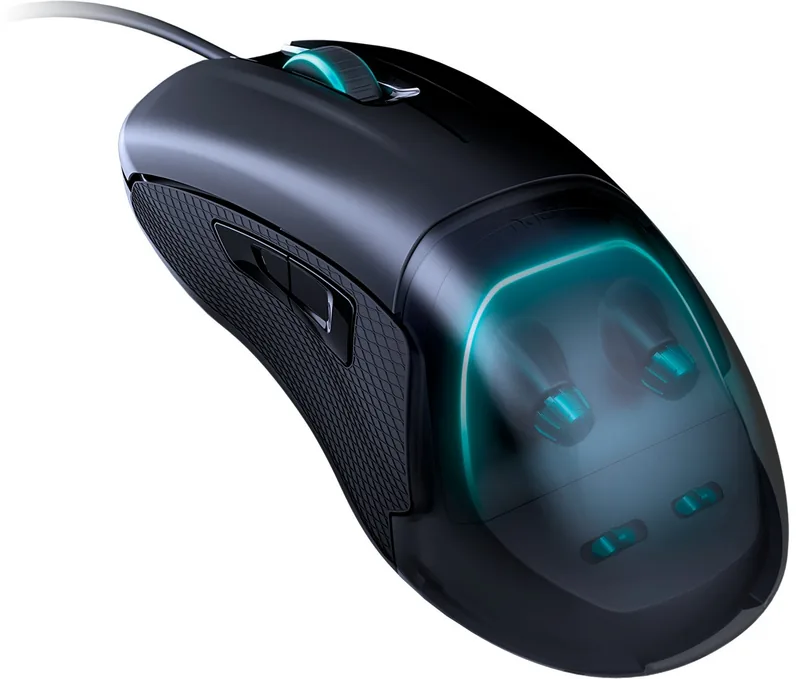
Turn the DPI adjustment wheel located under the removable transparent cover. The light will blink to indicate changes. Select your desired level: Yellow (400), Purple (600), Blue (800), Green (1200), Red (2000), Light Blue (4000), or White (5000). Wait three seconds for the light to stop blinking.
Is this answer helpful?
The manual specifies USB connectivity but primarily details Windows usage. As a plug-and-play device, it should function on macOS for basic movement and clicking, though specific OS compatibility for all features like polling rates is not explicitly confirmed in the provided text.
Is this answer helpful?
The product comes with a two-year manufacturer warranty from the date of purchase. It covers defects due to faulty material or workmanship. You must retain your proof of purchase and original packaging for remote purchases to process any warranty claims.
Is this answer helpful?
Yes. The mouse features an L/R switch that activates the two extra buttons on either the left or right side. Toggle this switch to enable the buttons on your preferred side while deactivating them on the other side.
Is this answer helpful?
No. The Nacon GM-500ES is a plug-and-play device. No additional drivers or software are required. You can simply connect it to a spare USB port and begin using it immediately.
Is this answer helpful?
Use only a soft, clean, damp cloth for external cleaning. Do not use detergents as they may damage the finish or leak inside. Never immerse the mouse in liquid or expose it to splashing water.
Is this answer helpful?
Advantages and Disadvantages
Advantages

- Hardware-based controls allow customization without installing additional software drivers
- Seven DPI levels ranging from 400 to 5000 with clear LED color indicators for easy selection
- Includes three different sized top covers to ensure a comfortable ergonomic fit for various hand sizes
- High polling rate options up to 1000Hz provide superior responsiveness for competitive gaming
- Plug and play functionality means immediate usability upon connecting to a USB port
Disadvantages

- No software support means advanced macro programming or detailed profile management is not possible
- The removable top cover mechanism may accumulate dust or debris over time if not cleaned regularly
- Limited to basic button configuration compared to mice with full software suites
- Warranty does not cover accidental damage, misuse, or normal wear and tear
- Requires keeping the original packaging for warranty claims on distance purchases
Product Specification
Suitability
both hands (left hand, right hand)
Keys
7 (total), 2 (main), 2 (left), 2 (right), 1 (scroll wheel click)
Scroll Wheel
1x 2-way
Tracking
LED-red/IR
Resolution
5000dpi, reducible to 4000/2000/1200/800/600/400dpi
Sensor
PixArt PMW 3310
Buttons
mechanical buttons, Omron
Polling Rate
1000Hz, adjustable to 500/250Hz (wired USB)
Lighting
RGB
Connection
wired (5.9ft), USB-A 2.0
Power Supply
USB
Color
solid, black
Features
thumb rest, adjustable geometry, interchangeable top shell (for different hand sizes), non-slip surface (rubberized sides)
Product Description
Elevate Your Gaming with the Nacon GM-500ES E-Sports Mouse
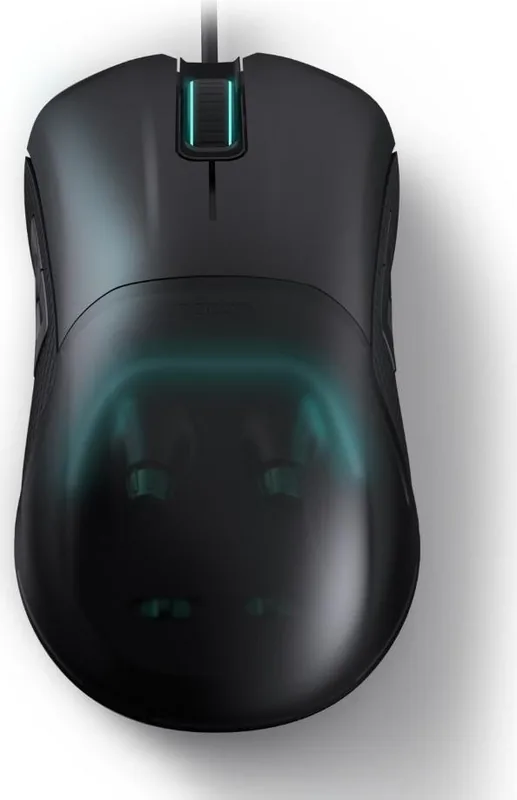
The Nacon GM-500ES is a high-performance gaming mouse designed to enhance your video gaming experience without requiring complex software installations. This sleek black USB device features a unique hardware-based control system that allows you to customize every aspect of its performance directly on the mouse. By removing the transparent top cover, users can access intuitive dials and switches to adjust settings instantly.
One of the standout features of the GM-500ES is its adjustable DPI sensor. Users can select from seven distinct resolution levels ranging from 400 dpi to 5000 dpi. Each setting is visually confirmed by a specific LED color, including yellow for 400, purple for 600, blue for the default 800, green for 1200, red for 2000, light blue for 4000, and white for 5000 dpi. The polling rate is equally customizable, offering options of 250Hz, 500Hz, or the ultra-responsive 1000Hz, ensuring your cursor movements are tracked with maximum precision.
Ergonomics play a crucial role in long gaming sessions, and the GM-500ES addresses this with three interchangeable top covers of varying sizes. This allows players to find the perfect fit for their hand shape, reducing fatigue during extended use. Additionally, an L/R switch enables left-handed and right-handed users to activate the two extra programmable buttons located on either side of the device. The mouse also features customizable RGB lighting effects controlled via a dedicated dial.
As a true plug-and-play device, the GM-500ES requires no driver downloads. Simply connect it to any available USB port and start playing immediately. Backed by a two-year manufacturer warranty covering defects in materials and workmanship, this mouse is built for durability. Remember to keep your proof of purchase and original packaging for any warranty claims. For optimal longevity, avoid exposing the device to moisture, dust, or extreme temperatures, and clean it only with a soft damp cloth.
Search for 67,706 Manuals online


Type-in Brand or Model