
Nacon Compact Manual
PDF manual · 32 Pages
English



Quick check
Incorrect answer, please try again.
Chat with your Nacon Compact manual using AI
Get instant AI answers from your Nacon Compact manual
Ask anything about the Nacon Compact. Answers come from this manual, with the pages they are based on.
Ask a Question
Do you recommend Compact?
Yes NoFrequently Asked Questions
It is designed to provide a simple, wired control option for PS4 gaming with a compact shape, familiar button layout, and essential features for everyday play.
Is this answer helpful?
Yes, it can work with Windows PC games that use the XInput protocol. XInput is activated automatically when the controller is connected.
Is this answer helpful?
It does not support the DualShock 4 built-in speaker, light bar, or SIXAXIS motion sensor features.
Is this answer helpful?
Connect the USB plug to a free USB port on your PS4 system, then power on the console. The controller should be ready to use right away.
Is this answer helpful?
Yes, it includes a 3.5 mm headset connector, which is useful for private audio and voice chat during gameplay.
Is this answer helpful?
It is designed for comfortable everyday use, but the manual recommends taking 15-minute breaks every hour and holding it with a light grip.
Is this answer helpful?
The controller comes with a 2-year manufacturer warranty against defects in material or workmanship, under the terms described by the brand.
Is this answer helpful?
Advantages and Disadvantages
Advantages

- Compact wired design offers a stable, no-lag gaming connection.
- Includes touch pad, headset jack, and full PS4-style controls.
- XInput support makes it usable on compatible Windows PC games.
- USB setup is simple and does not require charging.
- 2-year warranty adds peace of mind for buyers.
Disadvantages

- No built-in speaker, light bar, or SIXAXIS motion support.
- Wired design limits movement compared with wireless controllers.
- Compact size may not suit players who prefer larger grips.
- PC compatibility is mentioned, but not officially endorsed by Sony.
Product Specification
Type
Gamepad
Compatibility
PS4, PC
Connectivity
wired (9.84 ft), USB
Power supply
USB
Buttons
14 (total), 4 (function buttons), 4 (action buttons), 2 (Trigger), 2 (shoulder buttons), 2 (analog sticks)
Analog sticks
1 concave (left below D-pad), 1 concave (right below action buttons)
D-pad
concave
Features
0.14 in jack, 2 vibration motors, Touchpad
Product Description
Nacon Compact Controller (PS4) Review
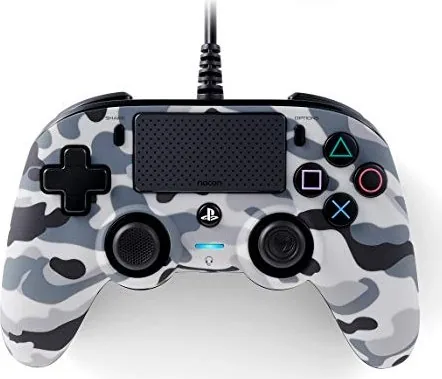
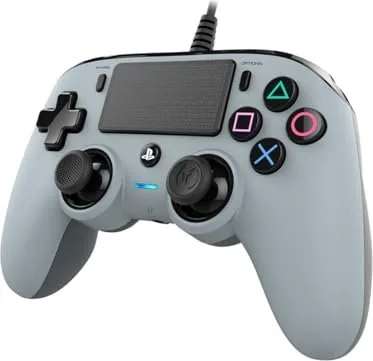
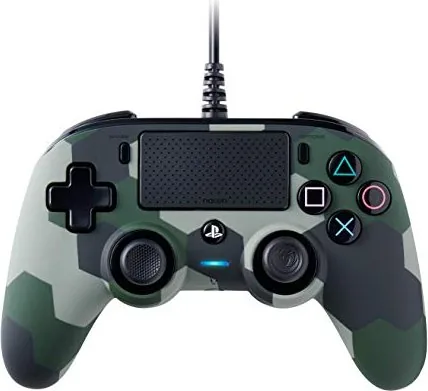
The Nacon Compact Controller (PS4) is a wired gamepad built for players who want a simple, dependable controller with a familiar layout and a smaller, more comfortable form factor. Designed for PlayStation 4 gameplay, it focuses on practical features rather than flashy extras, making it a solid option for everyday gaming sessions.
A compact controller with a familiar feel
At first glance, the controller looks clean and easy to use. It includes the classic PS-style essentials such as a touch pad, SHARE and OPTIONS buttons, dual analog sticks with L3/R3 clicks, a directional pad, action buttons, and shoulder triggers. The LED player status indicator adds a useful visual touch, while the 3.5 mm headset connector supports private audio and chat during play.
Because it is wired through USB, setup is quick and straightforward: plug it into a free USB port on your PS4 and start playing. There is no need to charge batteries or worry about wireless pairing. That makes it especially appealing for players who want a reliable controller that is ready whenever they are.
Built for comfort and versatility
The compact design is one of the main highlights. It can feel easier to handle for players who prefer a lighter, more compact controller during longer sessions. The button layout is intuitive, and the controller is also compatible with Windows PC games that use XInput, which adds extra value for multi-platform players.
The Nacon Compact Controller (PS4) Manual also notes that firmware updates may be available online, helping improve usability over time. This is a nice detail for users who want their hardware to stay current. The controller is positioned as a practical gaming tool rather than a premium feature-heavy device, which may be exactly what many players need.
What to keep in mind
This controller does not include every feature found on the DualShock 4 wireless controller. It does not support the built-in speaker, light bar, or SIXAXIS motion sensing. For players who rely on those functions, this may be an important limitation. Still, for standard gameplay, it delivers the core controls most users expect.
The controller also comes with a 2-year warranty, which adds confidence for buyers looking for a straightforward and supported accessory.
Notes
- Intended for indoor use only.
- Avoid moisture, heat, dust, and mechanical shock.
- Take regular breaks during long gaming sessions.
- Always use the controller with a light grip for comfort.
Search for 67,706 Manuals online


Type-in Brand or Model