
Nacon Compact Illuminated Manual
PDF manual · 32 Pages
English



Quick check
Incorrect answer, please try again.
Chat with your Nacon Compact Illuminated manual using AI
Get instant AI answers from your Nacon Compact Illuminated manual
Ask anything about the Nacon Compact Illuminated. Answers come from this manual, with the pages they are based on.
Ask a Question
Do you recommend Compact Illuminated?
Yes NoFrequently Asked Questions
It is a compact wired controller with illuminated LEDs and a transparent shell. It focuses on core controls and a simple plug-and-play setup, while omitting some advanced DUALSHOCK 4 features.
Is this answer helpful?
Yes. Connect the USB plug to a free PS4 USB port, then power on the system. The controller is designed for straightforward use without a complicated pairing process.
Is this answer helpful?
Yes. The light effect can be switched on or off using the button on the back of the controller. This lets you choose between a lit or more subtle look while playing.
Is this answer helpful?
Yes, it can work with Windows PC games that use the XInput protocol. The controller activates XInput automatically when connected to a compatible PC.
Is this answer helpful?
Yes. It includes a 3.5 mm headset connector, which is useful for private listening or voice chat in supported games and setups.
Is this answer helpful?
It does not support the built-in speaker, the light bar, or the SIXAXIS motion sensor. It is focused on core input and a wired gaming experience instead.
Is this answer helpful?
Advantages and Disadvantages
Advantages

- Compact shape feels comfortable and easy to handle for many players.
- USB wired connection offers simple setup and steady gameplay.
- Integrated LED backlight adds a stylish visual effect.
- 3.5 mm headset jack supports private in-game audio and chat.
Disadvantages

- Does not support PS4 DUALSHOCK 4 speaker, light bar, or motion sensing.
- Wired design limits movement compared with wireless controllers.
- Not intended for outdoor, wet, or high-humidity environments.
- No user-serviceable parts; damaged units should not be opened.
Product Specification
Type
Gamepad
Compatibility
PS4, PC
Connectivity
wired (9.84 ft), USB
Power Supply
USB
Buttons
14 (total), 4 (function buttons), 4 (action buttons), 2 (Trigger), 2 (shoulder buttons), 2 (analog sticks)
Analog Sticks
1 concave (left below D-pad), 1 concave (right below action buttons)
D-pad
concave
Special Features
0.14 in jack, 2 vibration motors, LED lighting, Touchpad
Product Description
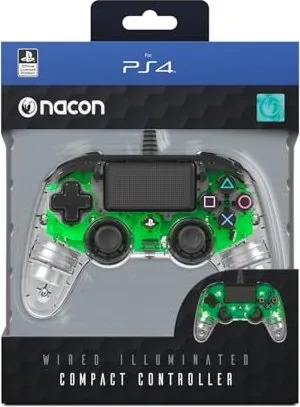
Nacon Compact Illuminated Controller (PS4)
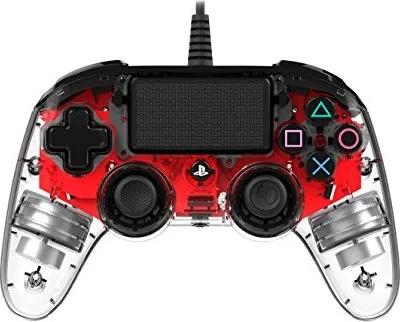
The Nacon Compact Illuminated Controller (PS4) is a practical wired gamepad designed for players who want a comfortable, straightforward alternative for PlayStation 4 gaming. It focuses on essential controls, a compact shape, and a clean illuminated look that adds style without complicating the setup.
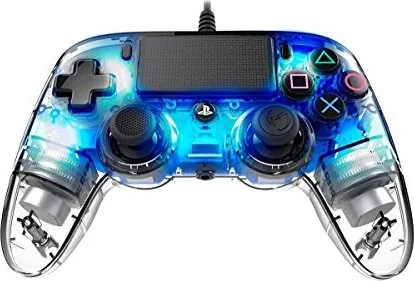
Built around a USB connection, this controller is easy to use: plug it into a free PS4 port and you are ready to play. The compact design makes it a good fit for shorter play sessions, younger players, or anyone who prefers a smaller controller in hand. A transparent shell and integrated LEDs create a subtle backlit effect that gives it a distinctive personality during gameplay.
One of its most appealing features is the blend of simplicity and functionality. It includes a touch pad, action buttons, shoulder buttons, analog triggers, dual sticks, a directional pad, a 3.5 mm headset connector, and player status lighting. That makes it suitable for a wide range of games while keeping the layout familiar for PS4 users.
The Nacon Compact Illuminated Controller (PS4) Manual highlights that the controller does not replicate every feature of the original DUALSHOCK 4. It does not support the built-in speaker, light bar, or SIXAXIS motion sensing. Even so, it offers a reliable wired connection and can also work with Windows PC games using XInput, giving it extra flexibility beyond console play.
For everyday use, the controller feels like a no-frills gaming companion. The backlight can be switched on or off using the rear button, and firmware updates may be available to improve usability over time. It is best suited for indoor use and should be handled with basic care, especially since the unit is not designed for disassembly or repair.
Overall, this controller is a solid choice for players who value affordability, easy setup, and a compact form factor. It may not be the most advanced PS4 controller, but it delivers the core gaming experience with a stylish illuminated finish and dependable wired performance.
Notes
- Best for users who prefer a wired controller
- Lighting adds a visual upgrade without affecting controls
- PC compatibility is a useful bonus for multi-platform gamers
- Keep it indoors and avoid moisture or impact
Search for 67,706 Manuals online


Type-in Brand or Model