Manual.ly Logo

Midas M32R Manual

0.0 · 0 Ratings

PDF manual · 67 Pages

English

M: claude-opus-5-5
page

/ 67

Loading...
midas-m32r-digital-console-user-manual-35080df3-a5bc-49cc-88ca-5bc200d96529 page 3
3 DIGITAL RACK MIXER M32R User Manual
Terminals marked with this symbol carry
electrical current of sucient magnitude
to constitute risk of electric shock.
Use only high-quality professional speaker cables with
¼" TS or twist-locking plugs pre-installed. Allother
installation or modication should be performed only
by qualiedpersonnel.
This symbol, wherever it appears,
alertsyou to the presence of uninsulated
dangerous voltage inside the
enclosure-voltage that may be sucient to constitute a
risk ofshock.
This symbol, wherever it appears,
alertsyou to important operating and
maintenance instructions in the
accompanying literature. Please read the manual.
Caution
To reduce the risk of electric shock, donot
remove the top cover (or the rear section).
No user serviceable parts inside. Refer servicing to
qualied personnel.
Caution
To reduce the risk of re or electric shock,
do not expose this appliance to rain and
moisture. The apparatus shall not be exposed to dripping
or splashing liquids and no objects lled with liquids,
suchas vases, shall be placed on the apparatus.
Caution
These service instructions are for use
by qualied service personnel only.
Toreduce the risk of electric shock do not perform any
servicing other than that contained in the operation
instructions. Repairs have to be performed by qualied
servicepersonnel.
1. Read these instructions.
2. Keep these instructions.
3. Heed all warnings.
4. Follow all instructions.
5. Do not use this apparatus near water.
6. Clean only with dry cloth.
7. Do not block any ventilation openings. Install in
accordance with the manufacturer’s instructions.
8. Do not install near any heat sources such as
radiators, heat registers, stoves, or other apparatus
(including ampliers) that produce heat.
9. Do not defeat the safety purpose of the polarized
or grounding-type plug. A polarized plug has two blades
with one wider than the other. A grounding-type plug
has two blades and a third grounding prong. The wide
blade or the third prong are provided for your safety. Ifthe
provided plug does not t into your outlet, consult an
electrician for replacement of the obsolete outlet.
10. Protect the power cord from being walked on or
pinched particularly at plugs, convenience receptacles,
and the point where they exit from the apparatus.
11. Use only attachments/accessories specied by
themanufacturer.
12. Use only with the
cart, stand, tripod, bracket,
or table specied by the
manufacturer, orsold with
the apparatus. When a cart
is used, use caution when
moving the cart/apparatus
combination to avoid
injury from tip-over.
13. Unplug this apparatus during lightning storms or
when unused for long periods of time.
14. Refer all servicing to qualied service personnel.
Servicing is required when the apparatus has been
damaged in any way, such as power supply cord or plug
is damaged, liquid has been spilled or objects have fallen
into the apparatus, the apparatus has been exposed
to rain or moisture, does not operate normally, or has
beendropped.
15. The apparatus shall be connected to a MAINS socket
outlet with a protective earthing connection.
16. Where the MAINS plug or an appliance coupler is
used as the disconnect device, the disconnect device shall
remain readily operable.
17. Correct disposal of this
product: This symbol indicates that
this product must not be disposed
of with household waste,
according to the WEEE Directive
(2012/19/EU) and your national
law. This product should be taken
to a collection center licensed for the recycling of waste
electrical and electronic equipment (EEE). The
mishandling of this type of waste could have a possible
negative impact on the environment and human health
due to potentially hazardous substances that are generally
associated with EEE. At the same time, your cooperation
in the correct disposal of this product will contribute to
the ecient use of natural resources. For more
information about where you can take your waste
equipment for recycling, please contact your local city
oce, or your household waste collection service.
18. Do not install in a conned space, such as a book
case or similar unit.
19. Do not place naked ame sources, such as lighted
candles, on the apparatus.
20. Please keep the environmental aspects of battery
disposal in mind. Batteries must be disposed-of at a
battery collection point.
21. Use this apparatus in tropical and/or
moderate climates.
Music Tribe accepts no liability for any loss which
may be suered by any person who relies either
wholly or in part upon any description, photograph,
or statement contained herein. Technical specications,
appearances and other information are subject to
change without notice. All trademarks are the property
of their respective owners. Midas, Klark Teknik,
Lab Gruppen, Lake, Tannoy, Turbosound, TC Electronic,
TC Helicon, Behringer, Bugera and Coolaudio are
trademarks or registered trademarks of Music Tribe
Global Brands Ltd. © Music Tribe Global Brands Ltd.
2018 All rights reserved.
For the applicable warranty terms and conditions
and additional information regarding Music Tribe’s
Limited Warranty, please see complete details online at
musictribe.com/warranty.
LEGAL DISCLAIMER
LIMITED WARRANTY
Important Safety
Instructions

Chat with your Midas M32R manual using AI

Get instant AI answers from your Midas M32R manual

Ask anything about the Midas M32R. Answers come from this manual, with the pages they are based on.

M32R Maintenance Schedule

Remind me when maintenance is due
Monthly
Clean the control centre and GUI screen

Switch off and isolate from mains. Clean with a dry, lint-free cloth. Avoid harsh abrasives, solvents, ammonia-based cleaners, or direct liquid application on the screen.

Show in the manual (page 59)
Monthly
Check controls for freedom of operation

Verify that all control knobs, faders, and pushbuttons move freely to prevent sticking, as the controls are self-cleaning.

Show in the manual (page 59)
Monthly
Check functionality of all controls and equipment

Inspect the operation of all hardware controls (knobs, faders, buttons, LEDs) and verify the overall functionality of the equipment.

Show in the manual (page 59)

Free maintenance reminders

Timed to your purchase date. Always free, unsubscribe anytime.

By submitting you agree to the privacy policy. Unsubscribe with one click in any email.
M: qwen/qwen3.8-flash

Ask a Question

0/1000

Do you recommend M32R?

Yes No

Frequently Asked Questions

A

The Midas M32R features 16 Midas PRO Series digitally-controllable microphone preamplifiers. Each input can accept balanced or unbalanced mic- or line-level signals and includes switchable phantom power, a 72 dB gain range, and a maximum level of +23 dBu before clip.

Is this answer helpful?

A

Yes, you can record any stereo signal directly onto a USB stick or compatible USB hard drive using the front panel USB port. However, note that multi-channel recording is only available via the Klark Teknik DN32-USB interface card.

Is this answer helpful?

A

The M32R has a total count of 168 x 168 accessible sources and destinations. This is achieved through its onboard I/O and the dual AES50 Ethernet jacks which employ Klark Teknik SuperMAC technology to contribute 96 x 96 signals.

Is this answer helpful?

A

Yes, the M32R supports 16 channels of ULTRANET personal monitoring. It also integrates seamlessly with the Behringer P-16 personal monitoring system, allowing for a complete live, studio, and installed sound solution.

Is this answer helpful?

A

To update the firmware, download the new file to the root level of a FAT-formatted USB thumb drive. Plug the drive into the front panel USB connector while the console is off, then hold the USB View button while switching the console on. The update takes 2-3 minutes longer than a regular boot.

Is this answer helpful?

M: qwen/qwen3.8-flash

Advantages and Disadvantages

Advantages

  • Includes 16 award-winning Midas PRO Series digitally-controllable microphone preamps
  • Features 16 Midas PRO motorised faders rated for one million cycles for reliable performance
  • Offers extensive connectivity with 96 bi-directional channels over SuperMAC AES50
  • Integrates seamlessly with other M32 consoles, DL16 stageboxes, and P-16 monitoring systems
VS

Disadvantages

  • Multi-channel recording is only available via the separate DN32-USB expansion card
  • No user serviceable parts inside; repairs must be performed by qualified personnel
  • USB socket is not suitable for non-memory devices like keyboards or mice
  • Equipment must be used in tropical or moderate climates as per safety guidelines
M: qwen/qwen3.8-flash

Product Description

Midas M32R Digital Console Overview

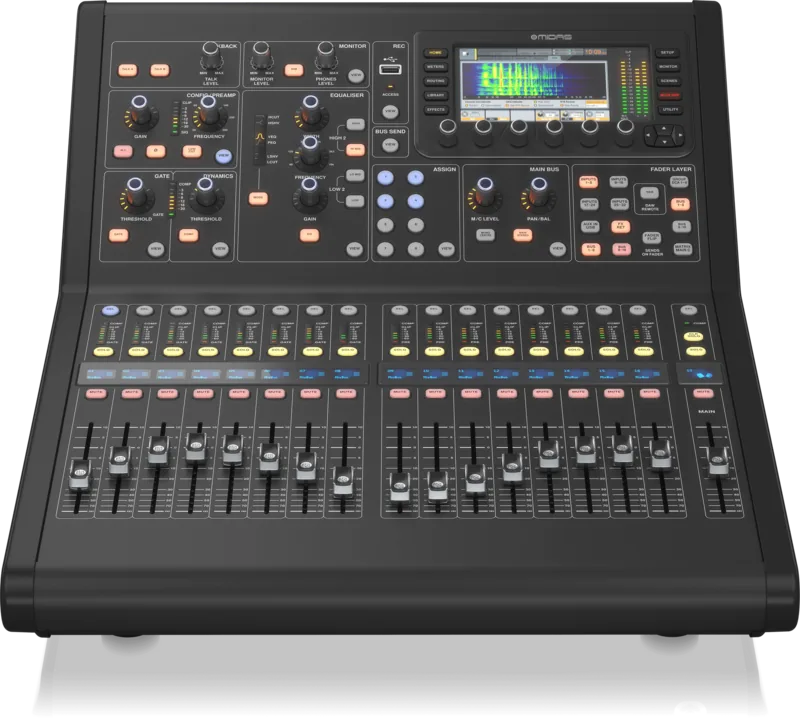
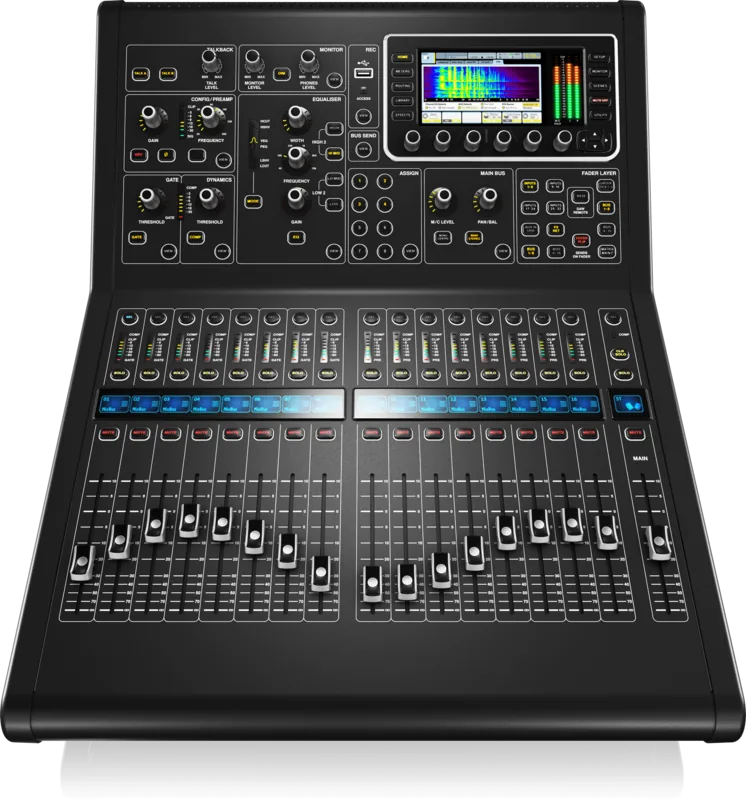
The Midas M32R is a digital rack mixer designed for both live sound and studio applications. It combines the renowned audio quality of the Midas PRO series with a compact, desktop-friendly form factor. This console features 40 input channels, powered by 16 Midas PRO microphone preamplifiers and equipped with 25 mix buses. The unit is engineered to provide extensive connectivity and signal processing capabilities in a streamlined package.

Key Features and Connectivity

The M32R integrates award-winning Midas PRO Series microphone preamplifiers that offer switchable phantom power, a 72 dB gain range, and a maximum level of +23 dBu before clipping. Each of the 16 microphone inputs accepts balanced or unbalanced mic- or line-level signals. The control surface includes eight high-resolution 100 mm motorised faders for the input section and another set of eight faders for controlling DCA groups, bus masters, and matrices. These faders are rated for one million cycles, ensuring durability during frequent use.

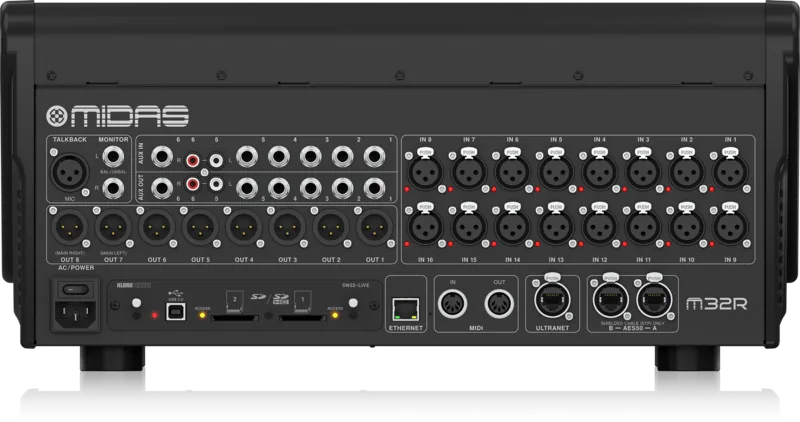
Connectivity options are abundant, featuring dual AES50 Ethernet jacks utilizing Klark Teknik SuperMAC technology. This allows for 96 bi-directional channels over AES50, contributing to a total count of 168 x 168 accessible sources and destinations. Additionally, the rear panel provides six line-level auxiliary inputs and outputs, eight XLR outputs, stereo monitoring outs on XLR/TRS, and dual phone outputs. For personal monitoring, the console supports 16 channels of ULTRANET output.

Recording and Effects

The M32R includes a top-panel USB connector that enables system data storage or direct recording of board mixes to external flash or hard drives. While multi-channel recording requires the DN32-USB card, stereo uncompressed WAV files can be recorded directly via USB. The internal effects rack offers eight true-stereo processors with over 60 effects models, eliminating the need for additional outboard gear. Users can run four high-quality effects concurrently, including delay, chorus, and reverb, along with eight channels of 31-band graphic equalization.

Workflow and Control

Designed for intuitive workflow, the console features a daylight-viewable TFT screen and dedicated channel editing controls for instant access to gain, dynamics, EQ, and other functions. A five-inch wide, high-contrast colour display aids in navigating complex parameters. The system supports remote control via iPad application or editing software connected through Ethernet. Scene saving and recall capabilities allow for quick setup changes, making it ideal for installed and production sound environments.

M: claude-opus-5-5

© Copyright 2026 Manual.ly