
MERCUSYS MR70X Manual
PDF manual · 85 Pages
English



Quick check
Incorrect answer, please try again.
Chat with your MERCUSYS MR70X manual using AI
Get instant AI answers from your MERCUSYS MR70X manual
Ask anything about the MERCUSYS MR70X. Answers come from this manual, with the pages they are based on.
Ask a Question
Do you recommend MR70X?
Yes NoFrequently Asked Questions
Check the bottom label for the default password. If changed, log in to http://mwlogin.net using the admin password and navigate to Wireless Settings to retrieve or reset the key.
Is this answer helpful?
Press and hold the Reset button on the rear panel for more than 5 seconds. This restores factory defaults. You will need to reconfigure internet settings and create a new login password.
Is this answer helpful?
Ensure your computer is connected correctly and set to obtain IP automatically. Verify you are entering http://mwlogin.net or 192.168.1.1. Try clearing browser cache or using a different browser.
Is this answer helpful?
Check the Internet status in the dashboard. Manually set DNS to 8.8.8.8, restart modem and router, clone MAC address if required by ISP, or upgrade firmware if problems persist.
Is this answer helpful?
Use the WDS Bridging feature in the Wireless settings. Configure the second device as an access point or repeater to link networks and expand coverage area effectively.
Is this answer helpful?
Advantages and Disadvantages
Advantages

- Supports next-gen Wi-Fi 6 with speeds up to 1800 Mbps
- Advanced features like OFDMA and MU-MIMO improve efficiency
- Comprehensive parental controls and QoS management
- WPA3 security ensures strong network protection
- Flexible operation modes including AP and Router
Disadvantages

- WPS function unavailable if wireless is disabled
- DMZ host exposes device to potential internet risks if misused
- Requires compatible client devices for full Wi-Fi 6 benefits
- Complex setup for advanced features like OpenVPN
- LED lights may be distracting at night without Night Mode
Product Specification
Modem
N/A
WAN
1x 1000Base-T
LAN
3x 1000Base-T
Wireless
WLAN 802.11a/b/g/n/ac/ax (Wi-Fi 6), simultaneous
Transfer Rate
574Mbps (2.4GHz), 1201Mbps (5GHz)
Security
WPA, WPA2, WPA3, WPS
Antennas
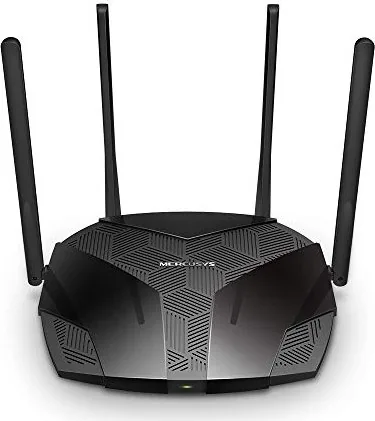
4x external
Ports
N/A
Power Consumption
No data provided (operating consumption), 12V/1A/12W (max. power supply output)
Dimensions
8.22x6.76x1.64in
Features
IPv6, MU-MIMO, VPN passthrough
Band Capability
Dual Band (simultaneous)
Transfer Rate 802.11n (Wi-Fi 4) 2.4GHz
300Mbps (Spatial Streams: 2x2, Bandwidth: 40MHz, Modulation: 64-QAM)
Transfer Rate 802.11ac (Wi-Fi 5) 5GHz
867Mbps (Spatial Streams: 2x2, Bandwidth: 80MHz, Modulation: 256-QAM)
Transfer Rate 802.11ax (Wi-Fi 6 / Wi-Fi 6E) 2.4GHz
574Mbps (Spatial Streams: 2x2, Bandwidth: 40MHz, Modulation: 1024-QAM)
Transfer Rate 802.11ax (Wi-Fi 6 / Wi-Fi 6E) 5GHz
1201Mbps (Spatial Streams: 2x2, Bandwidth: 80MHz, Modulation: 1024-QAM)
Note
Transfer rate specification for 802.11ax at 2.4GHz and 5GHz. (802.11n 2x2 40MHz 64-QAM: 300Mbps, 802.11ac 2x2 80MHz 256-QAM: 867Mbps, 802.11ax (2.4GHz) 2x2 40MHz 1024-QAM: 574Mbps, 802.11ax (5GHz) 2x2 80MHz 1024-QAM: 1201Mbps)
Note #2
Open-/DD-WRT may only be available for certain revisions, please check further links!
Note #3
In some cases, the maximum power consumption figure provided by the manufacturer corresponds only to the maximum output rating of the power supply and is therefore not a meaningful indicator of daily power usage.
Product Description
MERCUSYS MR70X AX1800 - Read, Download & Print Free
The MERCUSYS MR70X AX1800 represents a significant leap in home networking technology by embracing the latest Wi-Fi 6 standard. This dual-band router is engineered to deliver exceptional speed and reliability, making it an ideal choice for modern households and small offices where multiple devices demand high performance simultaneously. With combined wireless speeds reaching up to 1800 Mbps, this device ensures that streaming 4K video, online gaming, and heavy file transfers occur without lag or interruption.
Equipped with advanced features like OFDMA and MU-MIMO, the MR70X optimizes data transmission efficiency. The 5 GHz band offers speeds up to 1201 Mbps, while the 2.4 GHz band provides up to 574 Mbps, creating a robust network environment capable of handling numerous connected gadgets at once. Whether you are working from home or enjoying entertainment, this router maintains stable connections even in crowded network conditions.
Setting up the MERCUSYS MR70X is straightforward thanks to its user-friendly web interface accessible via mwlogin.net. Users can easily configure various modes including Wireless Router mode and Access Point mode. The interface allows for detailed customization of network settings, security protocols, and parental controls. Parents can set time limits and block inappropriate content, ensuring a safe browsing experience for children. Additionally, the QoS feature allows users to prioritize specific devices, guaranteeing smooth gameplay or video calls when bandwidth is scarce.
Security is a top priority with built-in SPI firewall protection, access control lists, and support for WPA3 encryption. The router also supports VPN server functionality, enabling secure remote access to your home network from anywhere in the world. For those needing extended coverage, the WDS bridging feature allows seamless connection with other access points. Safety guidelines emphasize using only the provided power adapter and keeping the device away from moisture and heat sources to ensure longevity.
Notes
- Ensure clients support Wi-Fi 6 features for optimal performance.
- Use original power supply to prevent damage.
- Keep ventilation openings clear to avoid overheating.
Search for 67,706 Manuals online


Type-in Brand or Model