
MERCUSYS Halo H90X Manual
PDF manual · 26 Pages
English



Quick check
Incorrect answer, please try again.
Chat with your MERCUSYS Halo H90X manual using AI
Get instant AI answers from your MERCUSYS Halo H90X manual
Ask anything about the MERCUSYS Halo H90X. Answers come from this manual, with the pages they are based on.
Ask a Question
Do you recommend Halo H90X?
Yes NoFrequently Asked Questions
Download the MERCUSYS app, log in or sign up with a Mercusys ID, and follow the step-by-step instructions to connect and configure your Halo device using the LED indicators for visual feedback.
Is this answer helpful?
Solid yellow means starting up, pulsing yellow is resetting, solid blue is setting up, pulsing blue is ready for setup, solid white is registered, pulsing white is updating firmware, and red indicates issues or disconnection.
Is this answer helpful?
Yes, you can enable a guest network within the Wi-Fi settings section of the app to share network details easily with family and friends while securing your main network.
Is this answer helpful?
Yes, you can create profiles for family members, specify devices belonging to them, and set individualized controls including time limits and content filtering to protect family access.
Is this answer helpful?
Update the Halo when prompted in the MERCUSYS app by tapping Update Halo in the menu to ensure your device remains secure and performs optimally.
Is this answer helpful?
Yes, you can add friends and family members as managers. Each manager should have their own Mercusys ID to access and assist with settings remotely.
Is this answer helpful?
Please note that the Halo H series and S series cannot work together, so ensure you purchase matching units for your mesh network expansion.
Is this answer helpful?
Advantages and Disadvantages
Advantages

- AX6000 Mesh System covers whole home without dead zones
- Easy app setup and intuitive management dashboard
- Robust parental controls and guest network options
- IPv6 support and advanced network customization settings
- Monthly reports and monthly security threat monitoring
Disadvantages

- Indoor use only restriction applies to device placement
- H series units incompatible with S series models
- Requires MERCUSYS app for complete device management
- LED status customization limited by firmware versions
- Performance varies based on environmental and client factors
Product Specification
Modem
N/A
Wireless
WLAN 802.11a/b/g/n/ac/ax (Wi-Fi 6), simultaneous
Transfer Rate
1148Mbps (2.4GHz), 4804Mbps (5GHz)
Security
WPA, WPA2, WPA3
Antennas
Internal
Power Consumption
Not specified (consumption, operation), not specified (max. power supply rating)
Dimensions
5.91x3.70x3.41 in
Features
IPv6, MU-MIMO, Roaming, Mesh (shared band), VPN passthrough (PPTP/L2TP), VLAN, TR-069
Band Support
Dual Band (simultaneous), Mesh (shared band)
Set Contents
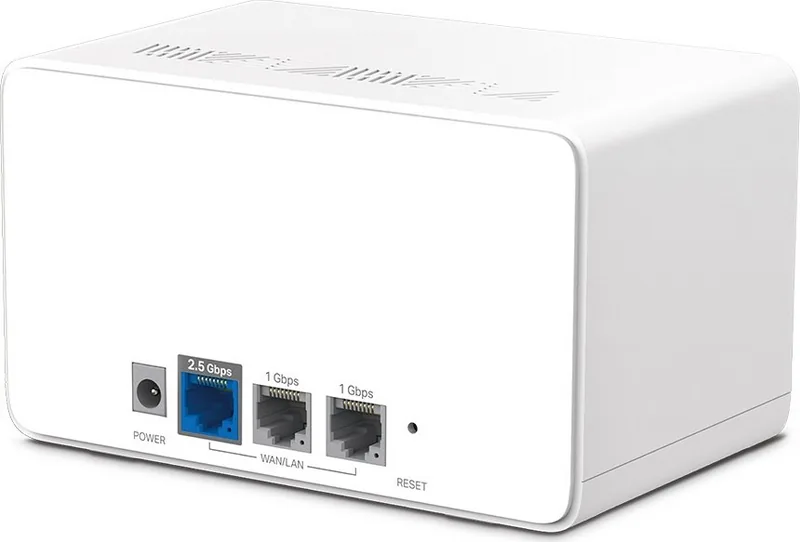
2x Router (2x 1000Base-T WAN/LAN, 1x 2.5GBase-T WAN/LAN)
Mesh Base
1x Router, Total Base Ports: 2x 1000Base-T WAN/LAN, 1x 2.5GBase-T WAN/LAN
Transfer Rate 802.11ax (Wi-Fi 6 / Wi-Fi 6E) 2.4GHz
1148Mbps (Spatial Streams: 4x4, Bandwidth: 40MHz, Modulation: 1024-QAM)
Transfer Rate 802.11ax (Wi-Fi 6 / Wi-Fi 6E) 5GHz
4804Mbps (Spatial Streams: 4x4, Bandwidth: 160MHz, Modulation: 1024-QAM)
Note
Transfer rate specification for 802.11ax at 2.4GHz and 5GHz. (802.11ax (2.4GHz) 4x4 40MHz 1024-QAM: 1148Mbps, 802.11ax (5GHz) 4x4 160MHz 1024-QAM: 4804Mbps)
Product Description
Discover the MERCUSYS Halo H90X
Revolutionizing Home Connectivity
The MERCUSYS Halo H90X serves as a robust AX6000 Whole Home Mesh Wi-Fi System designed to eliminate dead zones and ensure seamless internet access throughout your residence. This advanced networking solution leverages cutting-edge technology to provide high-speed performance for all your connected devices. Whether you are streaming high-definition video, gaming online, or working from home, this system delivers consistent reliability. It supports MU-MIMO technology to handle multiple data streams simultaneously, maximizing efficiency for households.
Easy Setup and Management
Setting up your network has never been simpler with the MERCUSYS application. Users can scan a QR code or download the app to guide them through the installation process. The LED indicators on each unit provide clear visual feedback during startup, setup, and normal operation, ensuring you know the status of your connection at a glance. Solid colors indicate specific states while blinking patterns signal updates or errors. Blue light indicates readiness while red signals issues. Refer to the MERCUSYS Halo H90X Manual for detailed operational guidance if you need to reset factory defaults or troubleshoot connectivity issues regarding the WAN or LAN ports.
Advanced Network Control
Owners gain full administrative control via the app dashboard. You can manage connected devices, set up guest networks, and configure parental controls to protect family members online. The Quality of Service feature allows for prioritizing specific devices during critical tasks like video calls to ensure lag-free performance. IPv6 firewall rules and port forwarding options are available for power users seeking deeper customization of their local network structure. You can also compile blacklists to prevent unwanted access and maintain network safety. WPS connectivity simplifies the process for adding new clients.
Comprehensive Monitoring and Security
The system includes a monthly report feature that reviews usage statistics, security threats, and total connected devices. This helps users understand their network consumption patterns over time. Managers can be added to shared access the network, allowing family members to assist with settings using their own Mercusys ID. Firmware updates are handled securely through the app to keep the hardware protected against vulnerabilities. Beamforming technology focuses the signal toward connected devices to maximize range and stability.
Safety and Compliance Standards
The device adheres to strict regulatory standards for electromagnetic emissions and operates safely within specified temperature ranges. It is designed for indoor use and includes built-in safeguards against overheating and electrical hazards. Regular maintenance involves keeping vents clear and using the provided power adapter to ensure longevity. This comprehensive mesh system represents the ideal choice for modern households demanding high performance and secure connectivity.
Search for 67,706 Manuals online


Type-in Brand or Model