
MERCUSYS Halo H80X Manual
PDF manual · 26 Pages
English



Quick check
Incorrect answer, please try again.
Chat with your MERCUSYS Halo H80X manual using AI
Get instant AI answers from your MERCUSYS Halo H80X manual
Ask anything about the MERCUSYS Halo H80X. Answers come from this manual, with the pages they are based on.
Ask a Question
Do you recommend Halo H80X?
Yes NoFrequently Asked Questions
Download MERCUSYS app, scan QR, log in, and follow prompts to connect.
Is this answer helpful?
It indicates the Halo is setting up your network.
Is this answer helpful?
Yes, use Parental Controls to block content and set time limits.
Is this answer helpful?
Yes, change network name and password via Wi-Fi settings.
Is this answer helpful?
Yes, tap Update Halo in the app to check for updates.
Is this answer helpful?
Yes, add family or friends as managers with their own IDs.
Is this answer helpful?
Keep between 0 to 40 degrees Celsius for operation.
Is this answer helpful?
Advantages and Disadvantages
Advantages

- Intuitive app-based setup via Mercusys application.
- Powerful QoS prioritizes bandwidth for critical devices.
- Comprehensive parental controls for family safety.
- Clear LED status indicators for system health.
- Manager support allows shared network administration.
Disadvantages

- H series and S series models are not compatible.
- LED colors may confuse users during firmware updates.
- Requires Mercusys ID for initial account creation.
- Indoor use restricted in some regions like UK.
- No mention of external storage support in specs.
Product Specification
Modem
N/A
Wireless
WLAN 802.11a/b/g/n/ac/ax (Wi-Fi 6), simultaneous
Transmission Rate
574Mbps (2.4GHz), 2402Mbps (5GHz)
Security
WPA, WPA2, WPA3
Antennas
Internal
Power Consumption
No information (consumption, operation), No information (max. power supply output)
Dimensions
5.04 x 3.30 x 3.19 inches
Features
IPv6, MU-MIMO, Roaming, Mesh (shared band), VPN passthrough (PPTP/L2TP), VLAN
Band Capability
Dual Band (simultaneous), Mesh (shared band)
Mesh Base
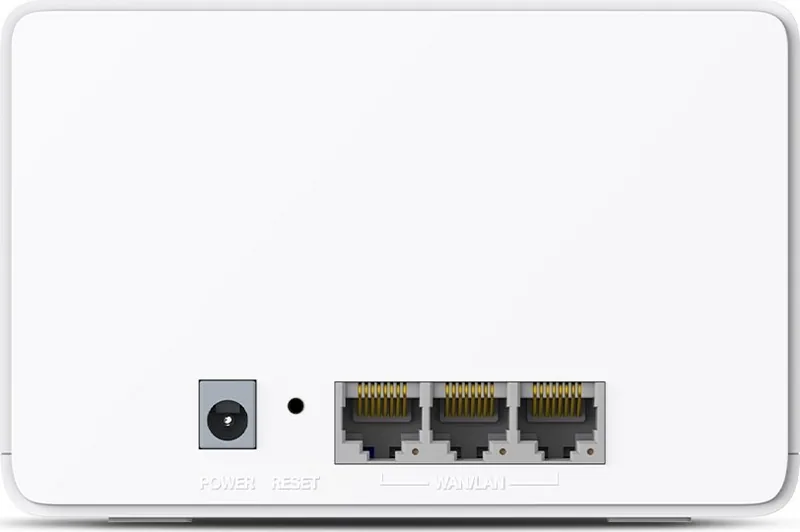
1x Router, Total Base Connections: 3x 1000Base-T WAN/LAN
Transmission Rate 802.11ax (Wi-Fi 6 / Wi-Fi 6E) 2.4GHz
574Mbps (Spatial Streams: 2x2, Bandwidth: 40MHz, Modulation: 1024-QAM)
Transmission Rate 802.11ax (Wi-Fi 6 / Wi-Fi 6E) 5GHz
2402Mbps (Spatial Streams: 2x2, Bandwidth: 160MHz, Modulation: 1024-QAM)
Note
Transmission rate specification for 802.11ax at 2.4GHz and 5GHz. (802.11ax (2.4GHz) 2x2 40MHz 1024-QAM: 574Mbps, 802.11ax (5GHz) 2x2 80MHz 1024-QAM: 1201Mbps)
Product Description
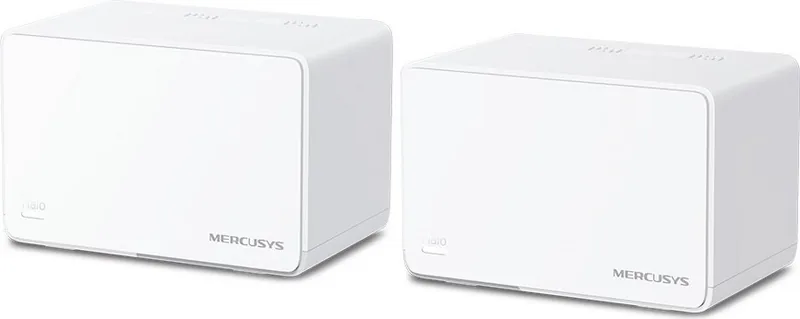
The MERCUSYS Halo H80X revolutionizes home networking with its AX3000 Whole Home Mesh Wi-Fi System. Designed for modern households demanding high speed and reliability, this device ensures stable connections across every corner of your living space. Setting up your network is incredibly straightforward using the dedicated MERCUSYS app, which guides you through every step of the process. You simply download the app from your device store, create a Mercusys ID, and follow the prompts to configure your new router efficiently. This seamless process minimizes downtime and gets you connected.
Advanced Features for Smart Homes
Once connected, users gain access to a robust dashboard packed with utilities. Here, you can monitor connected devices in real time, manage network security settings, and control configurations with intuitive taps. The Halo offers powerful tools like Parental Controls, allowing you to create specific profiles for family members. You can restrict internet access. Additionally, the Quality of Service (QoS) feature prioritizes bandwidth for critical tasks like video calls, online gaming, or streaming services. Guest networks are also supported, keeping your main personal network secure while allowing visitors temporary access without compromising your primary data privacy.
Hardware and Status Indicators
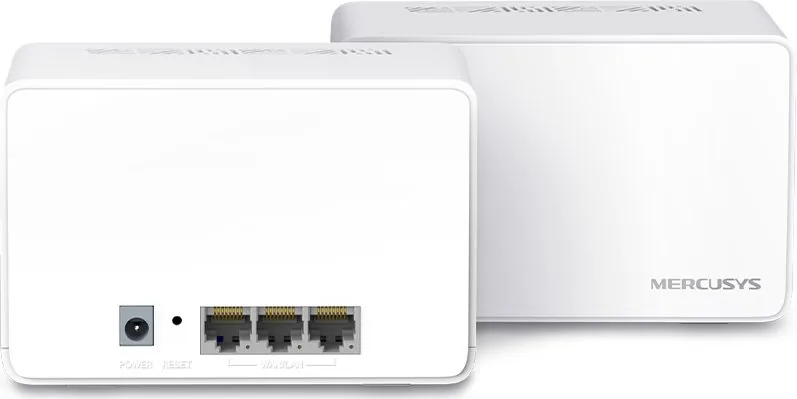
Each Halo unit features customizable LED indicators that display status at a glance. Colors range from solid blue during setup to solid white indicating registered. Solid red typically indicates a hardware issue, while pulsing yellow signals a factory reset. The hardware includes multiple WAN and LAN auto-sensing ports, making it compatible with various ISP modem configurations. For those interested in technical specifications, the MERCUSYS Halo H80X Manual confirms compliance with EU safety standards and offers detailed safety guidelines regarding electromagnetic fields and pacemakers.
Comprehensive Management Tools
The system supports managers, enabling friends and family to contribute to network administration securely. Each manager holds a unique account to ensure accountability. Monthly reports provide insights into usage statistics and security threats, ensuring you stay informed about network health. Firmware updates are handled directly through the app, keeping the system secure against vulnerabilities. Compatibility is key, though note that H series and S series models cannot operate together. This ecosystem provides a flexible solution for expanding Wi-Fi coverage without the hassle of dead zones or signal loss.
Safety and Environmental Standards
Users should keep the device away from water or heat. Operating temperature ranges from zero to forty degrees Celsius. The device meets strict regulatory requirements for radio equipment and emissions. Proper ventilation is essential to prevent overheating. Regular maintenance involves simply ensuring clean power adapters are recommended for the device.
Search for 67,706 Manuals online


Type-in Brand or Model