
MERCUSYS AC12 Manual
PDF manual · 67 Pages
English



Quick check
Incorrect answer, please try again.
Chat with your MERCUSYS AC12 manual using AI
Get instant AI answers from your MERCUSYS AC12 manual
Ask anything about the MERCUSYS AC12. Answers come from this manual, with the pages they are based on.
Ask a Question
Do you recommend AC12?
Yes NoFrequently Asked Questions
Press and hold the Reset button on the rear panel for more than five seconds until the LEDs blink quickly. Alternatively, log in to the web interface and navigate to System Tools > Backup & Restore to perform a factory default restore.
Is this answer helpful?
The router does not come with a pre-set password. Upon first login, you will be prompted to create a new admin password. The default IP address is 192.168.1.1 and the domain is mwlogin.net.
Is this answer helpful?
Yes, as long as your fiber provider uses an Ethernet cable output from their ONT (Optical Network Terminal). Connect the ONT to the WAN port and configure the appropriate connection type in the router settings.
Is this answer helpful?
Yes, the router supports IPv6 configuration under the Network menu. You can select Pass-Through mode or Router mode depending on your ISP's deployment requirements.
Is this answer helpful?
While there is no strict hard limit, the 2x2 MIMO architecture handles typical home loads efficiently. Performance may vary based on the number of active devices and their data consumption patterns.
Is this answer helpful?
Advantages and Disadvantages
Advantages

- Dual-band support ensures fast speeds and reduced interference
- Easy quick setup wizard simplifies initial configuration
- Comprehensive parental controls and access management features
- Supports multiple WAN connection types including PPPoE and VPN
- Clear LED indicators provide immediate status feedback
Disadvantages

- No built-in USB port for storage or printer sharing
- Limited channel width options compared to higher-end models
- Guest network bandwidth throttling requires manual setup
- Default firmware may lack some advanced security patches immediately
- Plastic build feels less durable than metal alternatives
Product Specification
Modem
N/A
Wireless
WLAN 802.11a/b/g/n/ac (Wi-Fi 5), simultaneous
Transfer Rate
300Mbps (2.4GHz), 867Mbps (5GHz)
Security
WPA, WPA2, WPS
Antennas
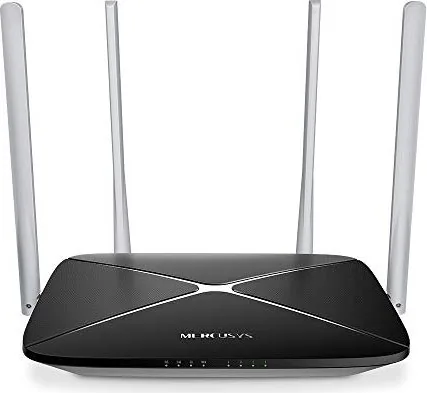
4 external
Power Consumption
Not specified (operating consumption), not specified (max power supply output)
Dimensions
8.74x5.51x1.26 inches
Features
IPv6, MU-MIMO
Band Capability
Dual Band (simultaneous)
Manufacturer Warranty
two years
Product Description
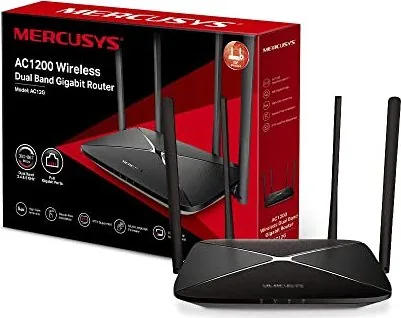
MERCUSYS AC1200 Wireless Dual Band Gigabit Router Review
The MERCUSYS AC1200 router is a powerful networking solution designed for small offices and home environments. It integrates a four-port switch, firewall, NAT router, and wireless access point into a single compact device. Powered by 2x2 MIMO technology, this router delivers exceptional range and speed, making it ideal for users demanding high-performance networking without the complexity of enterprise-grade equipment.
Key Features and Performance
This dual-band router operates on both 2.4GHz and 5GHz frequencies, ensuring compatibility with a wide range of devices while minimizing interference. The 2.4GHz band offers robust coverage for everyday tasks, while the 5GHz band provides faster speeds for streaming and gaming. With support for WPA2-PSK security using AES encryption, your network remains protected against unauthorized access.
The hardware design includes clear LED indicators on the front panel to show system status, Wi-Fi activity, WAN connection, and LAN port usage. The rear panel features four LAN ports, one WAN port for connecting to your modem, a power socket, and a dedicated WPS/Reset button for easy setup or recovery.
Configuration and Management
Setting up the MERCUSYS AC1200 is straightforward thanks to the Quick Setup Wizard accessible via http://mwlogin.net. Users can customize SSIDs and passwords for both frequency bands easily. Advanced configuration options allow for detailed control over WAN settings including PPPoE, Dynamic IP, Static IP, L2TP, and PPTP protocols. Network controls include parental controls and access lists to manage who connects and when.
Additional features like Virtual Server, DMZ host, UPnP, and Dynamic DNS cater to advanced users needing specific port forwarding or remote access capabilities. The system tools section enables firmware upgrades, backup and restore functions, and diagnostic tools like Ping and Tracert to troubleshoot connectivity issues effectively.
Important Notes
- Always keep the router in a well-ventilated area away from heat sources.
- Maintain at least 20cm distance between the device and your body during operation to comply with RF exposure limits.
- Use only the provided power adapter to ensure safety and optimal performance.
Search for 67,706 Manuals online


Type-in Brand or Model