
MDT DALI Control PRO64 Manual
PDF manual · 3 Pages
English



Quick check
Incorrect answer, please try again.
Chat with your MDT DALI Control PRO64 manual using AI
Get instant AI answers from your MDT DALI Control PRO64 manual
Ask anything about the MDT DALI Control PRO64. Answers come from this manual, with the pages they are based on.
Ask a Question
Do you recommend DALI Control PRO64?
Yes NoFrequently Asked Questions
The gateway controls up to 64 electronic ballasts (ECGs) complying with EN 62386-101/102 (DALI 1 and DALI-2). It also supports up to eight DALI-2 motion or light sensors (EN 62386-303/304) and emergency lighting per EN 62386-202.
Is this answer helpful?
The gateway supplies DALI power directly (typical 18 V DC, short-circuit proof) with a guaranteed 160 mA and maximum 250 mA output. For larger device counts or higher current draws, an additional DALI power supply may be necessary to remain within guaranteed limits.
Is this answer helpful?
Commissioning requires assigning a physical KNX address and loading the application via ETS5/6. MDT provides a Device Control App (DCA) and an etsapp available from MDT’s website; press the programming key when prompted and verify programming LED status.
Is this answer helpful?
Mount on DIN-35 mm rail (4TE). Connect KNX via bus connector, mains and DALI via screw terminals. Use recommended 1.5 mm² conductors, keep DALI segment under 300 m, and insulate KNX conductors with supplied shrink tube to ensure double basic insulation.
Is this answer helpful?
Yes. Multi-master operation per EN 62386-103 ed2 is supported. The gateway also supports single-battery and central-battery emergency lighting systems compliant with EN 62386-202.
Is this answer helpful?
Full functionality requires ETS5 or ETS6 plus the MDT Device Control App (DCA) etsapp and the product knxprod database. The device is KNX certified and complies with EN 62386 series standards and applicable EMC and safety directives.
Is this answer helpful?
Advantages and Disadvantages
Advantages

- Supports up to 64 ballasts with individual and 16-group control for flexible addressing.
- Integrated DALI power supply (typ. 18 VDC) removes the need for external DALI PSU in most setups.
- Compatible with DALI-1 and DALI-2 devices plus up to 8 DALI-2 sensors for modern sensor integration.
- ETS5/6 Device Control App (DCA) support enables streamlined configuration and commissioning.
- DIN-rail 4TE housing and RJ45 Ethernet simplify professional panel installations and network access.
Disadvantages

- DALI supply current limited (guaranteed 160 mA, max 250 mA) — may require external PSU for large loads.
- Device must be installed and commissioned by qualified electricians, adding installer dependency.
- Maximum DALI segment length 300 m and recommended 1.5 mm² cable impose wiring constraints.
- Use is restricted to regions compliant with CE; not permitted for use in USA and Canada.
- Some advanced configuration requires downloading and installing the MDT etsapp and knxprod database.
Product Specification
Type
Control Unit Hardware
Standard
KNX
Function
Gateway
Topology
Star
Special Features
IP20
Product Description
MDT DALI Control PRO64 Gateway — Powerful DALI-to-KNX Integration
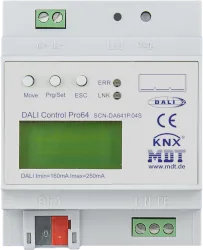
The MDT DALI Control PRO64 Gateway is a compact, DIN-rail mounted multi-master application controller that bridges KNX systems and DALI lighting networks. Housed in a 4TE enclosure, this gateway converts KNX switching and dimming commands into DALI telegrams and translates DALI status and events back into KNX messages. It supports both DALI 1 and DALI-2 standards (EN 62386-101/102), plus DALI-2 motion and light sensors (EN 62386-303/304), enabling flexible, standards-compliant lighting control for commercial and residential installations.
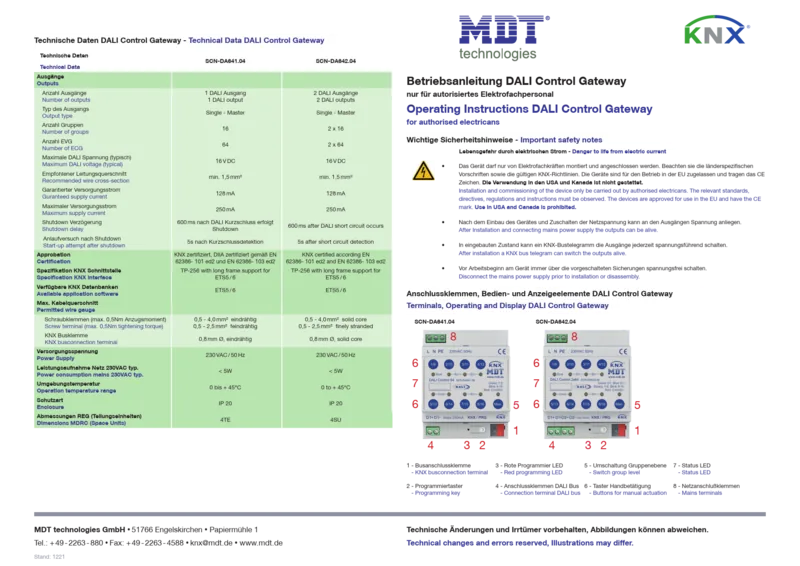
Designed to control up to 64 electronic ballasts (ECGs) via a single DALI output, the PRO64 provides group control for 16 groups and individual addressing for each of the 64 devices. Up to eight DALI-2 sensors can be powered and managed directly from the gateway, and emergency lighting (single-battery and central-battery systems per EN 62386-202) is supported. The device supplies the required DALI power (typical 18 VDC, short-circuit proof) with a guaranteed 160 mA and maximum 250 mA output, removing the need for external DALI power supplies in most setups.
Installation is straightforward: mount on a DIN-35 mm rail, connect KNX and mains via screw terminals, attach the DALI bus (recommended 1.5 mm², max 300 m per segment), and connect Ethernet via RJ45 as needed. The bus connector and programming key with a red LED make commissioning with ETS5/6 and the MDT Device Control App simple. The gateway supports multi-master operation (EN 62386-103 ed2) and includes a shrink tube for KNX insulation to meet double basic insulation recommendations.
The PRO64 integrates tightly into ETS workflows via MDT’s DCA (Device Control App). Make sure to install the corresponding etsapp alongside the knxprod database for full configuration options. The gateway’s KNX interface supports TP-256 with long frame for ETS5, and the product is KNX and DiiA certified, meeting EMC and relevant safety standards.
Whether you need centralized group scenes, fine-grained individual dimming, sensor-based automation, or emergency-lighting compliance, the MDT DALI Control PRO64 Gateway is a robust solution for professional KNX-DALI installations.
Notes
- Ensure only qualified electricians install and commission the device; follow local regulations.
- Observe the 300 m maximum DALI segment length and recommended 1.5 mm² conductor.
- Verify total DALI device current draw does not exceed the guaranteed supply current.
- Download the latest application software and MDT etsapp from the MDT website before commissioning.
Search for 67,732 Manuals online


Type-in Brand or Model