Manual.ly Logo

Mackie MainStream Manual

0.0 · 0 Ratings

PDF manual · 24 Pages

English

M: QW-35-FL
page

/ 24

Loading...
8d0f16a2bd3cca724fba335bcc9fb5269371 page 2
MAINSTREAM COMPLETE LIVE STREAMING & VIDEO CAPTURE INTERFACE WITH PROGRAMMABLE CONTROL KEYS
2
Important Safety Instructions
1. Read these instructions.  
2. Keep these instructions.
3. Heed all warnings.
4. Follow all instructions.
5. Do not use this apparatus near water.
6. Clean only with a dry cloth.
7. Do not block any ventilation openings.
Install in accordance with the manufacturer’s instructions.
8. Minimum distance (5 cm) around the apparatus for sucient ventilation.
The ventilation should not be impeded by covering the ventilation openings
with items, such as newspapers, table-cloths, curtains, etc.
9. Do not install near any heat sources such as radiators, heat registers,
stoves, or other apparatus (including amplifiers) that produce heat.
10. No naked flame sources, such as lighted candles, should be placed
on the apparatus.
11. Do not defeat the safety purpose of the polarized or grounding-type plug.
A polarized plug has two blades with one wider than the other. A grounding-
type plug has two blades and a third grounding prong. The wide blade or the
third prong are provided for your safety. If the provided plug does not fit into
your outlet, consult an electrician for replacement of the obsolete outlet.
12. Protect the power cord from being walked on or pinched particularly
at plugs, convenience receptacles, and the point where they exit
from the apparatus.
13. Only use attachments/accessories specified by the manufacturer.
14. Use only with a cart, stand, tripod, bracket,
or table specified by the manufacturer, or sold
with the apparatus. When a cart is used, use
caution when moving the cart/apparatus combination
to avoid injury from tip-over.
15. Unplug this apparatus during lightning storms
or when unused for long periods of time.
16. Refer all servicing to qualified service personnel.
Servicing is required when the apparatus has been damaged in any way,
such as power-supply cord or plug is damaged, liquid has been spilled
or objects have fallen into the apparatus, the apparatus has been exposed
to rain or moisture, does not operate normally, or has been dropped.
17. This apparatus shall not be exposed to dripping or splashing,
and no object filled with liquids, such as vases or beer glasses,
shall be placed on the apparatus.
18. Do not overload wall outlets and extension cords as this can result
in a risk of fire or electric shock.
19. The use of apparatus is in moderate climates. [113 ˚F / 45 ˚C maximum].
PORTABLE CART
WARNING
WARNING — To reduce the risk of fire or electric shock, do not expose this apparatus
to rain or moisture.
20. NOTE: This device complies with Part 15 of the FCC Rules [and contains
license-exempt transmitter(s)/receiver(s) that comply with Innovation,
Science and Economic Development Canada’s license-exempt RSS(s)].
Operation is subject to the following two conditions:
(1) this device may not cause harmful interference, and
(2) this device must accept any interference received, including
interference that may cause undesired operation.
L’émetteur/récepteur exempt de licence contenu dans le présent
appareil est conforme aux CNR d’Innovation, Sciences et Développement
économique Canada applicables aux appareils radio exempts de licence.
L’exploitation est autorisée aux deux conditions suivantes:
(1) l’appareil ne doit pas produire de brouillage, et
(2) l’appareil doit accepter tout brouillage radioélectrique subi, même
si le brouillage est susceptible d’en compromettre le fonctionnement.
CAUTION: Changes or modifications to this device not expressly
approved by LOUD Audio, LLC. could void the user’s authority
to operate the equipment under FCC rules.
21. This apparatus does not exceed the Class B limits for radio noise
emissions from digital apparatus as set out in the radio interference
regulations of the Canadian Department of Communications.
Canada ICES-003(B)/NMB-003(B)
ATTENTION
— Le présent appareil numérique n’émet pas de bruits
radioélectriques dépassant las limites applicables aux appareils
numériques de class A/de class B (selon le cas) prescrites dans
le réglement sur le brouillage radioélectrique édicté par les ministere
des communications du Canada.
22. Exposure to extremely high noise levels may cause permanent hearing
loss. Individuals vary considerably in susceptibility to noise-induced
hearing loss, but nearly everyone will lose some hearing if exposed
to suciently intense noise for a period of time. The U.S. Government’s
Occupational Safety and Health Administration (OSHA) has specified
the permissible noise level exposures shown in the following chart.
According to OSHA, any exposure in excess of these permissible limits
could result in some hearing loss. To ensure against potentially dangerous
exposure to high sound pressure levels, it is recommended that all
persons exposed to equipment capable of producing high sound
pressure levels use hearing protectors while the equipment
is in operation. Ear plugs or protectors in the ear canals
or over the ears must be worn when operating the equipment
in order to prevent permanent hearing loss if exposure is in excess
of the limits set forth here:
Duration, per
day in hours
Sound Level dBA,
Slow Response
Typical Example
8 90 Duo in small club
6 92
4 95 Subway Train
3 97
2 100 Very loud classical music
1.5 102
1 105 Ty screaming at Troy about deadlines
0.5 110
0.25 or less 115 Loudest parts at a rock concert
Correct disposal of this product: This symbol indicates that this product should not be disposed of with your household waste, according to the WEEE directive (2012/19/EU)
and your national law. This product should be handed over to an authorized collection site for recycling waste electrical and electronic equipment (EEE). Improper handling of
this type of waste could have a possible negative impact on the environment and human health due to potentially hazardous substances that are generally associated with EEE.
At the same time, your cooperation in the correct disposal of this product will contribute to the eective usage of natural resources. For more information about where you can
drop o your waste equipment for recycling, please contact your local city oce, waste authority, or your household waste disposal service.

Chat with your Mackie MainStream manual using AI

Get instant AI answers from your Mackie MainStream manual

Ask anything about the Mackie MainStream. Answers come from this manual, with the pages they are based on.

MainStream Maintenance Schedule

As needed
Update firmware

Download and install the latest firmware from the product page using the USB-C connection to ensure optimal performance.

Show in the manual (page 11)
Periodically
Clean with dry cloth

Clean the apparatus only with a dry cloth as specified in the safety instructions.

M: qwen/qwen3.8-flash

Ask a Question

0/1000

Do you recommend MainStream?

Yes No

Frequently Asked Questions

A

It is a live streaming and video capture interface designed to integrate video, audio and stream control into a single device for gamers and podcasters.

Is this answer helpful?

A

Yes, you can connect a gaming console to the HDMI input jack for video capture up to 1080p60 while viewing the game via the passthrough at 4K60.

Is this answer helpful?

A

The unit is USB bus powered through a single USB-C 3.1 port, drawing between 7.5W and 15W from the connected computer.

Is this answer helpful?

A

Yes, Channel 1 XLR input includes a 48V Phantom Power switch for compatible condenser microphones, but it must be off for ribbon mics.

Is this answer helpful?

A

The passthrough output supports up to 4Kp60 Ultra HD resolution while the capture input is limited to 1080p60 Full HD resolution.

Is this answer helpful?

A

Yes, the 1/8 inch smartphone jack features a Mix-Minus function to prevent echo or loopback for remote guests joining your stream.

Is this answer helpful?

A

Verify all input and output knobs are not muted or at minimum volume, check cable connections are secure, and confirm devices are powered on.

Is this answer helpful?

M: QW-35-FL

Advantages and Disadvantages

Advantages

  • Single device integration for audio and video with minimal desk clutter
  • Zero-latency direct monitoring for critical recording sessions
  • 4K passthrough support allows for low latency gaming viewing
  • Programmable multifunction keys trigger scenes or samples instantly
  • USB-C bus powering eliminates need for external power adapters
VS

Disadvantages

  • Headphone amplifier level very loud risking hearing damage if not careful
  • Requires certified USB-C cables rated 3.1 or higher for operation
  • Capture resolution limited to 1080p60 despite 4K passthrough capability
  • No internal battery backup requires continuous connection to computer
  • Phantom power can damage sensitive ribbon mics if misconfigured
M: QW-35-FL

Product Specification

Interface

USB-C 3.1

Input Channels

2

Output Channels

2

Mic Preamps

1

Analog Inputs

1x Mic In (XLR/0.25 in Combo), 1x Mic In (0.14 in Jack), 1x Stereo Line In (0.14 in Jack)

Analog Outputs

2x Line Out (0.25 in Jack), 1x Headphones (0.25 in Jack)

Digital Inputs

no

Digital Outputs

no

AD/DA Converters

24-bit/48 kHz

Features

Bus powered, HDMI In/Out, Level Meter, Streaming Interface

Dimensions

8.43x2.44x3.74 in (WxHxD)

Weight

1.32 lbs

M: QW-35-FL

Product Description

Elevating your broadcast quality is simpler than ever with the Mackie MainStream interface. This powerful device combines live streaming and video capture capabilities into a single, compact hub designed for modern creators. Gamers and podcasters appreciate the seamless integration of professional audio and video connections. By connecting your microphone, game feed, and camera sources directly, you achieve a sleek setup that puts essential audio controls right at your fingertips. Ensuring streams look crisp and sound engaging for viewers.

Comprehensive Connectivity Options

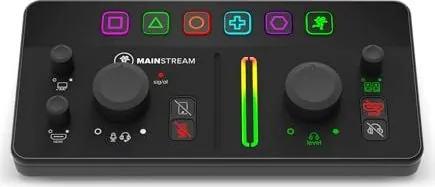
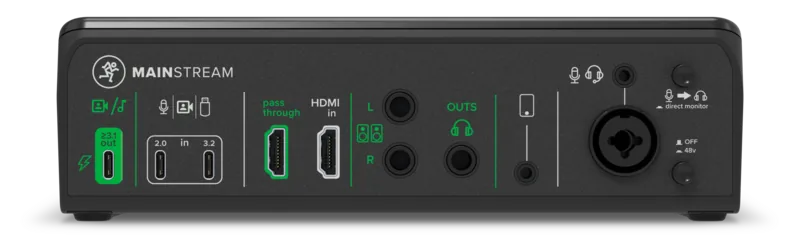
The rear panel offers versatile inputs including XLR combo jacks for dynamic or condenser microphones with phantom power support. An HDMI input handles video capture up to 1080p60 while passthrough supports 4K viewing for gaming. Dual USB-C ports facilitate webcam connections and act as a hub for ports. You can power the unit via a single USB-C cable connected to a computer, minimizing cable clutter on your desk. The direct monitor switch enables zero-latency audio feedback, crucial for recording accurate voiceovers during live sessions. A dedicated smartphone jack allows remote guests to join without echo using the mix-minus feature for clean audio.

Advanced Control Features

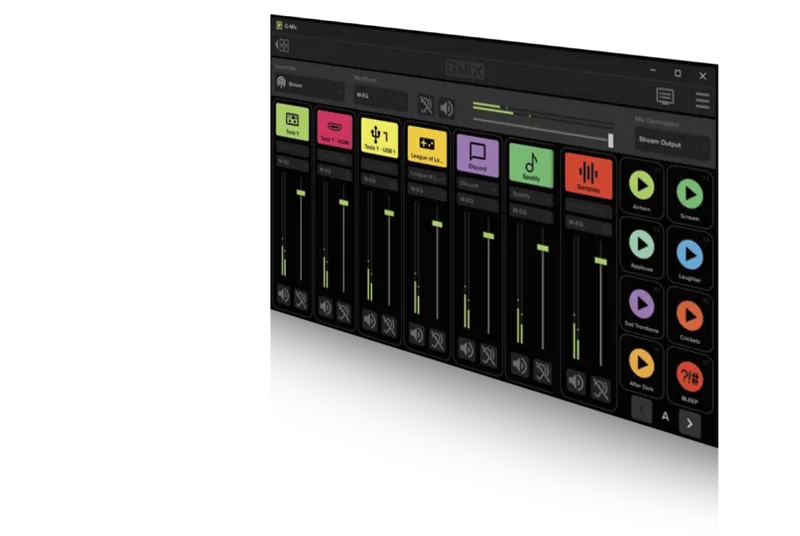
Top panel controls allow precise management of audio levels across all channels. The PC audio return knob adjusts game audio mixing for your stream output simultaneously with music sources. Multifunction keys act as programmable triggers for scene switching or virtual samples within streaming software platforms. You can map these keys to Hot Key Settings in applications like OBS for total customization of actions. Mute buttons illuminate when active to provide visual confirmation of audio status for quick reference. Main meters display signal levels in color, helping you avoid clipping and distortion during intense moments.

Setup and Maintenance Guidelines

Safety instructions advise keeping ventilation openings clear of obstructions to maintain optimal operating temperatures for the hardware. Regularly check your sales receipt for warranty coverage and save the original packaging for future shipping needs. Firmware updates ensure your device maintains compatibility with the latest software and security patches found in the Mackie MainStream Manual. Always turn volume controls to zero before connecting headphones to prevent damaging hearing during setup. Troubleshooting steps suggest verifying all cables are secure and powered on before checking for sound output problem.

Notes: Never exceed 45 degrees Celsius operation to protect components. Do not use unbalanced cables near high noise levels to preserve signal integrity.

M: QW-35-FL

© Copyright 2026 Manual.ly