
Mackie MainStream Manual
PDF manual · 24 Pages
English



Quick check
Incorrect answer, please try again.
Chat with your Mackie MainStream manual using AI
Get instant AI answers from your Mackie MainStream manual
Ask anything about the Mackie MainStream. Answers come from this manual, with the pages they are based on.
MainStream Maintenance Schedule
Download and install the latest firmware from the product page using the USB-C connection to ensure optimal performance.
Clean the apparatus only with a dry cloth as specified in the safety instructions.
Ask a Question
Do you recommend MainStream?
Yes NoFrequently Asked Questions
It is a live streaming and video capture interface designed to integrate video, audio and stream control into a single device for gamers and podcasters.
Is this answer helpful?
Yes, you can connect a gaming console to the HDMI input jack for video capture up to 1080p60 while viewing the game via the passthrough at 4K60.
Is this answer helpful?
The unit is USB bus powered through a single USB-C 3.1 port, drawing between 7.5W and 15W from the connected computer.
Is this answer helpful?
Yes, Channel 1 XLR input includes a 48V Phantom Power switch for compatible condenser microphones, but it must be off for ribbon mics.
Is this answer helpful?
The passthrough output supports up to 4Kp60 Ultra HD resolution while the capture input is limited to 1080p60 Full HD resolution.
Is this answer helpful?
Yes, the 1/8 inch smartphone jack features a Mix-Minus function to prevent echo or loopback for remote guests joining your stream.
Is this answer helpful?
Verify all input and output knobs are not muted or at minimum volume, check cable connections are secure, and confirm devices are powered on.
Is this answer helpful?
Advantages and Disadvantages
Advantages

- Single device integration for audio and video with minimal desk clutter
- Zero-latency direct monitoring for critical recording sessions
- 4K passthrough support allows for low latency gaming viewing
- Programmable multifunction keys trigger scenes or samples instantly
- USB-C bus powering eliminates need for external power adapters
Disadvantages

- Headphone amplifier level very loud risking hearing damage if not careful
- Requires certified USB-C cables rated 3.1 or higher for operation
- Capture resolution limited to 1080p60 despite 4K passthrough capability
- No internal battery backup requires continuous connection to computer
- Phantom power can damage sensitive ribbon mics if misconfigured
Product Specification
Interface
USB-C 3.1
Input Channels
2
Output Channels
2
Mic Preamps
1
Analog Inputs
1x Mic In (XLR/0.25 in Combo), 1x Mic In (0.14 in Jack), 1x Stereo Line In (0.14 in Jack)
Analog Outputs
2x Line Out (0.25 in Jack), 1x Headphones (0.25 in Jack)
Digital Inputs
no
Digital Outputs
no
AD/DA Converters
24-bit/48 kHz
Features
Bus powered, HDMI In/Out, Level Meter, Streaming Interface
Dimensions
8.43x2.44x3.74 in (WxHxD)
Weight
1.32 lbs
Product Description
Elevating your broadcast quality is simpler than ever with the Mackie MainStream interface. This powerful device combines live streaming and video capture capabilities into a single, compact hub designed for modern creators. Gamers and podcasters appreciate the seamless integration of professional audio and video connections. By connecting your microphone, game feed, and camera sources directly, you achieve a sleek setup that puts essential audio controls right at your fingertips. Ensuring streams look crisp and sound engaging for viewers.
Comprehensive Connectivity Options
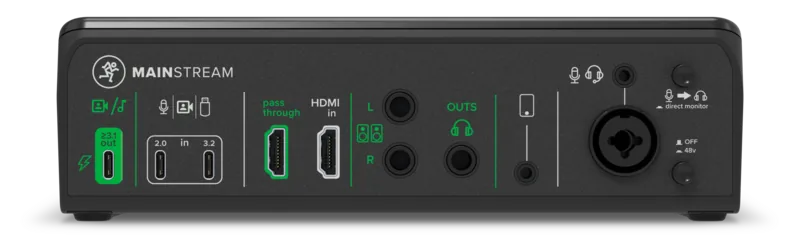
The rear panel offers versatile inputs including XLR combo jacks for dynamic or condenser microphones with phantom power support. An HDMI input handles video capture up to 1080p60 while passthrough supports 4K viewing for gaming. Dual USB-C ports facilitate webcam connections and act as a hub for ports. You can power the unit via a single USB-C cable connected to a computer, minimizing cable clutter on your desk. The direct monitor switch enables zero-latency audio feedback, crucial for recording accurate voiceovers during live sessions. A dedicated smartphone jack allows remote guests to join without echo using the mix-minus feature for clean audio.
Advanced Control Features
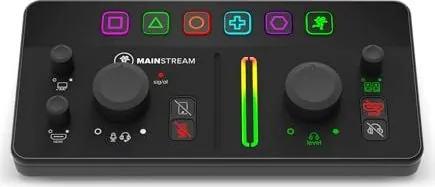
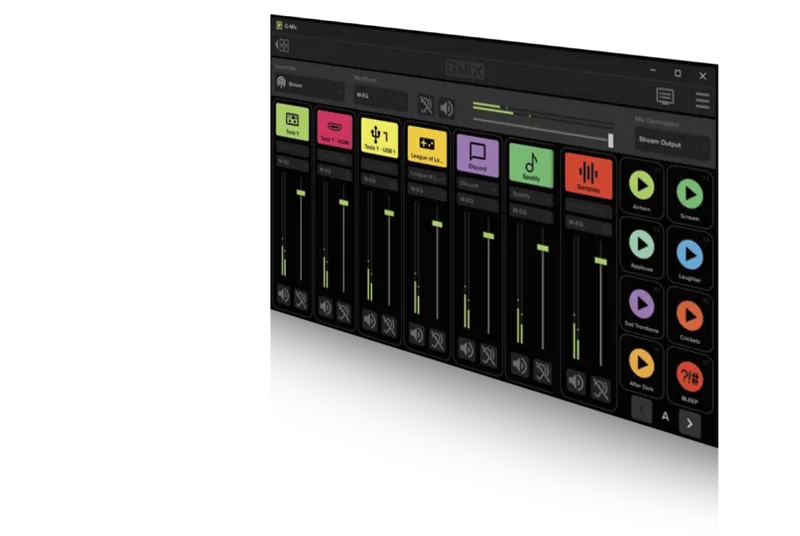
Top panel controls allow precise management of audio levels across all channels. The PC audio return knob adjusts game audio mixing for your stream output simultaneously with music sources. Multifunction keys act as programmable triggers for scene switching or virtual samples within streaming software platforms. You can map these keys to Hot Key Settings in applications like OBS for total customization of actions. Mute buttons illuminate when active to provide visual confirmation of audio status for quick reference. Main meters display signal levels in color, helping you avoid clipping and distortion during intense moments.
Setup and Maintenance Guidelines
Safety instructions advise keeping ventilation openings clear of obstructions to maintain optimal operating temperatures for the hardware. Regularly check your sales receipt for warranty coverage and save the original packaging for future shipping needs. Firmware updates ensure your device maintains compatibility with the latest software and security patches found in the Mackie MainStream Manual. Always turn volume controls to zero before connecting headphones to prevent damaging hearing during setup. Troubleshooting steps suggest verifying all cables are secure and powered on before checking for sound output problem.
Notes: Never exceed 45 degrees Celsius operation to protect components. Do not use unbalanced cables near high noise levels to preserve signal integrity.
Search for 67,706 Manuals online


Type-in Brand or Model