
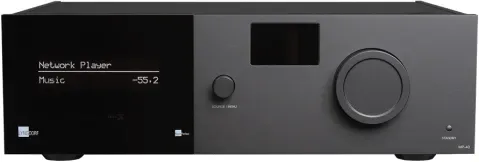
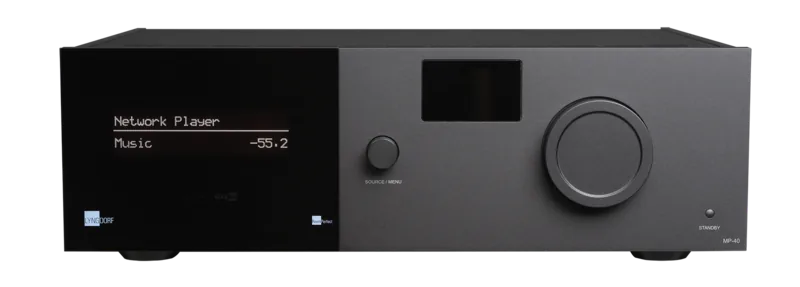
Lyngdorf MP-40 Manual
PDF manual · 36 Pages
English


Quick check
Incorrect answer, please try again.
Chat with your Lyngdorf MP-40 manual using AI
Get instant AI answers from your Lyngdorf MP-40 manual
Ask anything about the Lyngdorf MP-40. Answers come from this manual, with the pages they are based on.
Ask a Question
Do you recommend MP-40?
Yes NoFrequently Asked Questions
Place the calibration microphone at ear height in the main listening position. Measure distances to each speaker from the tweeter center using accurate tools. Ensure room measurements cover the entire room including random positions to achieve high RoomKnowledge percentage above ninety percent. This ensures the system can calculate the best focus and global filters for your specific room.
Is this answer helpful?
Yes, the Lyngdorf MP-40 supports Dolby Atmos, DTS:X, and Auro-3D surround sound formats. It can decode 10 discrete channels from the source and features 16 balanced XLR outputs for discrete channels. It handles object-based formats and upmixes legacy signals to utilize all your speakers for immersive audio experiences.
Is this answer helpful?
Yes, the device supports streaming via network connections. It allows access to UPnP music libraries, Spotify Connect, and AirPlay. It also features a built-in media streamer that supports USB music file playback and vTuner internet radio stations for diverse audio content consumption.
Is this answer helpful?
To pair the RF remote, hold down Play and OK until the green LED flashes. Point the remote at the MP-40 within 30 cm until the LED stops blinking. To switch modes, hold OK and 2 for RF or OK and 1 for IR. Red LED indicates IR mode, Green indicates RF mode.
Is this answer helpful?
If the signal clips, the system will display an error message. This usually happens if the incoming signal is too loud or there is significant noise in the environment. You should reduce the volume of the signal and repeat the measurement to ensure the calibration is not corrupted by distortion.
Is this answer helpful?
Yes, you can update the firmware via the web interface or a USB drive. Updates from remote files occur automatically when connected to the Internet. Updates from local files require uploading a file to a USB drive or using the web upload function. Settings and RoomPerfect data remain intact during updates.
Is this answer helpful?
No, the Zone B audio output does not include RoomPerfect filters. It outputs a stereo downmix of the movie in the main room or other sources without the specific room correction applied to the main zone. It is designed for adjacent spaces like a bar area outside the listening area.
Is this answer helpful?
Advantages and Disadvantages
Advantages

- Advanced RoomPerfect calibration optimizes sound for specific room acoustics effectively.
- Support for Dolby Atmos, DTS:X, and Auro-3D surround formats enhances movies significantly.
- Extensive connectivity includes HDMI 2.0b, USB, Network, and multiple trigger outputs for flexibility.
- Customizable Voicing allows different sound profiles for each audio source input independently.
- Remote control works in both RF and IR modes for flexible operation in any lighting.
Disadvantages

- RoomPerfect calibration requires careful microphone placement and measurement steps to complete.
- Rack mounting requires removal of factory feet which might void warranty if not done correctly.
- High voltage range detection is automatic but requires stable mains connection for best performance.
- Some complex features like Zone B do not include RoomPerfect filtering for sound correction.
- IP control setup may require technical knowledge for third party integrations to work fully.
Product Specification
Type
A/V Preamp
Channels
15.1
Tuner
Internet Radio
Audio Decoder
Auro-3D, Dolby Atmos, Dolby Surround, DTS Neural:X, DTS:X
Audio Connections
eARC, 3x Digital Audio In (coaxial), 4x Digital Audio In (optical), Digital Audio In (AES/EBU), Digital Audio Out (coaxial), 15.1 Multi-Channel Pre Out (XLR)
Video Connections
3x HDMI 2.0b In, 1x HDMI 2.0b Out, HDCP 2.2
Additional Connections
2x USB-A 2.0, USB-B 2.0, RJ-45
Calibration System
RoomPerfect
THD
0.005%
Features
3D ready, HDMI Pass-Through, 4K-Pass-Through, LipSync, Multi-Zone, HDR10, HLG, Dolby Vision, Apple AirPlay, Roon, Spotify
Power Consumption
85W max
Color
Black
Dimensions
17.72 x 5.51 x 14.13 in (WxHxD)
Weight
14.77 lbs
Product Description
Introduction
The Lyngdorf MP-40 stands as a pinnacle of audio engineering tailored for demanding home theater enthusiasts seeking immersive soundscapes and precise acoustic reproduction. This advanced processor supports the latest surround sound technologies including Dolby Atmos, DTS:X, and Auro-3D for true cinematic experiences. Users benefit from full 11.1 discrete channel support plus additional auxiliary outputs for subwoofers or height channels to create depth. A standout feature is the RoomPerfect system which analyzes room acoustics to flatten frequency response and optimize bass management across the entire listening area effectively.
Installation and Connectivity
Installation is straightforward yet flexible for both rack mounting and free-standing placement depending on the specific home layout requirements. The unit automatically detects operating voltage between 100 and 240 volts ensuring global compatibility for international travelers and setups. Proper ventilation requires at least one inch of space around the unit to ensure passive cooling remains effective during long listening sessions. The rear panel provides numerous inputs such as HDMI, USB, and network for versatile integration into modern home networks securely.
Connectivity includes three HDMI inputs and one output compatible with 4K HDR video standards for future proofing home theater systems effectively. Two USB ports facilitate music file playback, software updating, and backup operations to preserve custom settings and calibration data safely. Network connectivity enables digital streaming services like Spotify Connect and AirPlay alongside UPnP library access for wireless music streaming. Setting up the system involves following the guidelines found in the Lyngdorf MP-40 Manual to ensure optimal placement of speakers and calibration of the included measurement microphone accurately.
Calibration and Control
Proper calibration requires placing the microphone at ear height in the main listening position to capture the true acoustic environment details. Users must measure distances to each speaker from the tweeter center accurately using laser tools if available for precision. Room measurements should cover the entire room including random positions to achieve high RoomKnowledge percentage above ninety percent for best results. Voicing settings allow customization per source, letting users tune bass and treble independently without affecting other inputs or zones within the system.
Zone B output supports secondary listening areas with stereo downmix capabilities linked to specific triggers for multi-room audio distribution. Power management options include deep sleep or network wake-up modes to match home automation requirements and reduce energy consumption efficiently. Backup and restore functions safeguard user settings during firmware updates. Troubleshooting is supported through detailed error logs accessible via the network system to identify issues quickly. Software updates can be performed via web or USB drive for convenience. Warranty service requires contact with the local distributor for authorized support.
Search for 67,732 Manuals online


Type-in Brand or Model