

Linksys WUSB6300 Manual
PDF manual · 364 Pages
English



Quick check
Incorrect answer, please try again.
Chat with your Linksys WUSB6300 manual using AI
Get instant AI answers from your Linksys WUSB6300 manual
Ask anything about the Linksys WUSB6300. Answers come from this manual, with the pages they are based on.
Ask a Question
Do you recommend WUSB6300?
Yes NoFrequently Asked Questions
It is a dual-band wireless adapter that upgrades Windows PC connectivity to AC standards.
Is this answer helpful?
Yes, Windows XP is supported but requires specific security updates for WPA2 compatibility.
Is this answer helpful?
Insert the included disc and follow the software setup or allow Windows to auto-detect the driver.
Is this answer helpful?
It supports WPA2 Personal, WPA2 Enterprise, and WEP encryption standards for network security.
Is this answer helpful?
Yes, the 5GHz band reduces interference to provide a stable connection suitable for gaming.
Is this answer helpful?
Speeds reach up to 300 Mbps on 2.4GHz and 433 Mbps on 5GHz depending on router capability.
Is this answer helpful?
Advantages and Disadvantages
Advantages

- Dual-band 2.4GHz and 5GHz support for reduced interference
- USB 3.0 interface maximizes data throughput speed
- Compatible with wide range from Windows XP to version 8
- Dedicated WPS button simplifies router connection setup
- Compact physical design does not clutter USB ports
Disadvantages

- Windows XP requires specific updates for WPA2 compliance
- Installation often relies on included driver disc
- Older OS support may lack latest security features
- Internal antennas may have limited range compared to external
- Driver recognition can be inconsistent on some systems
Product Specification
Type
Wi-Fi Adapter
Form Factor
1x USB Stick
Connection
1x USB-A 3.0 (Connector, 5Gbps)
Connectivity
1x Wi-Fi 802.11a/b/g/n/ac (1x 2.4GHz or 1x 5GHz, WPS Button), 1x Signal Amplifier, 1x Antenna (integrated, 2x electrical)
Data Rate
1x 2.4GHz Wi-Fi (300Mbps, 2x2), 1x 5GHz Wi-Fi (867Mbps, 2x2)
Power Supply
Powered via connection only
Chipset
Realtek RTL8812AU (Wi-Fi Adapter)
Dimensions
1.18 x 0.43 x 3.50 in (W x H x D)
Weight
0.60 oz
Compatibility
Universal
USB Designation
Link
Product Description
Linksys AC1200 USB Adapter Review
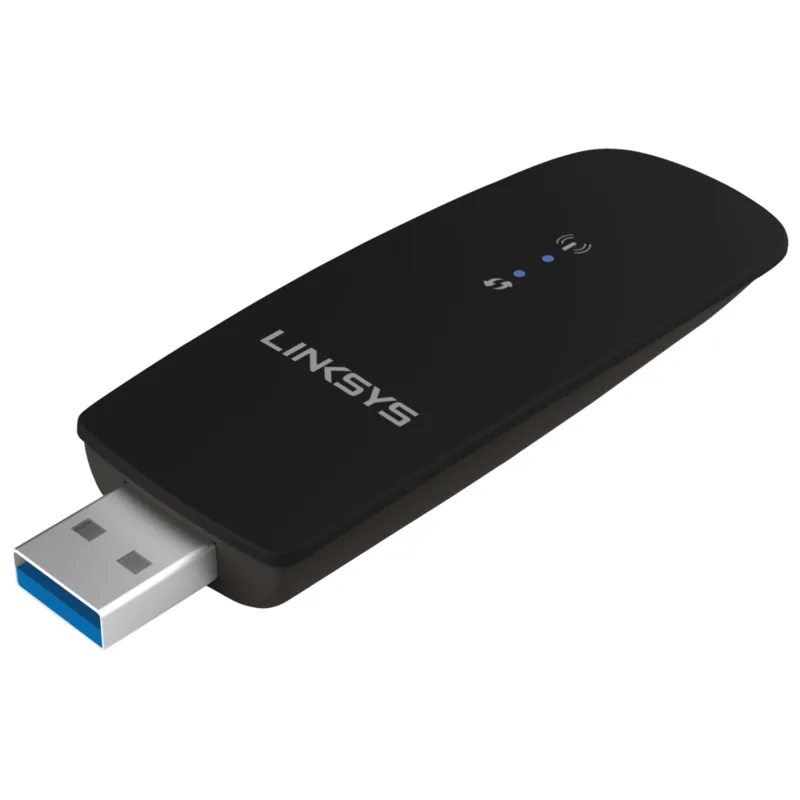
The Linksys WUSB6300 AC1200 represents a significant step forward in personal wireless connectivity for PC users worldwide. Designed specifically for Windows-based desktops and laptops, this dual-band adapter transforms devices that lack built-in advanced networking capabilities into high-speed internet hubs. By leveraging the modern AC technology, users benefit from dedicated support for both 2.4GHz and 5GHz frequencies. This dual-band capability is crucial for reducing interference from neighboring networks and devices, resulting in a significantly more stable connection suitable for demanding applications like streaming high-definition media, online gaming, or transferring large files across a local network. Installation procedures are streamlined to minimize user frustration during the initial setup phase. While the product includes driver software on a compact disc for guiding the installation process, many newer Windows operating systems often recognize the hardware automatically upon connection. The high-speed USB 3.0 interface ensures that data throughput is maximized, effectively preventing potential bottlenecks that slower USB 2.0 ports might introduce during periods of high-demand network usage. Security protocols remain a top priority during configuration, as the device supports robust WPA2 Personal and Enterprise standards alongside legacy WEP options to ensure that your sensitive personal data remains protected from unauthorized access attempts.
Connectivity Features
Physical operation is visually indicated by bright LED lights located on the front panel of the compact plastic casing. One light signals power status while the adjacent indicator signals wireless activity, making it easy to verify connectivity status at a glance without opening menus. For consumers who prefer a quicker setup method, the dedicated Wi-Fi Protected Setup button simplifies the connection process directly to a compatible router without requiring complex password entry procedures. Software compatibility spans a wide range of Windows environments, extending from XP up to version 8 in both 32-bit and 64-bit formats. This versatility makes it an excellent upgrade tool for older enterprise or home hardware. However, users relying on Windows XP should be aware that specific security updates are recommended for full WPA2 compliance to ensure network security standards are met. The small physical design allows it to remain attached to a desktop PC tower without cluttering the port area or creating cable management issues.
Performance and Support
This device is highly suitable for home offices or individual users seeking reliable AC performance without the need for expensive hardware overhauls. Troubleshooting is supported via built-in OS utilities if connection issues arise, often resolving problems by simply checking the network adapter status in the control panel settings. The unit measures roughly three and a half inches in length and weighs less than an ounce. It carries multiple international safety certifications to ensure durability. Connectivity speeds reach up to 300 Mbps on the 2.4GHz band and 433 Mbps on the 5GHz band. Users can access round-the-clock technical support through the company website for any configuration questions.
Search for 67,706 Manuals online


Type-in Brand or Model