
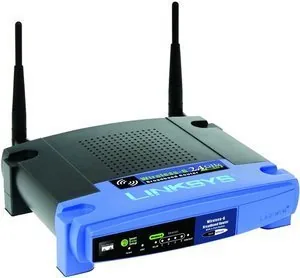
Linksys WRT54GL Manual
PDF manual · 41 Pages
English



Quick check
Incorrect answer, please try again.
Chat with your Linksys WRT54GL manual using AI
Get instant AI answers from your Linksys WRT54GL manual
Ask anything about the Linksys WRT54GL. Answers come from this manual, with the pages they are based on.
Ask a Question
Do you recommend WRT54GL?
Yes NoVideo Manual
Linksys WRT54G setup | How to install and troubleshooting | Easy Steps
Frequently Asked Questions
The WRT54GL supports IEEE 802.11g and is backward-compatible with 802.11b, with a maximum theoretical wireless data rate of up to 54 Mbps on the 2.4 GHz band.
Is this answer helpful?
Connect a computer to the router, open a browser and enter the default IP address 192.168.1.1. Leave the username blank and use the default password 'admin' (change it under Administration > Management after first login).
Is this answer helpful?
The router supports WPA Personal and WPA2 Personal/Enterprise, WEP, wireless MAC filtering, NAT with an SPI firewall, and additional features like access restrictions, VPN passthrough, and secure remote management (HTTPS option).
Is this answer helpful?
Yes — use Applications & Gaming settings for port range forwarding or port triggering, or place a device in the DMZ for full exposure. For better security, prefer specific port forwarding over using DMZ.
Is this answer helpful?
Use the MAC Address Clone feature in Setup to clone the MAC of your previously registered device, or manually enter the ISP-registered MAC address so the router can access the service without re-registering.
Is this answer helpful?
While reliable for basic tasks, the WRT54GL’s 802.11g/2.4 GHz hardware and 10/100 LAN ports limit throughput. For heavy streaming, many simultaneous clients, or gigabit wired speeds, a modern dual-band or 802.11ac/ax router is recommended.
Is this answer helpful?
Either press and hold the Reset button on the back for about five seconds, or go to Administration > Factory Defaults in the web utility and select the option to restore defaults, then save settings.
Is this answer helpful?
Advantages and Disadvantages
Advantages

- Supports WPA/WPA2 and SPI firewall for strong fundamental security.
- Comprehensive web-based configuration: port forwarding, QoS, DDNS, MAC clone.
- Simple setup with included wizard and SecureEasySetup for easier wireless pairing.
- Four 10/100 Ethernet ports plus full NAT routing for small networks.
- Compatible with open-source firmware for advanced customization.
Disadvantages

- Limited to 802.11g (2.4 GHz) — lower throughput than modern dual-band routers.
- 10/100 LAN ports restrict wired network speed compared with gigabit alternatives.
- Aging hardware and firmware may lack recent security or performance enhancements.
- No built-in modern features like MU-MIMO, beamforming, or 5 GHz support.
- WEP support exists but is insecure; requires WPA2 for acceptable protection.
Product Specification
Modem
N/A
WAN
1x 100Base-TX
LAN
4x 100Base-TX
Wireless
WLAN 802.11b/g
Data Rate
54Mbps (2.4GHz)
Security
64/128bit WEP, WPA, WPA2
Antennas
2x external
Power Consumption
not specified (consumption, operation), not specified (max. power supply output)
Special Features
OpenWRT, DD-WRT
Band Capability
Single Band
Manufacturer Warranty
three months
Note
Open-/DD-WRT may only be available for certain revisions, please refer to further links!
Product Description
Linksys WRT54GL — Reliable Wireless-G Router
The Linksys WRT54GL remains a compact, dependable wireless router for home and small-office networks. Built around 802.11g (backward-compatible with 802.11b), it delivers up to 54 Mbps wireless throughput and four 10/100 Ethernet LAN ports for wired devices. Its simple form factor, external antennas, and easy web-based configuration make it a practical choice for users who need stable connectivity without complexity.
Key features and user experience
Out of the box the WRT54GL offers straightforward setup via a browser utility and an included setup wizard. The router supports core broadband connection types (DHCP, Static IP, PPPoE, PPTP, L2TP and regional variants), flexible DHCP server settings, and optional DDNS and MAC address cloning for ISPs that require registered hardware addresses.
Security is a strong point for its era: the WRT54GL supports WPA/WPA2 (Personal and Enterprise), WEP, wireless MAC filtering, NAT, and an SPI firewall. Administrators can fine-tune wireless parameters (SSID, channel, transmit rate, beacon/DTIM intervals), advanced routing (static and RIP dynamic routing), and granular access rules (port forwarding, port triggering, DMZ, QoS and application/port-based policies).
Advanced users benefit from features like firmware upgrade and configuration backup/restore, diagnostic tools (ping/traceroute), logging, and remote management (with optional HTTPS). Wireless multimedia (WMM) and QoS options help prioritize voice and gaming traffic when needed. The unit also includes SecureEasySetup for simplified wireless key distribution and a physical reset button to restore factory defaults.
Practical notes
The WRT54GL is a legacy 2.4 GHz 802.11g device — fine for basic browsing, streaming, and light file sharing, but not comparable to modern dual-band or 802.11n/ac/ax routers for high-density or high-throughput environments. Its compact feature set and support for open-source firmware make it attractive to hobbyists who want custom functionality or who need a stable secondary router.
Overall, the Linksys WRT54GL is a solid, user-friendly router with comprehensive configuration options for network security, NAT/firewall rules, and device prioritization — an economical choice for straightforward wireless networking needs.
Notes
- Supports WPA2, SPI firewall, NAT and wireless MAC filtering for layered security.
- Best suited for legacy or modest home/small-office networks; not designed for high-bandwidth modern Wi‑Fi demands.
- Firmware upgrades and configuration backups are available through the Administration interface.
Search for 67,706 Manuals online


Type-in Brand or Model
apatel40
9 months ago
Do I need to flash DD-WRT/Tomato/OpenWRT to get good performance from the Linksys WRT54GL, or is the original firmware reliable? Is flashing risky for beginners?
Manual.ly
9 months ago
The WRT54GL can be used reliably with the original Linksys firmware for basic home routing (internet access, standard wireless settings). Many buyers flash DD-WRT, Tomato, or OpenWRT to unlock advanced features like better range tuning, bridging, QoS, and more configuration options. Flashing is only risky if you use the wrong firmware or interrupt the process. For the safest approach: use the correct firmware for the WRT54GL model/version, back up your settings, follow the community flashing steps exactly, and perform the recommended NVRAM/reset procedure after flashing. Also note that altering firmware can affect warranty depending on your region and retailer policies.