

Linksys WRT3200ACM Manual
How many stars do you give the WRT3200ACM manual?
PDF manual · 877 Pages
English



/ 877

Quick check
Incorrect answer, please try again.
Chat with your Linksys WRT3200ACM manual using AI
Get instant AI answers from your Linksys WRT3200ACM manual
Ask anything about the Linksys WRT3200ACM. Answers come from this manual, with the pages they are based on.
Ask a Question
Do you recommend WRT3200ACM?
Yes No
maxie17
2 months ago
Does the 5GHz band offer good range through walls, especially in a multi-story home with concrete floors?
Frequently Asked Questions
Connect an Ethernet cable from your modem to the yellow Internet port on the back of the router. Wait for the Internet LED to turn solid white, indicating a successful connection.
Is this answer helpful?
Yes, you can connect USB drives to the USB 3.0 or USB 2.0/eSATA ports to share files, stream media, or set up FTP access across your network.
Is this answer helpful?
MU-MIMO stands for Multi-User Multiple Input Multiple Output. It allows the router to talk to multiple devices at once rather than one by one, significantly reducing latency on busy networks.
Is this answer helpful?
Press and hold the Reset button on the back for about 10 seconds until the power LED starts flashing. This will restore all default configurations.
Is this answer helpful?
Yes, the router works seamlessly with Mac computers. You can manage it using Safari or other supported browsers on macOS.
Is this answer helpful?
Use the wall-mount slots on the bottom feet. Align them with screws inserted into the wall (104mm or 210mm spacing) and slide the router down until it fits snugly.
Is this answer helpful?
Advantages and Disadvantages
Advantages

- MU-MIMO technology allows simultaneous communication with multiple devices
- Dual-band support with 2.4 GHz and 5 GHz frequencies for reduced interference
- Includes USB 3.0 and eSATA combo ports for versatile storage sharing
- Linksys Smart Wi-Fi enables remote management via web or mobile app
- Wall-mountable design with adjustable external antennas for better coverage
Disadvantages

- No built-in mesh capability without additional hardware purchases
- European models require manual power button activation unlike US versions
- LED indicators can be bright and may cause glare in dark rooms
- Setup process requires initial wired connection for configuration
- External power adapter is not detachable from the unit
Product Specification
Modem
N/A
WAN
1x 1000Base-T
LAN
4x 1000Base-T
Wireless
WLAN 802.11a/b/g/n/ac/h (Wi-Fi 5), simultaneous
Transfer Rate
600Mbps (2.4GHz), 2600Mbps (5GHz) split across 3x 867Mbps
Security
WPA, WPA2, WPS
Antennas
4x external (removable)
Ports
1x USB 3.0, 1x USB 2.0 (shared), 1x eSATA (shared)
Power Consumption
No data (consumption, operation), no data (max. power supply output)
Dimensions
9.69x7.64x2.05 inches
Features
MU-MIMO, IPv6, VPN passthrough (IPSec/PPTP), TPC/DFS, OpenWRT, DD-WRT
Band Capability
Tri Band (simultaneous)
Note
Open-/DD-WRT may only be available for certain revisions; please refer to further links!
Product Description
Linksys WRT3200ACM: The Ultimate MU-MIMO Gigabit Router
The Linksys WRT3200ACM stands out as a powerhouse in the world of home networking, designed specifically for users who demand high-speed performance and robust reliability. This dual-band AC router leverages advanced MU-MIMO technology to communicate with multiple devices simultaneously, eliminating the lag often associated with busy networks. Whether you are streaming 4K video, gaming online, or working from home, this device ensures that your bandwidth is distributed efficiently among all connected gadgets.
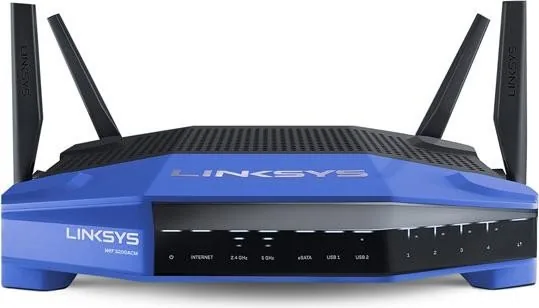
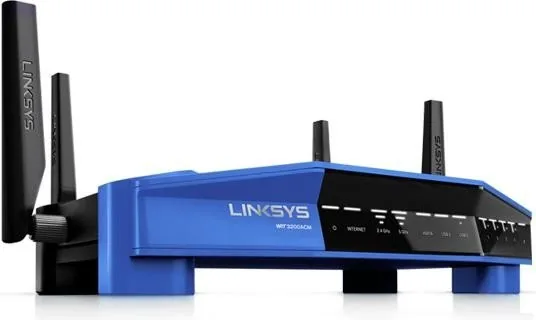
Equipped with four adjustable external antennas, the WRT3200ACM provides superior signal coverage throughout your home. The front panel features intuitive LED indicators for power, internet status, and activity on both 2.4 GHz and 5 GHz bands, allowing you to monitor your network health at a glance. On the back, you will find a comprehensive array of ports including four Gigabit Ethernet ports, a dedicated Internet port, and versatile USB connectivity options. These include a high-speed USB 3.0 port and a combo USB 2.0/eSATA port, enabling you to share storage drives or printers across your entire network easily.
Managing your network has never been simpler thanks to the Linksys Smart Wi-Fi platform. This cloud-based interface allows you to configure settings, set up parental controls, create guest networks, and prioritize media traffic from anywhere in the world using a web browser or mobile app. The system also includes built-in troubleshooting tools to diagnose connection issues quickly. For physical installation, the router offers flexible wall-mounting capabilities with slots on the base, ensuring it can be placed discreetly while maintaining optimal airflow to prevent overheating.
Security is a top priority with support for WPA2 encryption and RADIUS security keys, protecting your data from unauthorized access. The router supports FAT, NTFS, and HFS+ file systems, making it compatible with various operating systems and storage devices. With its sleek design and powerful feature set, the Linksys WRT3200ACM is an excellent choice for modern households requiring a stable and fast wireless experience.
Important Notes
- Always ensure antennas are connected before powering on the device for best performance.
- Use CAT5e or higher cables for Gigabit Ethernet connections to avoid speed bottlenecks.
- Keep the router away from direct sunlight and heat sources to maintain optimal operating temperatures.
Search for 67,706 Manuals online


-
No results found.
Type-in Brand or Model
Alex NetUser
3 months ago
Is this router compatible with OpenWrt and DD-WRT, and are there any known hardware limitations I should be aware of?
Manual.ly
3 months ago
Yes, the Linksys WRT3200ACM is widely supported by alternative firmwares like OpenWrt, DD-WRT, and LEDE due to its strong Marvell CPU and sufficient RAM. However, users have reported that the second 5GHz radio (Marvell 88W8887) lacks driver support for data transmission in many custom images and may require disabling for stable operation. Additionally, some newer hardware revisions with different NAND chips may face booting issues or lack full feature support on third-party firmware. While the device excels at OpenVPN performance and general stability, please verify your specific hardware revision against community forums before purchasing if you plan to use non-stock firmware.