

Linksys LGS300 Manual
PDF manual · 109 Pages
English



Quick check
Incorrect answer, please try again.
Chat with your Linksys LGS300 manual using AI
Get instant AI answers from your Linksys LGS300 manual
Ask anything about the Linksys LGS300. Answers come from this manual, with the pages they are based on.
Ask a Question
Do you recommend LGS300?
Yes NoFrequently Asked Questions
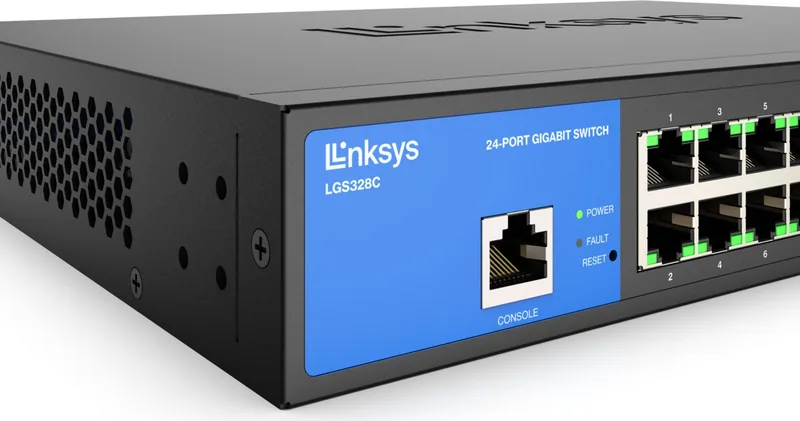
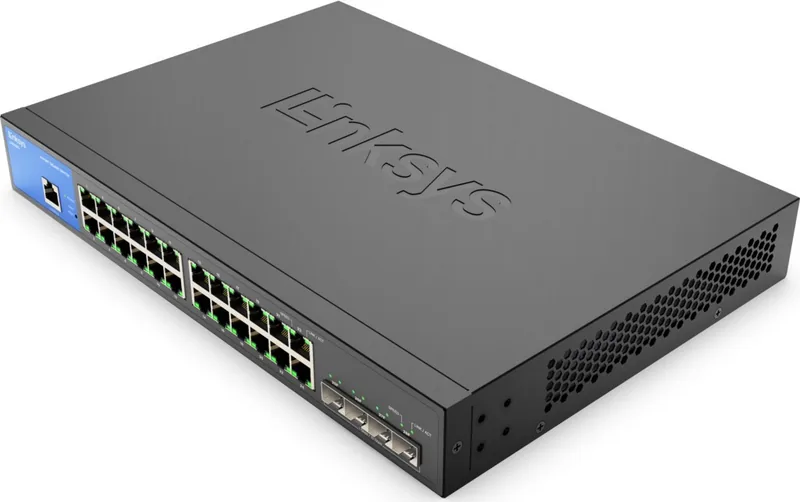
The device features 24 Gigabit RJ-45 ports for standard copper connections and 4 SFP+ slots for high-speed fiber uplink integration, providing flexible connectivity options.
Is this answer helpful?
Yes, it offers Power over Ethernet management that tracks power usage and allows prioritization for connected devices such as IP phones and cameras.
Is this answer helpful?
Yes, you can configure VLANs for traffic segmentation, set PVIDs, and enable Voice VLAN settings to enhance quality for telephony applications.
Is this answer helpful?
Security features include Access Control Lists, Port Security, 802.1x authentication, DHCP Snooping, and various ACL options to filter unauthorized traffic.
Is this answer helpful?
It supports STP, RSTP, and MSTP protocols to detect and disable network loops while providing automatic backup links for failover scenarios.
Is this answer helpful?
Yes, IGMP and MLD Snooping allow intelligent forwarding of multicast traffic, reducing flooding and saving bandwidth for better network performance.
Is this answer helpful?
Advantages and Disadvantages
Advantages

- High performance with 24 Gigabit RJ-45 ports and 4 SFP+ slots for fiber connectivity.
- Comprehensive security features including Access Control Lists and Port Protection settings.
- Support for Layer 2 management protocols like Spanning Tree and Link Aggregation.
- Energy Efficient Ethernet reduces power consumption during low usage periods.
- Robust PoE management capabilities for powering connected devices like IP phones.
Disadvantages

- Limited to Layer 2 functionality without advanced Layer 3 routing features.
- Fan noise may be audible in quiet office environments during heavy processing.
- Power budget capacity restricts the number of high-power PoE devices supported.
- Configuration requires time to master the various VLAN and QoS options.
- No web-based interface details for simple remote management scenarios.
Product Specification
Function
Switch
Type
Standalone, Rackmount (via mounting brackets)
Network Connections
24x RJ-45, 4x SFP+
Speeds
24x RJ-45 (10/100/1000Base-T), 4x SFP+ (1G/10Gb/s)
PoE
N/A
Backplane
128Gb/s, 95.23Mp/s, 12KB Jumbo frames, 16K MAC Addresses
Officially Supported Standards
802.1AX, 802.1D, 802.1AB, 802.1p, 802.1Q, 802.1s, 802.1w, 802.1X, 802.3, 802.3ab, 802.3ad, 802.3az, 802.3u, 802.3x, 802.3z, IGMPv3, MLDv1
Configuration
Web interface, Console, Serial (RJ-45)
Cooling
passive
Dimensions (WxHxD)
12.99 x 1.73 x 9.06 inches, 1HE
Weight
4.37 lbs
Color
black, blue
Features
Metal chassis, removable mounting brackets, firmware updates possible
Manufacturer Warranty
five years
Note
For this device, "link aggregation" was officially specified using the obsolete standard IEEE802.3ad. The function has not been managed by the IEEE "Working Group 3" (IEEE 802.3, CSMA/CD - Ethernet) since 2008, but by the "Working Group 1" (IEEE 802.1, High Level Interface - Internetworking) and is defined technically unchanged via IEEE 802.1AX.
Product Description
Elevate Your Network Infrastructure
Modern business environments require reliable connectivity to maintain productivity and security standards. The Linksys LGS300 Desktop Gigabit Managed Switch, 24x RJ-45, 4x SFP+ Manual serves as an essential reference for IT professionals managing these complex systems effectively. This hardware solution delivers robust Layer 2 management capabilities designed specifically for desktop or small rack deployment scenarios where physical footprint matters. With twenty-four RJ-45 ports and four high-capacity SFP+ slots, it offers immense flexibility for connecting copper and fiber network types simultaneously. This device ensures network stability.
Key Features and Performance
Administrators can leverage advanced enterprise features like Virtual LAN support to segment traffic efficiently across departments. Spanning Tree Protocol ensures critical loop prevention within redundant topologies, while Link Aggregation Group allows for dramatically increased bandwidth through multiple physical ports bonded logically. Security is paramount in data centers, and this switch includes Access Control Lists and Port Security settings to block unauthorized access. You can monitor live traffic using Port Mirroring for deep diagnostics and network analysis capabilities. Energy Efficient Ethernet standards reduce power consumption significantly during periods of low link utilization.
Management and Configuration
The device securely supports DHCP Snooping to protect against rogue DHCP servers launching network attacks. Power over Ethernet management allows connected devices like IP phones and security cameras to receive power efficiently through the data cable. Users can configure both IPv4 and IPv6 settings for seamless dual-stack networking requirements. Monitoring tools provide detailed statistics on every port activity and packet counts for auditing. System time synchronization via SNTP ensures accurate logging for comprehensive troubleshooting sessions.
Comprehensive Control
Implementing these settings helps organizations maintain optimal network health and performance metrics consistently. The configuration interface allows for granular control over VLAN assignment and Quality of Service policies for priority traffic. Voice VLAN settings enhance quality specifically for IP telephony applications without delay. Security protocols like 802.1x authenticate users before granting network access to sensitive resources. Maintenance tasks such as firmware upgrading and factory resets remain straightforward via the management interface. This equipment represents a solid choice for scalable network expansion needs. Regular maintenance checks are recommended for optimal performance.
Protocol Support
Link Layer Discovery Protocol helps identify neighbors quickly and efficiently. Internet Group Management Protocol Snooping reduces multicast flooding significantly. Multicast Listener Discovery handles IPv6 multicast traffic intelligently to prevent bandwidth waste. Jumbo Frame support allows larger data packets for high throughput applications. Access Control Lists filter traffic based on specific rules and policies. Monitoring RMON and Port Statistics keep administrators informed of network health. Dual image capability ensures firmware safety during upgrades.
Search for 67,706 Manuals online


Type-in Brand or Model