
Linksys E900 Manual
PDF manual · 25 Pages
English



Quick check
Incorrect answer, please try again.
Chat with your Linksys E900 manual using AI
Get instant AI answers from your Linksys E900 manual
Ask anything about the Linksys E900. Answers come from this manual, with the pages they are based on.
Ask a Question
Do you recommend E900?
Yes NoVideo Manual
Linksys E900 setup | Features | Password | Firmware | Reset | Manual Installation
Frequently Asked Questions
Run Linksys Connect from the included CD or download it from Linksys support, follow the on-screen steps, or open a web browser to 192.168.1.1 and use the browser-based utility to complete setup manually.
Is this answer helpful?
Use WPA2 Personal for the best balance of security and compatibility in home networks. Avoid WEP because it is easily compromised. For enterprise environments, use WPA2/WPA Enterprise with a RADIUS server.
Is this answer helpful?
No. The E900 is a single‑band 2.4 GHz Wireless‑N router and has Fast Ethernet (10/100 Mbps) LAN ports. For 5 GHz or Gigabit LAN, choose a higher‑end model like the E2500, E3200 or E4200.
Is this answer helpful?
Try pressing and holding the router Reset button for 10–15 seconds to restore factory defaults, temporarily disable any computer firewall, use a different computer to run setup, or run the browser setup at 192.168.1.1.
Is this answer helpful?
Press the Wi‑Fi Protected Setup (WPS) button on the router, then enable WPS on the client device to establish a secure connection without manually entering the passphrase. Ensure the device supports WPS and that WPA/WPA2 is used.
Is this answer helpful?
Visit the official Linksys support website for your model to download firmware, Linksys Connect, and documentation. Keep firmware up to date to improve performance and security.
Is this answer helpful?
The E900 is a Wireless‑N router with two external antennas, 2.4 GHz radio, four 10/100 Mbps Ethernet LAN ports, one WAN port, Reset and WPS buttons, and runs on 12V 0.5A power. Dimensions and weight are compact for desktop use.
Is this answer helpful?
Advantages and Disadvantages
Advantages

- Affordable Wireless-N performance suitable for basic home networking and streaming.
- Easy setup via Linksys Connect or browser utility at 192.168.1.1.
- Compact design with two external antennas for improved 2.4 GHz coverage.
- Supports common ISP connection types: DHCP, Static IP, PPPoE, PPTP, L2TP.
- Security options include WPA2/WPA and WPS for quick secure pairing.
Disadvantages

- Limited to 2.4 GHz Wireless-N—no modern 5 GHz band or AC/AX speeds.
- Four Fast Ethernet ports only (10/100 Mbps), not Gigabit for LAN.
- No USB storage support on E900 model (present only on higher models).
- WEP support exists but is insecure; advanced enterprise features require RADIUS.
- Modest hardware specs may struggle with heavy multi-device households.
Product Specification
Modem
N/A
WAN
1x 100Base-TX
LAN
4x 100Base-TX
Wireless
WLAN 802.11b/g/n (Wi-Fi 4)
Transfer Rate
300Mbps (2.4GHz)
Security
64/128bit WEP, WPA, WPA2, WPS
Antennas
internal
Power consumption
No information (consumption, operation), no information (max. power supply output)
Band Capability
Single Band
Manufacturer's warranty
2 years
Product Description
Linksys E900 — Reliable Wireless-N Router
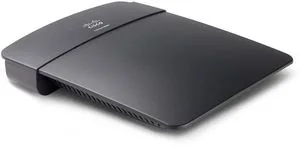
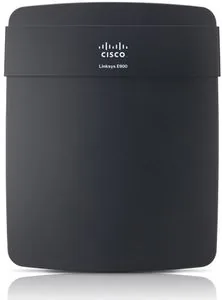
The Linksys E900 is a compact, budget-friendly Wireless-N router designed for home and small-office networks. With dual external antennas, 2.4 GHz operation, and four Fast Ethernet ports, the E900 provides straightforward wired and wireless connectivity for everyday tasks such as web browsing, streaming, and light file transfers. Its small footprint and simple LED indicators make it easy to place on a desk or shelf without drawing attention.
Setup is aimed at simplicity: use the included Linksys Connect software or the browser-based utility at 192.168.1.1 to configure the device. The router supports automatic DHCP configuration, static IP, PPPoE, PPTP and L2TP connection types, so it works with most ISPs. Basic setup screens let you set the router address, DHCP range and time settings quickly, while more advanced options are accessible for users who want to tweak network behavior.
Wireless features focus on compatibility and ease of use. Network Mode supports Mixed, Wireless-B/G/N and single-mode choices to match older or newer wireless clients. SSID naming, channel selection, channel width (20 MHz or Auto for mixed environments), and SSID broadcast control are all configurable. For security, the E900 supports WEP, WPA, WPA2 and mixed modes; WPA2 Personal is recommended for best security. A WPS button simplifies secure connection for WPS-capable devices.
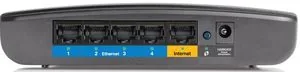
Hardware highlights include two external antennas for improved coverage on 2.4 GHz, four Fast Ethernet LAN ports and one WAN (Internet) port, a power connector and Reset/WPS buttons. LEDs indicate power, Internet and LAN activity so you can quickly verify status. The router draws modest power (12V, 0.5A), and its compact dimensions make it easy to fit into most setups.
For troubleshooting and management, Linksys provides Linksys Connect (for guided setup, device management, guest access and parental controls) and a browser utility for advanced settings like security modes, RADIUS configuration and WEP key generation. Support resources and firmware/software downloads are available through Linksys support channels.
Notes:
- WPA2 Personal is recommended for home security; avoid WEP where possible.
- Use the router's Reset button to restore factory defaults if setup fails.
- Keep firmware updated via Linksys support to maintain performance and security.
Search for 67,706 Manuals online


Type-in Brand or Model
Katrin_Schmidt
10 months ago
Why does my Wizard need an internet connection to work during initial setup, and my WiFi router connection seems to drop about every two weeks so the device has to be restarted? Firmware did not help.
Manual.ly
10 months ago
During first setup, the Wizard typically requires an internet connection to complete device provisioning, account linking, and downloads of required components. If you want to configure without permanent internet, connect the device temporarily (or via Ethernet/LAN if supported), then proceed until you reach the normal web/app interface. If the device goes offline every couple of weeks, it is often related to WiFi signal stability or router settings rather than the firmware itself. Try placing the device closer to the router, avoid 2.4 GHz congestion, check power stability, and reboot the router regularly. If it still fails, contact support with the device model, router model, and any timestamps or logs so we can diagnose the disconnect cause.