
Linksys AE6000 Manual
PDF manual · 364 Pages
English



Quick check
Incorrect answer, please try again.
Chat with your Linksys AE6000 manual using AI
Get instant AI answers from your Linksys AE6000 manual
Ask anything about the Linksys AE6000. Answers come from this manual, with the pages they are based on.
Ask a Question
Do you recommend AE6000?
Yes NoFrequently Asked Questions
The Linksys AE6000 adds or upgrades Wi-Fi capability on compatible Windows desktop and laptop computers through a USB 2.0 port. It supports multiple Wi-Fi standards, including 802.11ac.
Is this answer helpful?
Yes. The adapter has an internal dual-band antenna and can work with supported 2.4 GHz and 5 GHz wireless networks.
Is this answer helpful?
It supports WEP, WPA, WPA2 Personal, WPA2 Enterprise, and Wi-Fi Protected Setup. WPA2 should be selected when it is available on the network.
Is this answer helpful?
Press the WPS button on the compatible router, gateway, or access point. Within two minutes, press and hold the adapter's WPS button for at least three seconds. The LED flashes during connection and stays lit when connected.
Is this answer helpful?
The listed compatibility includes Windows XP, Windows Vista, Windows 7, and Windows 8, with applicable 64-bit editions for Vista, Windows 7, and Windows 8.
Is this answer helpful?
Make sure the adapter is fully connected to the USB port. If it is still not detected, remove it and try a different USB port on the computer.
Is this answer helpful?
Advantages and Disadvantages
Advantages

- Supports dual-band Wi-Fi and 802.11ac alongside 802.11a/b/g/n standards.
- Compact 35 x 15 x 8 mm design weighs about 4 g for portable use.
- Includes WPS button for quick pairing with compatible network equipment.
- Supports WEP, WPA, WPA2 Personal, WPA2 Enterprise, and up to 128-bit encryption.
- Provides a connection and activity LED for simple status monitoring.
Disadvantages

- Uses USB 2.0 rather than a newer USB interface.
- Listed operating system support focuses on Windows XP, Vista, 7, and 8.
- WPS setup depends on compatible support from the router or access point.
- Older security options such as WEP are supported but are not recommended for modern networks.
- Performance can vary with distance, interference, and router capabilities.
Product Specification
Type
Wi-Fi adapter
Form factor
1x USB stick
Interface
1x USB-A 2.0 (plug)
Connection
1x Wi-Fi 802.11a/b/g/n/ac (1x 2.4 GHz or 1x 5 GHz), 1x transmit amplifier, 1x antenna (integrated, 1x electrical)
Transmission
1x 2.4 GHz Wi-Fi (150 Mb/s, 1x1), 1x 5 GHz Wi-Fi (433 Mb/s, 1x1)
Power supply
Power supplied via interface only
Chipset
MediaTek MT7610U
Dimensions
0.59 x 0.31 x 1.38 in (W x H x D)
Weight
0.14 oz
Compatibility
universal
Manufacturer warranty
two years
USB notation
Link
Product Description
Linksys AE6000 WLAN Adapter - Read, Download & Print Free
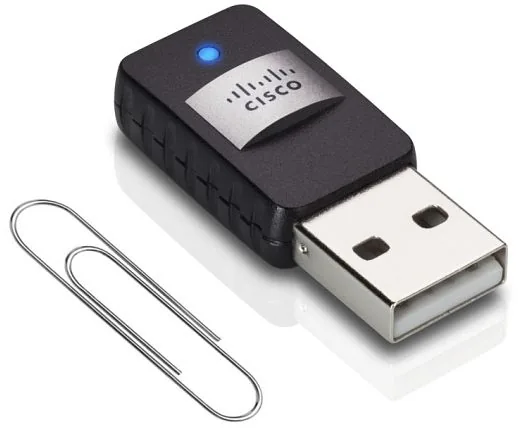
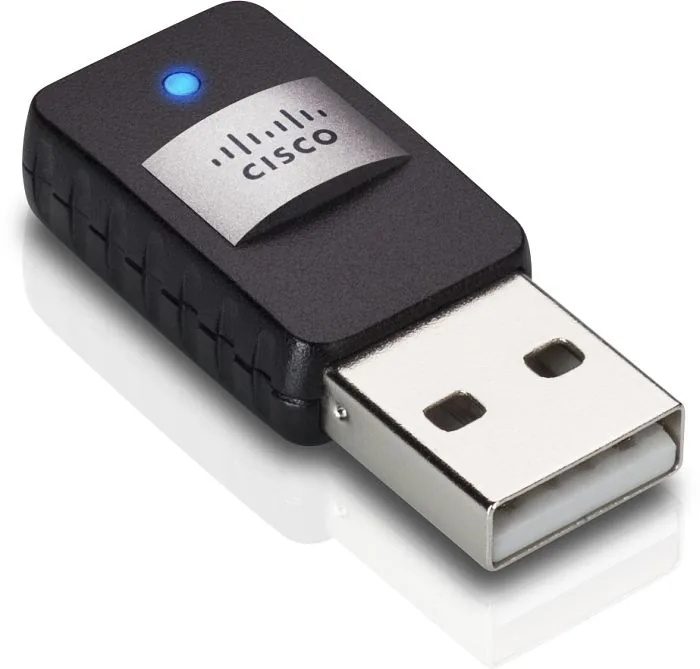
The Linksys AE6000 WLAN Adapter - Read, Download & Print Free is a compact dual-band Mini USB adapter designed to add or upgrade wireless connectivity on compatible Windows desktop and laptop computers. It uses USB 2.0 and supports Wi-Fi standards 802.11a, 802.11b, 802.11g, 802.11n, and 802.11ac, making it a practical option for older systems that need access to modern wireless networks.
Compact wireless upgrade
At only 35 x 15 x 8 mm and weighing about 4 g, the AE6000 is small enough to remain connected to a laptop without adding noticeable bulk. Its internal dual-band antenna lets users connect across supported 2.4 GHz and 5 GHz wireless networks. This flexibility can help users choose a less congested band when a compatible router or access point is available.
The adapter includes a connection and activity LED that flashes during wireless activity, offering a simple visual indication that the device is working. A dedicated Wi-Fi Protected Setup button also supports quick pairing with compatible routers, gateways, or access points. To use this method, press the WPS button on the network device, then hold the button on the adapter within two minutes.
Security and connection options
The Linksys AE6000 supports WEP, WPA, WPA2 Personal, WPA2 Enterprise, and Wi-Fi Protected Setup. Up to 128-bit encryption is listed for wireless protection. For everyday use, WPA2 is the better choice where available, helping protect network traffic and personal information.
After installation, users can connect through the operating system's built-in wireless settings or an installed wireless configuration utility. The supplied setup guidance covers Windows XP, Windows Vista, Windows 7, and Windows 8, including 32-bit and 64-bit editions where applicable. Connection steps generally involve selecting the correct wireless network name, entering the required security key, and confirming the connection.
Everyday troubleshooting notes
If a computer does not recognize the adapter, check that it is fully inserted into a USB port and try another port. If the computer connects but cannot communicate with other devices on the network, verify that the wireless network name, also called SSID, and security settings match the router and other connected devices.
Notes
- WPS requires a router or access point that supports Wi-Fi Protected Setup.
- Windows XP may require update KB893357 for WPA2 support.
- Actual wireless performance depends on network conditions, router capability, distance, and interference.
Search for 67,706 Manuals online


Type-in Brand or Model
Colin Rogers
4 months ago
Is the device easy to install and ready to use right away, and is the transmission reliable?
Manual.ly
4 months ago
Yes. Reviews highlight a clear German manual, very simple installation, immediate readiness for use, and very good, reliable transmission. Follow the included instructions for setup and ensure the devices are placed within the recommended range for best performance.