

Free Lightwave Manuals – Read, Download & Print
2 Manuals
Manuals
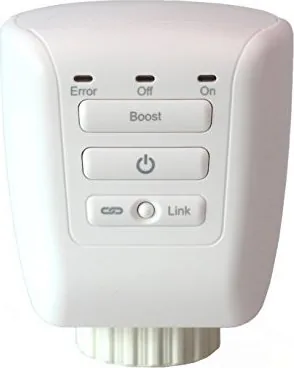
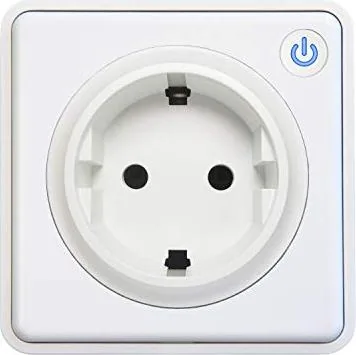
Categories

Introduction to Lightwave Systems
Smart home technology has revolutionized the way we interact with our living spaces. Lighting serves as the foundation of this transformation, offering convenience, energy efficiency, and enhanced security. Lightwave RF is a popular brand in this sector, providing wireless control solutions for home automation. Whether you are installing a new lighting system or integrating existing fixtures into a smart network, understanding the documentation provided by the manufacturer is crucial for success. This document serves as a detailed overview of the manuals associated with Lightwave products, guiding users through setup, operation, and maintenance procedures required for optimal performance. Proper management of these systems ensures longevity and consistent functionality.
Overview of Lightwave Systems
Lightwave products typically consist of various components such as smart bulbs, dimmers, switches, plugs, and sensors. Each component communicates wirelessly using a proprietary protocol that operates without the need for a central hub in many cases. This architecture simplifies installation and reduces wiring complexity significantly. The system is designed to be scalable, allowing homeowners to add devices incrementally as their needs evolve over time. Understanding the technical specifications of these devices helps users select the right components for their specific rooms and lighting requirements. High-quality materials ensure durability, while the software interface provides intuitive control over every aspect of the environment for a seamless experience.
Importance of Manuals
Manuals are the primary source of truth for any hardware product available today. Reading the documentation carefully prevents mistakes during installation that could lead to hardware damage or system instability. For Lightwave systems, the manual details the pairing process, voltage requirements, and maximum load capacities. Skipping these steps can result in devices that do not respond or behave unpredictably in daily use. Furthermore, the documentation outlines warranty terms and troubleshooting advice that can save time and money by avoiding unnecessary service calls when issues arise during operation.
Understanding Installation Steps
Proper installation begins with ensuring power is disconnected to ensure safety. This precaution protects the user from electrical hazards during the setup phase effectively. The manual provides diagrams showing wiring configurations for different types of switches. It is important to identify whether the device requires a neutral wire or not before proceeding with any work. Miswiring a switch can cause it to fail or trip the circuit breaker immediately after power is restored. The instructions often include torque settings for terminal screws to ensure a secure connection is made properly. Once wired, the physical installation of the faceplate must be aligned correctly to ensure a neat finish for the room.
Configuration and Pairing
After physical installation, the device must be paired with the control network for activation. The manual explains the pairing modes, which often involve holding specific buttons until LED indicators flash in a sequence. This step connects the physical switch or dimmer to the Lightwave app effectively for control. Users should ensure their smartphone is close to the device during this process to maintain a strong signal for pairing reliability. If pairing fails, the manual suggests resetting the device and trying again with fresh attempts. Some devices may require a specific reset procedure to clear previous configurations entirely before re-pairing works correctly.
Troubleshooting Guide
Even well-designed systems may encounter issues over time in real-world use. The troubleshooting section categorizes problems by symptom for easy reference and resolution. If lights flicker, the manual suggests checking the total load on the circuit immediately. This is a common issue when LED bulbs are mixed with dimmable loads in the same fixture. If devices do not connect, the guide advises checking Wi-Fi signal strength and router compatibility settings. The documentation also covers what to do if the battery in a remote control dies or if a sensor does not detect motion as expected. Each problem has a corresponding solution within the text for resolution.
Common Issues
Connectivity drops are a frequent complaint among users in various environments. The manual suggests moving routers closer to the hub or using a Wi-Fi extender to boost the signal. Another common issue involves the delay in response time when sending commands to devices. This can sometimes be attributed to network congestion or interference from other electronic devices. The documentation recommends prioritizing traffic on the smart home network to reduce latency for faster response times. Users are advised to keep firmware updated to resolve known bugs that might cause these performance dips in operation.
Software Updates
Manufacturer releases often include performance improvements and new features for the system regularly. The manual instructs users on how to check for updates through the mobile application regularly. It is vital to keep devices up to date to maintain security patches against vulnerabilities effectively. The update process is generally over-the-air, requiring an internet connection for the download to occur. A stable connection prevents the update from failing halfway through, which can brick the device permanently. The manual warns against interrupting power or data during this process to avoid corruption and data loss.
Advanced Features
Modern Lightwave systems offer capabilities that go beyond simple on and off control. Users can adjust brightness levels and color temperatures to mimic natural daylight cycles throughout the day. This helps regulate circadian rhythms and improves sleep quality significantly for occupants in the home. The manuals detail how to create custom scenes that combine multiple devices into a single command for convenience. For instance, a goodnight scene might turn off all lights and lock all doors simultaneously for security. These features greatly enhance user experience and system value in the long run for users.
Automation and Scheduling
Scheduling allows devices to act automatically at specific times without user intervention required. The manual explains how to set sunrise and sunset triggers based on geographic location accurately. Users can program lights to turn on when no motion is detected for a certain duration to simulate occupancy during absence. This feature is excellent for security when the home is empty for extended periods of time. The schedule editor in the application provides a visual interface to manage recurring events efficiently for convenience. The documentation advises testing schedules before relying on them fully to ensure they meet expectations.
Integration with Smart Home
Lightwave systems can integrate with other ecosystems such as Google Home and Amazon Alexa seamlessly. The manuals provide instructions on linking accounts to enable voice control for ease of use. This requires logging into both services and authorizing the connection to work properly for functionality. Once linked, users can speak commands to change lighting states without using the phone at all. The documentation also covers integration with third-party platforms like Hubitat or Home Assistant for advanced users. This flexibility allows the system to become a core part of a larger smart home infrastructure easily.
Conclusion
Navigating the world of smart lighting requires attention to detail and adherence to guidelines strictly. Lightwave manuals provide the necessary knowledge to ensure installations are safe and functional for everyone involved. By following the steps outlined in these documents, users can unlock the full potential of their smart home technology. Regular maintenance and staying informed about updates will keep the system running smoothly for years ahead. The investment in understanding these manuals pays off in reliability and enjoyment of the installed system permanently for the future.
Search for 67,732 Manuals online


Type-in Brand or Model