
Lian Li LANCOOL 205M Manual
PDF manual · 10 Pages
English



Quick check
Incorrect answer, please try again.
Chat with your Lian Li LANCOOL 205M manual using AI
Get instant AI answers from your Lian Li LANCOOL 205M manual
Ask anything about the Lian Li LANCOOL 205M. Answers come from this manual, with the pages they are based on.
Ask a Question
Do you recommend LANCOOL 205M?
Yes NoFrequently Asked Questions
Yes, the case supports 240mm AIO radiators at the front and top mounts, allowing for liquid cooling setups.
Is this answer helpful?
Two 3.5 inch HDDs fit on the primary tray, and there is additional space available for 2.5 inch SSDs.
Is this answer helpful?
Yes, removable air filters are installed for dust protection on intake points to maintain airflow cleanliness.
Is this answer helpful?
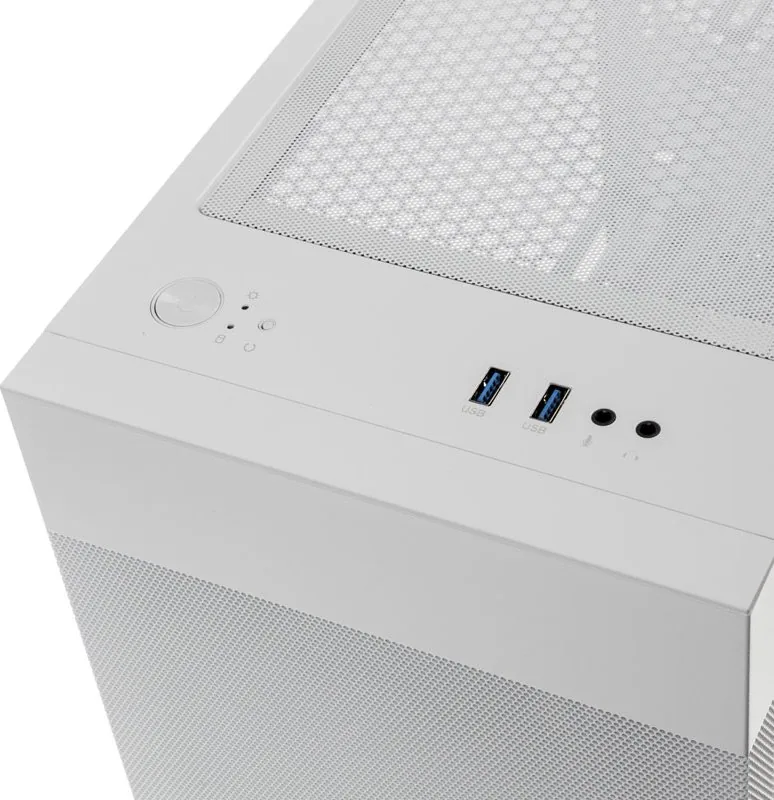
Two USB 3.0 ports are located on the front panel, offering fast data transfer speeds for peripherals.
Is this answer helpful?
Yes, a tempered glass side panel is included, allowing clear visibility of internal components and lighting.
Is this answer helpful?
Yes, various spare screws are included for mounting the motherboard standoffs, hard drives, and PSU components.
Is this answer helpful?
Filters are removable and can be washed or vacuumed gently to remove accumulated dust for optimal performance.
Is this answer helpful?
Advantages and Disadvantages
Advantages

- Supports 240mm AIO radiator on front and top for liquid cooling flexibility.
- Removable air filters help keep dust out and maintain internal airflow efficiency.
- Includes spare screws for hard drive, motherboard, and PSU mounting for ease of use.
- Tempered glass side panel offers clear visibility for custom RGB lighting builds.
- Dual USB 3.0 ports on front I/O panel provide convenient high-speed connectivity.
Disadvantages

- Some users may find the manual pages cluttered due to multiple languages in one file.
- Installing SSDs may require removing existing HDD trays depending on configuration needs.
- No included power supply unit or RGB fans limits initial aesthetic customization options.
- Large size might not fit all desks if space is constrained or limited room exists.
- Cable management holes are standard but might require additional clips for bulkier setups.
Product Specification
External
N/A
Internal
1x 2.5"/3.5" (Horizontal, Drive Rails), 1x 3.5", 2x 2.5"
Connectors
2x USB-A 3.0 (5Gb/s), 1x 3.5mm Jack (Line-Out), 1x 3.5mm Jack (Line-In)
PCI Slots
4
Fan (left)
N/A
Fan (right)
N/A
Fan (top)
2x 4.72" (optional)
Fan (bottom)
N/A
Fan (other)
N/A
Radiator Sizes
4.72"/5.51"/9.45" front, 4.72"/9.45" top
Motherboard
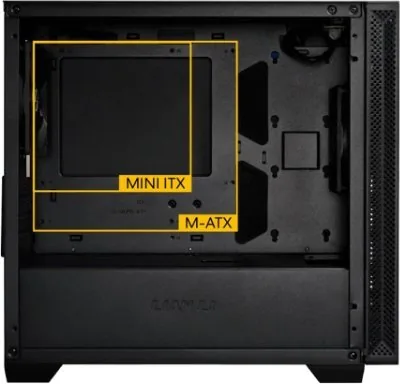
up to Micro-ATX
Supported Motherboards
Mini-ITX (6.7"x6.7")/Micro-ATX (9.6"x9.6")
Power Supply
ATX (max 7.09" deep)
Power Supply Position
bottom
CPU Cooler
max 6.30" height
Graphics Cards
max 13.78"
Weight
13.23 lbs
Chassis Type
Mini-Tower
Top
partially closed, largely fan grille, external dust filter
Bottom
partially closed, rear fan grille, external dust filter
Left
closed, glass
Right
closed
Back
partially closed, fan grille top right, PCI Slots (4x horizontal)
Front I/O Position
Chassis Side: top, Height: Front, Position: center
Features
Cable Management, Dust Filter, Glass Window
USB Naming
Left
Product Description
Discover the Lian Li LANCOOL 205M
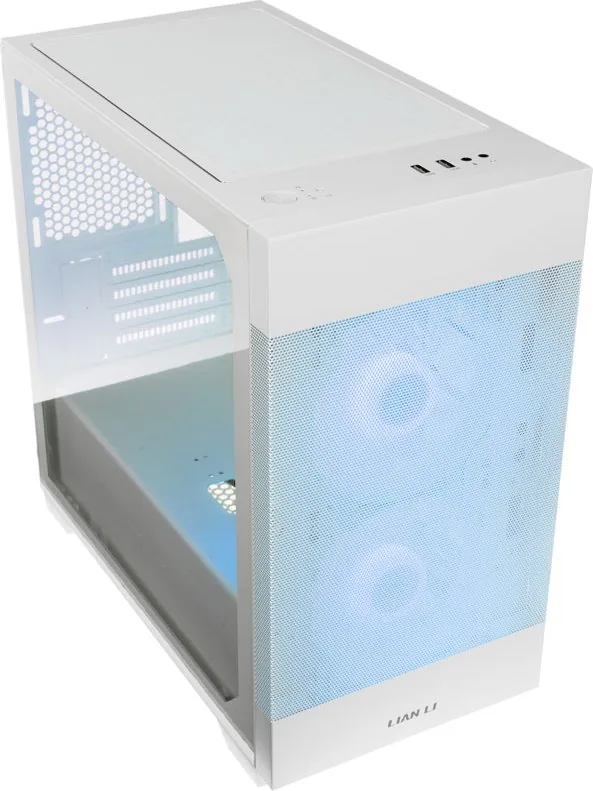
The Lian Li LANCOOL 205M emerges as a versatile mid-tower chassis designed for the modern PC enthusiast. This case prioritizes airflow and storage options to accommodate a wide range of hardware configurations. The front intake area is optimized for 120 mm fans or a 240 mm AIO liquid cooler. This flexibility allows users to tailor their cooling solution to specific thermal requirements. The top of the case also supports 120 mm fans or a 140 mm fan configuration. Having these options ensures that high-performance components stay cool during intense gaming sessions or rendering tasks.
Storage and Expansion
Storage versatility is a key highlight of this design. The chassis includes a removable HDD tray that holds two 3.5 inch hard drives efficiently. Additionally, the included 2.5 inch SSD rack allows for two additional fast storage devices. This means you can build a hybrid storage system without cluttering the interior space. Cable management is facilitated by provided cable ties and grommets for clean routing.
Front Panel and I/O
The I/O panel is functional and convenient. It features two USB 3.0 connectors for high-speed data transfer. Audio and microphone inputs are available for communication during gameplay. Power and reset buttons are easily reachable, along with LED indicators for system status. The HD audio header connection supports standard motherboard connections. Assembly requires attention to detail. The user needs to handle the tempered glass side panel carefully to avoid damage.
Maintenance Tips
Before finalizing the build, users should consult the Lian Li LANCOOL 205M Manual for screw placement diagrams. The manual outlines the mounting points for the motherboard standoffs and the power supply unit. Extra screws are provided for V-G cards and the HDD tray so you can use them for spares. Maintenance is simplified by the removable air filters. Dust buildup can affect cooling performance over time. Cleaning these filters helps maintain optimal airflow through the front intake and bottom chassis. It is also recommended to peel off the protective film from the glass panel before installation. This step prevents permanent scratches that could ruin the aesthetic appeal of the tempered glass.
In conclusion, the Lian Li LANCOOL 205M offers value through its design and cooling capabilities. The inclusion of spare hardware parts demonstrates attention to the user experience. Whether you are a new builder or an experienced veteran, this case provides a solid foundation for your next PC assembly. The balance of features makes it a recommended choice for mid-range builds.
Installation Notes Ensure all fans are securely seated in the brackets. Check the orientation of the USB 3.0 header pinout. Do not over-tighten screws on the motherboard tray. Keep the protective film on the glass until the very end to prevent damage. This ensures a clean look and proper function for your system components.
Search for 67,706 Manuals online


Type-in Brand or Model