
Lexmark XM7355 Manual
PDF manual · 342 Pages
English



Quick check
Incorrect answer, please try again.
Chat with your Lexmark XM7355 manual using AI
Get instant AI answers from your Lexmark XM7355 manual
Ask anything about the Lexmark XM7355. Answers come from this manual, with the pages they are based on.
XM7355 Maintenance Schedule
Remove dust, lint, and paper parts with a soft brush or vacuum. Wipe the outside with a damp, soft, lint-free cloth.
Open the scanner cover and clean the ADF glass, ADF glass pad, and platen glass with a damp, soft, lint-free cloth.
Turn off the printer, remove the tray, take out the rollers, and clean them with a lint-free cloth moistened with isopropyl alcohol.
Open Klappe D, remove the roller covers and units, then clean the pickup and feed rollers with a cloth moistened with isopropyl alcohol.
Open Klappe J, remove and empty the hole punch bin, then reinstall it and close the cover.
Free maintenance reminders
Timed to your purchase date. Always free, unsubscribe anytime.
Ask a Question
Do you recommend XM7355?
Yes NoFrequently Asked Questions
To enable mobile printing, ensure your device and the printer are on the same network. You can use Lexmark Mobile Print, Mopria for Android, or AirPrint for Apple devices. Simply open your document, select print, choose the XM7355 from the list, and send the job.
Is this answer helpful?
If the printer weighs over 20 kg, two people must lift it. Turn off the device, unplug all cables, and close all trays. Use a cart with a surface large enough to support the entire footprint. Avoid tilting the unit and ensure you grip the side handles only.
Is this answer helpful?
Yes, you can print directly from a USB flash drive. Supported file types include PDF, XPS, and various Microsoft Office formats. Insert the drive into the front USB port, navigate to the USB icon on the home screen, select the file, and confirm the print settings.
Is this answer helpful?
Navigate to Settings > Security > Secure Print Settings on the control panel. Configure the maximum invalid PIN attempts and expiration times. When printing from your computer, select the 'Secure Print' option and enter a four-digit PIN. Retrieve the document at the printer by entering the code.
Is this answer helpful?
Yes, the XM7355 supports scanning directly to email. You must first configure the SMTP settings using the Embedded Web Server or the control panel menu. Supported providers include Gmail, Outlook, and Yahoo. Once configured, select the Email icon on the home screen to scan and send.
Is this answer helpful?
The printer supports a wide range of sizes including A4, Letter, Legal, Folio, and various envelope sizes like Monarch and DL. Custom sizes between 105 x 148 mm and 216 x 356 mm are also supported in the universal tray.
Is this answer helpful?
No, the lithium battery inside the printer is not user-replaceable. Attempting to replace it yourself poses an explosion hazard. If the battery fails, contact Lexmark customer service for authorized replacement and disposal procedures.
Is this answer helpful?
Advantages and Disadvantages
Advantages

- High-capacity paper handling with optional 2100-sheet trays
- Comprehensive mobile printing support via AirPrint and Wi-Fi Direct
- Advanced security features including PIN release and data encryption
- Intuitive touchscreen interface with customizable shortcuts
- Versatile finishing options with stapling and hole punching
Disadvantages

- Requires specific Lexmark surge protectors to maintain warranty
- Lithium battery cannot be replaced by end-users due to explosion risk
- Optional high-capacity trays require a wheeled base for stability
- Some advanced cloud features are limited to specific regions
- Initial setup for email SMTP requires detailed network configuration
Product Specification
Format
A4 (Print), A4 (Scan)
Type
Printer/Scanner/Copier/Fax
Color System
1-color, 1x Single Toner
Printing
1200x1200dpi - 52 ppm (A4) (ISO)
Scanning
1200x1200dpi (CIS) - 52/27 ppm (A4)
Copying
1200x1200dpi - 52 ppm (A4) (ISO)
Paper Input
1100 sheets (1x 550 sheets + 1x 550 sheets), DADF (100 sheets), Duplex Unit
Memory
2GB (RAM)
Connectivity
1x USB-B 2.0, 2x USB-A 2.0 (Host), 1x Fax (RJ-11)
Network
Gb LAN, Universal Print (Azure Cloud Print), PIN Printing
Display
Color, 4.29", Touchscreen
Power Consumption
690W (typical), 58W (standby), 1.78W (sleep), 0.2W (off)
Sound Pressure Level
54.0dB(A)
Emulation
PCL 6, PostScript 3, PDF 1.7+
Chassis Color
White, Black
Dimensions
26.98x45.30x27.30 inches
Weight
147.71 lbs
Features
USB Direct Scan, Direct Print
Manufacturer Warranty
1 Year (On-site)
Product Description
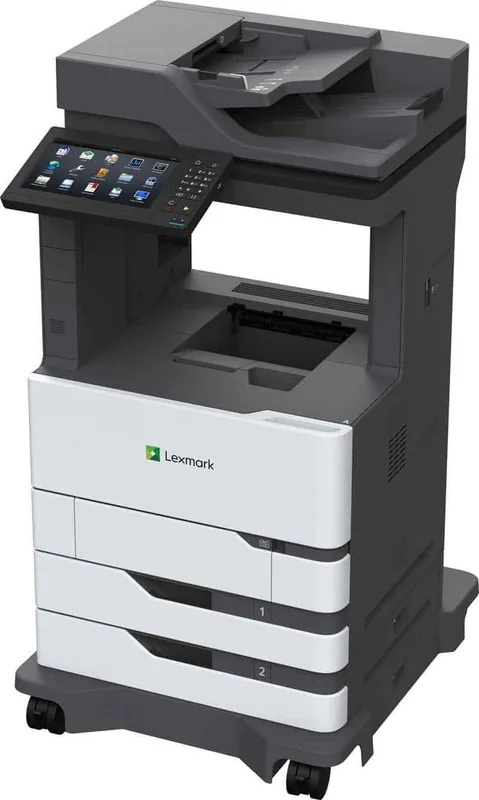
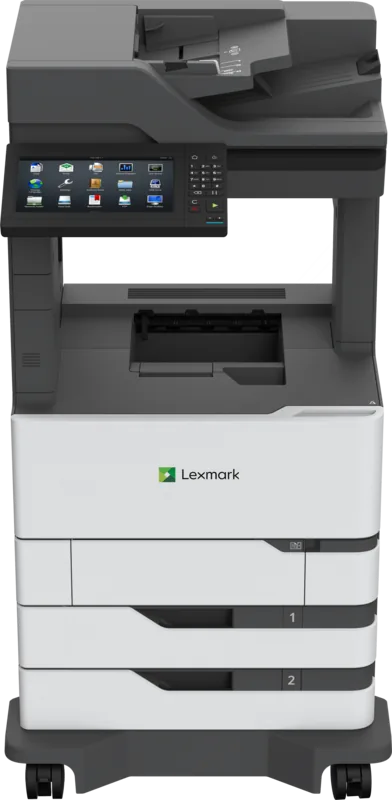
Lexmark XM7355 Laser Monochrome: The Ultimate Office Printing Solution
The Lexmark XM7355 Laser Monochrome printer stands as a robust powerhouse designed for high-volume business environments. This device seamlessly integrates reading, downloading, and printing capabilities into a single streamlined workflow. Whether you are managing complex document fleets or handling daily office tasks, the XM7355 delivers consistent performance with minimal downtime.
Designed with versatility in mind, this multifunction printer supports a wide array of connectivity options including Wi-Fi Direct, AirPrint, and Mopria standards. Users can effortlessly print from mobile devices without needing additional drivers. The intuitive touchscreen interface allows for quick access to essential functions like scanning, copying, and faxing directly from the home screen. Advanced features such as secure PIN printing ensure that sensitive documents remain confidential until the authorized user releases them at the physical device.
The machine excels in paper handling flexibility. It accommodates standard trays alongside optional high-capacity feeders capable of holding up to 2100 sheets. Special media types, including envelopes, labels, and cardstock, are supported with precision. The automatic document feeder simplifies multi-page scanning, while the flatbed glass handles fragile originals with care. For users requiring specialized finishing, the system supports stapling, hole punching, and sorting options through compatible finishers.
Security is paramount in modern offices, and the XM7355 addresses these concerns with built-in encryption and hard drive wiping capabilities. The device also offers accessibility features like voice control and screen magnification to assist all users. With its durable construction and energy-saving modes, this printer reduces operational costs while maintaining professional output quality. It is an ideal choice for organizations seeking reliability and efficiency in their document management processes.
Search for 67,706 Manuals online


Type-in Brand or Model